



Syncstorage-rs
Mozilla’s Sync provides a secure method for users to synchronize their data across Mozilla applications (like Firefox) using a Mozilla account. This project encapsulates the backend of the Sync service. It can be run using either a Postgres, Spanner, or MySQL database backend.
Sync operates by storing a combined version of your data on a remote server, which then synchronizes with the local Firefox copy across all your signed-in instances (referred to as connected devices, linked through a Mozilla account).
Get up and Running
To get up and running quickly, see Run Your Own Sync with Docker for instructions on deploying with Docker.
For a complete list of available configuration options you’ll need to consider, see the Configuration reference.
Below are detailed instructions for other setup configurations, including bootstrapping and migration instructions for Postgres, MySQL, and using the Google Spanner Emulator.
Mozilla Sync Storage built with Rust. Our documentation is generated using mdBook and published to GitHub Pages.
Initial Setup - Bootstrapping
General PostgreSQL Setup
Syncstorage-rs supports PostgreSQL as a database backend. The database connection is specified with a DSN like:
postgres://_user_:_password_@_host_/_database_
This DSN is then used for the SYNC_TOKENSERVER__DATABASE_URL & SYNC_SYNCSTORAGE__DATABASE_URL URLs.
These values are environment variables set for the application. You can view all configurations and environment variables in the Configuration documentation, specifically SYNC_TOKENSERVER__DATABASE_URL and SYNC_SYNCSTORAGE__DATABASE_URL.
Use your preferred methods, however here are some general instructions on how to setup a fresh PostgreSQL database and user:
-
First make sure you have a PostgreSQL server running. On most systems, you can start it with:
# On macOS with Homebrew brew services start postgresql # On Ubuntu/Debian sudo systemctl start postgresql -
Create the databases using
createdb:createdb -U postgres syncstorage createdb -U postgres tokenserver -
Connect to PostgreSQL to create a user and grant privileges:
psql -U postgres -d syncstorage -
Run the following SQL statements:
CREATE USER sample_user WITH PASSWORD 'sample_password';
GRANT ALL PRIVILEGES ON DATABASE syncstorage TO sample_user;
GRANT ALL PRIVILEGES ON DATABASE tokenserver TO sample_user;
Connection pattern: The general pattern for connecting to a PostgreSQL database is:
psql -d database_name -U username
The -d flag is a shorter alternative for --dbname while -U is an alternative for --username.
Environment configuration: You can optionally create a .env file with your database URL:
echo "DATABASE_URL=postgres://sample_user:sample_password@localhost/syncstorage" > .env
Or manually create the file:
touch .env
And add:
DATABASE_URL=postgres://sample_user:sample_password@localhost/syncstorage
Important Note about .env files:
We don’t tend to use the .env configuration in the production version of Sync, but for some choosing to self host, the .env solution may be useful. The .env file serves different purposes depending on the context:
-
For Diesel CLI migrations: Diesel automatically reads
DATABASE_URLfrom a.envfile in the current directory. When running migrations fromtokenserver-postgres/orsyncstorage-postgres/, you can create a.envfile in that specific directory with the appropriate database URL. This allows you to rundiesel migration runwithout the--database-urlflag. -
For running the application: The syncstorage-rs application uses prefixed environment variables:
SYNC_TOKENSERVER__DATABASE_URLfor the tokenserver databaseSYNC_SYNCSTORAGE__DATABASE_URLfor the syncstorage database
These can also be set in a
.envfile at the project root.
Example .env file for the application (at project root):
SYNC_TOKENSERVER__DATABASE_URL=postgres://sample_user:sample_password@localhost/tokenserver
SYNC_SYNCSTORAGE__DATABASE_URL=postgres://sample_user:sample_password@localhost/syncstorage
Example .env file for diesel migrations (in tokenserver-postgres/ directory):
DATABASE_URL=postgres://sample_user:sample_password@localhost/tokenserver
Example .env file for diesel migrations (in syncstorage-postgres/ directory):
DATABASE_URL=postgres://sample_user:sample_password@localhost/syncstorage
Bootstrapping Tokenserver (Postgres)
Tokenserver includes migrations to initialize its database, but they do not run by default. These can be enabled via the setting:
SYNC_TOKENSERVER__RUN_MIGRATIONS=true
Once you have created and defined your database, copy the URL.
SYNC_TOKENSERVER__DATABASE_URL=postgres://<DB URL>
Running Migrations Manually for Tokenserver
If you prefer to run migrations manually instead of using SYNC_TOKENSERVER__RUN_MIGRATIONS=true, you can use Diesel CLI:
Prerequisites:
-
Install diesel_cli with PostgreSQL support:
cargo install diesel_cli --no-default-features --features postgres -
Optional: Install diesel_cli_ext for additional features (schema/model generation):
cargo install diesel_cli_extFor more information on diesel_cli_ext, see the diesel_cli_ext repository.
Running Migrations:
The migrations are located in the tokenserver-postgres/migrations directory. To run them:
cd tokenserver-postgres
diesel migration run --database-url="postgres://<DB URL>"
Alternatively, if you’ve set the DATABASE_URL environment variable:
cd tokenserver-postgres
export DATABASE_URL="postgres://<DB URL>"
diesel migration run
Undoing Migrations:
To undo the last migration:
cd tokenserver-postgres
diesel migration redo --database-url="postgres://<DB URL>"
Note: The diesel.toml configuration file in the tokenserver-postgres directory specifies the migrations directory path and schema generation settings.
Note: We have automated support for this in Tokenserver, however the manual query that must run for Tokenserver is as follows:
After migrations run, insert a node entry:
INSERT INTO nodes (id, service, node, available, current_load, capacity, downed, backoff)
VALUES (1, 1, 'https://<SYNCSTORAGE URL HERE>', 100000, 0, 100000, 0, 0)
ON CONFLICT DO NOTHING;
Bootstrapping Syncstorage (Postgres)
Syncstorage includes migrations to initialize its database. These run by default (unlike Tokenserver).
Configure the database URL:
SYNC_SYNCSTORAGE__DATABASE_URL=postgres://<DB URL>
Running Migrations Manually for Syncstorage
If you need to run Syncstorage migrations manually, you can use Diesel CLI:
Prerequisites: Install diesel_cli with PostgreSQL support (if not already installed):
cargo install diesel_cli --no-default-features --features postgres
Running Migrations:
The migrations are located in the syncstorage-postgres/migrations directory. To run them:
cd syncstorage-postgres
diesel migration run --database-url="postgres://<DB URL>"
Or with the DATABASE_URL environment variable:
cd syncstorage-postgres
export DATABASE_URL="postgres://<DB URL>"
diesel migration run
Undoing Migrations:
To undo the last migration:
cd syncstorage-postgres
diesel migration redo --database-url="postgres://<DB URL>"
Note: Both syncstorage-postgres and tokenserver-postgres directories contain their own diesel.toml configuration files and separate migrations directories. Each must be run from its respective directory.
Bootstrapping Tokenserver (MySQL)
Tokenserver includes migrations to initialize its database, but they do not run by default. These can be enabled via the setting:
SYNC_TOKENSERVER__RUN_MIGRATIONS=true
NOTE: These migrations don’t run with any locking (at least on MySQL), it’s probably safest to limit the node count to 1 during the first run.
After migrations run, insert service and node entries:
INSERT INTO services (id, service, pattern)
VALUES (1, 'sync-1.5', '{node}/1.5/{uid}');

INSERT IGNORE INTO nodes (id, service, node, available, current_load, capacity, downed, backoff)
VALUES (1, 1, 'https://ent-dev.sync.nonprod.webservices.mozgcp.net', 100, 0, 100, 0, 0);
Bootstrapping Syncstorage (Cloud Spanner)
Syncstorage does not support initializing Cloud Spanner instances; this must be done manually. It does support initializing its MySQL backend and will support initializing the PostgreSQL backend in the future.
The schema DDL is available here: schema.ddl
We include a basic script to create an instance and initialize the schema via Spanner’s REST API: prepare-spanner.sh. This script is currently oriented to run against Cloud Spanner emulators, but it may be adapted to run against a real Spanner database.
System Requirements
- cmake (>= 3.5 and < 3.30)
- gcc
- golang
- libssl-dev
- make
- pkg-config
- Rust stable
- python 3.9+
- MySQL 8.0 (or compatible)
- libmysqlclient (
brew install mysqlon macOS,apt install libmysqlclient-devon Ubuntu,apt install libmariadb-dev-compaton Debian)
- libmysqlclient (
Depending on your OS, you may also need to install libgrpcdev,
and protobuf-compiler-grpc.
Local Setup
-
Follow the instructions below to use either MySQL or Spanner as your DB.
-
Now
cp config/local.example.toml config/local.toml. Openconfig/local.tomland make sure you have the desired settings configured. For a complete list of available configuration options, check out the Configuration reference. -
To start a local server in debug mode, run either:
make run_mysqlif using MySQL or,make run_spannerif using spanner.
The above starts the server in debug mode, using your new
local.tomlfile for config options. Or, simplycargo runwith your own config options provided as env vars. -
Visit
http://localhost:8000/__heartbeat__to make sure the server is running.
MySQL
Durable sync needs only a valid mysql DSN in order to set up connections to a MySQL database. The database can be local and is usually specified with a DSN like:
mysql://_user_:_password_@_host_/_database_
To setup a fresh MySQL DB and user:
- First make sure that you have a MySQL server running, to do that run:
mysqld - Then, run the following to launch a mysql shell
mysql -u root - Finally, run each of the following SQL statements
CREATE USER "sample_user"@"localhost" IDENTIFIED BY "sample_password";
CREATE DATABASE syncstorage_rs;
CREATE DATABASE tokenserver_rs;

GRANT ALL PRIVILEGES on syncstorage_rs.* to sample_user@localhost;
GRANT ALL PRIVILEGES on tokenserver_rs.* to sample_user@localhost;
Note that if you are running MySQL with Docker and encountered a socket connection error, change the MySQL DSN from localhost to 127.0.0.1 to use a TCP connection.
Spanner
Authenticating via OAuth
The correct way to authenticate with Spanner is by generating an OAuth token and pointing your local application server to the token. In order for this to work, your Google Cloud account must have the correct permissions; contact the Ops team to ensure the correct permissions are added to your account.
First, install the Google Cloud command-line interface by following the instructions for your operating system here. Next, run the following to log in with your Google account (this should be the Google account associated with your Mozilla LDAP credentials):
gcloud auth application-default login
The above command will prompt you to visit a webpage in your browser to complete the login process. Once completed, ensure that a file called application_default_credentials.json has been created in the appropriate directory (on Linux, this directory is $HOME/.config/gcloud/). The Google Cloud SDK knows to check this location for your credentials, so no further configuration is needed.
Key Revocation
Accidents happen, and you may need to revoke the access of a set of credentials if they have been publicly leaked. To do this, run:
gcloud auth application-default revoke
This will revoke the access of the credentials currently stored in the application_default_credentials.json file. If the file in that location does not contain the leaked credentials, you will need to copy the file containing the leaked credentials to that location and re-run the above command. You can ensure that the leaked credentials are no longer active by attempting to connect to Spanner using the credentials. If access has been revoked, your application server should print an error saying that the token has expired or has been revoked.
Authenticating via Service Account
An alternative to authentication via application default credentials is authentication via a service account. Note that this method of authentication is not recommended. Service accounts are intended to be used by other applications or virtual machines and not people. See this article for more information.
Your system administrator will be able to tell you which service account keys have access to the Spanner instance to which you are trying to connect. Once you are given the email identifier of an active key, log into the Google Cloud Console Service Accounts page. Be sure to select the correct project.
- Locate the email identifier of the access key and pick the vertical dot menu at the far right of the row.
- Select “Create Key” from the pop-up menu.
- Select “JSON” from the Dialog Box.
A proper key file will be downloaded to your local directory. It’s important to safeguard that key file. For this example, we’re going to name the file
service-account.json.
The proper key file is in JSON format. An example file is provided below, with private information replaced by “...”
{
  "type": "service_account",
  "project_id": "...",
  "private_key_id": "...",
  "private_key": "...",
  "client_email": "...",
  "client_id": "...",
  "auth_uri": "https://accounts.google.com/o/oauth2/auth",
  "token_uri": "https://oauth2.googleapis.com/token",
  "auth_provider_x509_cert_url": "https://www.googleapis.com/oauth2/v1/certs",
  "client_x509_cert_url": "..."
}
Note that the name service-account.json must be exactly correct to be ignored by .gitignore.
Connecting to Spanner
To point to a GCP-hosted Spanner instance from your local machine, follow these steps:
- Authenticate via either of the two methods outlined above.
- Open
local.tomland replacedatabase_urlwith a link to your spanner instance. - Open the Makefile and ensure you’ve correctly set you
PATH_TO_GRPC_CERT. make run_spanner.- Visit
http://localhost:8000/__heartbeat__to make sure the server is running.
Note, that unlike MySQL, there is no automatic migrations facility. Currently, the Spanner schema must be hand edited and modified.
Emulator
Google supports an in-memory Spanner emulator, which can run on your local machine for development purposes. You can install the emulator via the gcloud CLI or Docker by following the instructions here. Once the emulator is running, you’ll need to create a new instance and a new database.
Updating the emulator version: The emulator version is pinned in two places, each marked with SPANNER_EMULATOR_VER:
docker/docker-compose.spanner.yaml— used for e2e/integration tests.github/workflows/main-workflow.yml— used for CI unit tests
Both should always be set to the same version. When upgrading, update both and verify no regressions appear in CI.
Quick Setup Using prepare-spanner.sh
The easiest way to set up a Spanner emulator database is to use the prepare-spanner.sh script:
SYNC_SYNCSTORAGE__SPANNER_EMULATOR_HOST=localhost:9020 ./scripts/prepare-spanner.sh
This script will automatically:
- Create a test instance (
test-instance) on a test project (test-project) - Create a test database (
test-database) with the schema fromschema.ddl - Apply all DDL statements to set up the database structure
The script looks for schema.ddl in either the current directory or in syncstorage-spanner/src/. Make sure the SYNC_SYNCSTORAGE__SPANNER_EMULATOR_HOST environment variable points to your emulator’s REST API endpoint (typically localhost:9020).
After running the script, make sure that the database_url config variable in your local.toml file reflects the created database (i.e. spanner://projects/test-project/instances/test-instance/databases/test-database).
To run an application server that points to the local Spanner emulator:
SYNC_SYNCSTORAGE__SPANNER_EMULATOR_HOST=localhost:9010 make run_spanner
Manual Setup Using curl
If you prefer to manually create the instance and database, or need custom project/instance/database names, you can use the REST API directly. The Spanner emulator exposes a REST API on port 9020. To create an instance, use curl:
curl --request POST \
  "localhost:9020/v1/projects/$PROJECT_ID/instances" \
  --header 'Accept: application/json' \
  --header 'Content-Type: application/json' \
  --data "{\"instance\":{\"config\":\"emulator-test-config\",\"nodeCount\":1,\"displayName\":\"Test Instance\"},\"instanceId\":\"$INSTANCE_ID\"}"
Note that you may set PROJECT_ID and INSTANCE_ID to your liking. To create a new database on this instance, you’ll need to include information about the database schema. Since we don’t have migrations for Spanner, we keep an up-to-date schema in src/db/spanner/schema.ddl. The jq utility allows us to parse this file for use in the JSON body of an HTTP POST request:
DDL_STATEMENTS=$(
  grep -v ^-- schema.ddl \
  | sed -n 's/ \+/ /gp' \
  | tr -d '\n' \
  | sed 's/\(.*\);/\1/' \
  | jq -R -s -c 'split(";")'
)
This command:
- Filters out SQL comments (lines starting with
--) - Normalizes whitespace
- Removes newlines to create a single line
- Removes the trailing semicolon from the concatenated string
- Splits the DDL statements back into an array using
jq
Finally, to create the database:
curl -sS --request POST \
  "localhost:9020/v1/projects/$PROJECT_ID/instances/$INSTANCE_ID/databases" \
  --header 'Accept: application/json' \
  --header 'Content-Type: application/json' \
  --data "{\"createStatement\":\"CREATE DATABASE \`$DATABASE_ID\`\",\"extraStatements\":$DDL_STATEMENTS}"
Note that, again, you may set DATABASE_ID to your liking. Make sure that the database_url config variable in your local.toml file reflects your choice of project name, instance name, and database name (i.e. it should be of the format spanner://projects/<your project ID here>/instances/<your instance ID here>/databases/<your database ID here>).
To run the application server that points to the local Spanner emulator:
SYNC_SYNCSTORAGE__SPANNER_EMULATOR_HOST=localhost:9010 make run_spanner
Running via Docker
This requires access to Google Cloud Rust (raw) crate. Please note that due to interdependencies, you will need to ensure that grpcio and protobuf match the version used by google-cloud-rust-raw.
-
Make sure you have Docker installed locally.
-
Copy the contents of mozilla-rust-sdk into top level root dir here.
-
Comment out the
imagevalue undersyncserverin either docker/docker-compose.mysql.yaml or docker/docker-compose.spanner.yaml (depending on which database backend you want to run), and add this instead:build: context: . -
If you are using MySQL, adjust the MySQL db credentials in docker/docker-compose.mysql.yaml to match your local setup.
-
make docker_start_mysqlormake docker_start_spanner- You can verify it’s working by visiting localhost:8000/__heartbeat__
Connecting to Firefox
This will walk you through the steps to connect this project to your local copy of Firefox.
- Follow the steps outlined above for running this project using MySQL or Spanner.
- In Firefox, go to
about:config. Changeidentity.sync.tokenserver.uritohttp://localhost:8000/1.0/sync/1.5. - Restart Firefox. Now, try syncing. You should see new BSOs in your MySQL or Spanner instance.
Logging
Sentry:
- If you want to connect to the existing Sentry project for local development, login to Sentry, and go to the page with api keys. Copy the
DSNvalue. - Comment out the
human_logsline in yourconfig/local.tomlfile. - You can force an error to appear in Sentry by adding a
panic!into main.rs, just before the finalOk(()). - Now,
SENTRY_DSN={INSERT_DSN_FROM_STEP_1_HERE} make run. - You may need to stop the local server after it hits the panic! before errors will appear in Sentry.
RUST_LOG
We use env_logger: set the RUST_LOG env var.
The logging of non-Spanner SQL queries is supported in non-optimized builds via RUST_LOG=syncserver=debug.
Troubleshooting
-
rm Cargo.lock; cargo clean;- Try this if you’re having problems compiling. -
Some versions of OpenSSL 1.1.1 can conflict with grpcio’s built in BoringSSL. These errors can cause syncstorage to fail to run or compile. If you see a problem related to
libsslyou may need to specify thecargooption--features grpcio/opensslto force grpcio to use OpenSSL.
Sentry
-
If you’re having trouble working with Sentry to create releases, try authenticating using their self hosted server option that’s outlined here Ie,
sentry-cli --url https://selfhosted.url.com/ login. It’s also recommended to create a.sentryclircconfig file. See this example for the config values you’ll need.
System Requirements
- cmake (>= 3.5 and < 3.30)
- gcc
- golang
- libcurl4-openssl-dev
- libssl-dev
- make
- pkg-config
- Rust stable
- python 3.9+
- MySQL 8.0 (or compatible)
- libmysqlclient (
brew install mysqlon macOS,apt install libmysqlclient-devon Ubuntu,apt install libmariadb-dev-compaton Debian)
- libmysqlclient (
Depending on your OS, you may also need to install libgrpcdev,
and protobuf-compiler-grpc. Note: if the code complies cleanly,
but generates a Segmentation Fault within Sentry init, you probably
are missing libcurl4-openssl-dev.
Architecture
A high-level architectural overview of the Sync Service which includes Sync and Tokenserver.
Syncstorage
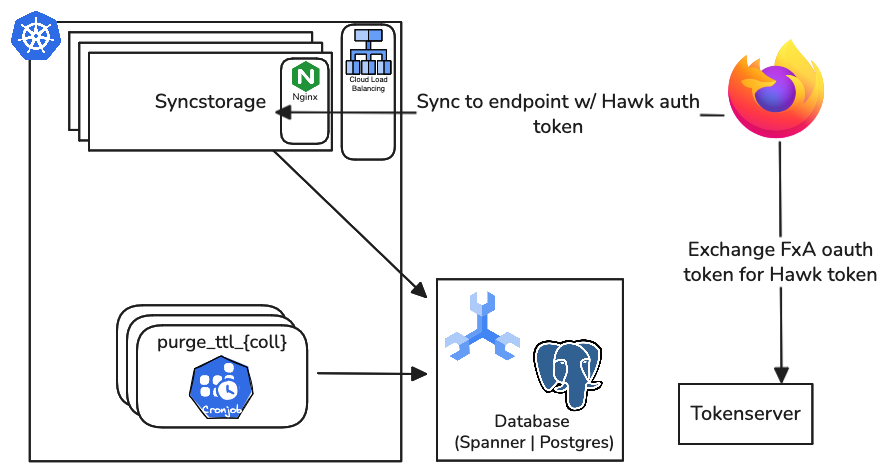
Below is an illustration of a highly-simplified Sync flow:
graph LR

  SignIn["Sign in to FxA"]
  FxA[("FxA")]
  OAuth["Sync client gets OAuth token"]
  PresentToken["OAuth Token presented to Tokenserver"]
  Tokenserver[("Tokenserver")]
  AssignNode["Tokenserver assigns storage node"]
  InfoCollections["info/collections: Do we even need to sync?"]

  MetaGlobal["meta/global: Do we need to start over?"]
  CryptoKeys["crypto/keys: Get keys"]

  GetStorage["GET storage/<collection>: Fetch new data"]
  PostStorage["POST storage/<collection>: Upload new data"]

  %% Main flow
  SignIn --> FxA
  FxA --> OAuth
  OAuth --> PresentToken
  PresentToken --> Tokenserver
  Tokenserver --> AssignNode
  AssignNode --> InfoCollections

  %% Decision / metadata path
  InfoCollections --> MetaGlobal
  MetaGlobal --> CryptoKeys

  %% Sync operations
  CryptoKeys --> GetStorage
  CryptoKeys --> PostStorage
Storage-Client Relationship
This high-level diagram illustrates the standard Sync collections and their relationships.
graph TD

  %% ===== Storage =====
  DB[("DB")]
  BookmarksMirror[("Bookmarks Mirror")]
  LoginStorage[("Login Manager Storage")]
  AutofillStorage[("Form Autofill Storage")]
  XPIDB[("XPI Database")]
  CredentialStorage[("Credential Storage")]

  %% ===== Client components =====
  Places["Places"]
  LoginManager["Login Manager"]
  TabbedBrowser["Tabbed Browser"]
  AddonManager["Add-on Manager"]
  ExtensionBridge["Extension Storage Bridge"]

  %% ===== Sync engines =====
  Bookmarks["Bookmarks"]
  History["History"]
  Passwords["Passwords"]

  CreditCards["Credit cards"]
  Addresses["Addresses"]
  OpenTabs["Open tabs"]

  Addons["Add-ons"]
  Clients["Clients"]

  %% ===== Sync internals =====
  subgraph Sync["Sync"]
  HTTPClient["HTTP Client"]
  TokenClient["Tokenserver Client"]
  end

  %% ===== Storage =====
  SyncStorage[("Sync Storage Server")]
  TokenServer[("Tokenserver")]
  PushService["Push Service"]

  subgraph FirefoxAccounts["Firefox Accounts Service"]
  PushIntegration["Push Integration"]
  FxAHTTP["HTTP Clients"]
  end
  subgraph Accounts
  MozillaPush[("Mozilla Push Server")]
  FxAAuth[("FxA Auth Server")]
  FxAOAuth[("FxA OAuth Server")]
  FxAProfile[("FxA Profile Server")]
  end

  %% ===== Relationships =====
  DB --> Places
  BookmarksMirror --> Places
  Places --> Bookmarks
  Places --> History
  LoginStorage <--> LoginManager

  AutofillStorage --> CreditCards
  AutofillStorage --> Addresses

  TabbedBrowser --> OpenTabs
  AddonManager --> Addons
  XPIDB --> AddonManager
  ExtensionBridge --> Clients

  %% ===== Sync engine / Collections =====
  Bookmarks --> Sync
  History --> Sync
  Passwords --> Sync
  CreditCards --> Sync
  Addresses --> Sync
  OpenTabs --> Sync
  Addons --> Sync
  Clients --> Sync
  HTTPClient --> Sync
  TokenClient <--> TokenServer
  SyncStorage <--> HTTPClient

  %% ===== Push & Accounts =====
  FirefoxAccounts --> PushIntegration
  FirefoxAccounts --> FxAHTTP
  FxAAuth <--> MozillaPush

  PushIntegration --> PushService
  FxAHTTP --> FxAAuth
  FxAHTTP --> FxAOAuth
  FxAHTTP --> FxAProfile
  CredentialStorage --> FirefoxAccounts
Payload Offload
On the Spanner backend, a collection can be opted into storing its BSO
payloads in a Google Cloud Storage bucket instead of inline in the database,
which lifts the per-record size ceiling. The BSO row keeps a gs:// URL in a
payload_link column, and syncserver resolves it on read so clients see an
ordinary BSO either way. A Spanner change stream feeds an asynchronous
reconciler that keeps the bucket and the database in agreement.
Offload is off by default and touches nothing for a collection that is not opted in. See Payload Offload for the flow, and GCP Infrastructure for where the pieces run.
Tokenserver

The intent of this file is inspired by a very sensible blog post many developers are familiar with regarding the necessity to illustrate systems with clarity. Given Sync’s complexity and interrelationships with other architectures, this
Configuration
Rust uses environment variables for a number of configuration options. Some of these include:
| variable | value | description |
|---|---|---|
| RUST_LOG | debug, info, warn, error | minimum Rust error logging level |
| RUST_TEST_THREADS | 1 | maximum number of concurrent threads for testing. |
In addition, Sync server configuration options can either be specified as environment variables (prefixed with SYNC_*) or in a configuration file using the --config option.
For example the following are equivalent:
$ SYNC_HOST=0.0.0.0 SYNC_MASTER_SECRET="SuperSikkr3t" SYNC_SYNCSTORAGE__DATABASE_URL=mysql://scott:tiger@localhost/syncstorage cargo run
$ cat syncstorage.local.toml
host = "0.0.0.0"
master_secret = "SuperSikkr3t"

[syncstorage]
database_url = "mysql://scott:tiger@localhost/syncstorage"
$ cargo run -- --config syncstorage.local.toml
Options can be mixed between environment variables and configuration. Environment variables have higher precedence.
Options
The following configuration options are available.
Server Settings
| Env Var | Default Value | Description |
|---|---|---|
| SYNC_HOST | 127.0.0.1 | Host address to bind the server to |
| SYNC_PORT | 8000 | Server port to bind to |
| SYNC_MASTER_SECRET | None, required | Secret used to derive auth secrets |
| SYNC_ENVIRONMENT | dev | Environment name (“dev”, “stage”, “prod”) |
| SYNC_HUMAN_LOGS | false | Enable human-readable logs |
| SYNC_ACTIX_KEEP_ALIVE | None | HTTP keep-alive header value in seconds |
| SYNC_WORKER_MAX_BLOCKING_THREADS | 512 | The maximum number of blocking threads in the worker threadpool. This threadpool is used by Actix-web to handle blocking operations. |
CORS
| Env Var | Default Value | Description |
|---|---|---|
| SYNC_CORS_ALLOWED_ORIGIN | * | Allowed origins for CORS requests |
| SYNC_CORS_MAX_AGE | 1728000 | CORS preflight cache seconds (20 days) |
| SYNC_CORS_ALLOWED_METHODS | [“DELETE”, “GET”, “POST”, “PUT”] | Allowed methods |
| SYNC_CORS_ALLOWED_HEADERS | See source | Allowed headers for CORS requests |
Syncstorage Database
| Env Var | Default Value | Description |
|---|---|---|
| SYNC_SYNCSTORAGE__DATABASE_URL | mysql://root@127.0.0.1/syncstorage | Database connection URL |
| SYNC_SYNCSTORAGE__DATABASE_POOL_MAX_SIZE | 10 | Max database connections |
| SYNC_SYNCSTORAGE__DATABASE_POOL_CONNECTION_TIMEOUT | 30 | Pool timeout in seconds |
| SYNC_SYNCSTORAGE__DATABASE_POOL_CONNECTION_LIFESPAN | None | Max connection age in seconds |
| SYNC_SYNCSTORAGE__DATABASE_POOL_CONNECTION_MAX_IDLE | None | Max idle time in seconds |
| SYNC_SYNCSTORAGE__DATABASE_POOL_SWEEPER_TASK_INTERVAL | 30 | How often, in seconds, a background task runs to evict idle database connections (Spanner only) |
| SYNC_SYNCSTORAGE__DATABASE_SPANNER_ROUTE_TO_LEADER | false | Send leader-aware headers to Spanner |
| SYNC_SYNCSTORAGE__SPANNER_EMULATOR_HOST | None | Spanner emulator host (e.g., localhost:9010) |
Syncstorage Limits
| Env Var | Default Value | Description |
|---|---|---|
| SYNC_SYNCSTORAGE__LIMITS__MAX_POST_BYTES | 2,621,440 | Max BSO payload size per request |
| SYNC_SYNCSTORAGE__LIMITS__MAX_POST_RECORDS | 100 | Max BSO count per request |
| SYNC_SYNCSTORAGE__LIMITS__MAX_RECORD_PAYLOAD_BYTES | 2,621,440 | Max individual BSO payload size |
| SYNC_SYNCSTORAGE__LIMITS__MAX_REQUEST_BYTES | 2,625,536 | Max Content-Length for requests |
| SYNC_SYNCSTORAGE__LIMITS__MAX_TOTAL_BYTES | 262,144,000 | Max BSO payload size per batch |
| SYNC_SYNCSTORAGE__LIMITS__MAX_TOTAL_RECORDS | 10,000 | Max BSO count per batch |
| SYNC_SYNCSTORAGE__LIMITS__MAX_QUOTA_LIMIT | 2,147,483,648 | Max storage quota per user (2 GB) |
| SYNC_SYNCSTORAGE__LIMITS__COLLECTIONS | unset | Optional per-collection limit overrides, as a JSON object mapping collection name -> limits object (e.g. {"newtab-images":{"max_record_payload_bytes":20971520,"max_post_bytes":26214400,"max_request_bytes":26218496}}). Supported override fields: max_record_payload_bytes, max_post_bytes, max_request_bytes. Any field left unset inherits the corresponding global limit. |
Syncstorage Features
| Env Var | Default Value | Description |
|---|---|---|
| SYNC_SYNCSTORAGE__ENABLED | true | Enable syncstorage service |
| SYNC_SYNCSTORAGE__ENABLE_QUOTA | false | Enable quota tracking (Spanner only) |
| SYNC_SYNCSTORAGE__ENFORCE_QUOTA | false | Enforce quota limits (Spanner only) |
| SYNC_SYNCSTORAGE__REQUIRE_COLLECTION_DELETE_CONFIRMATION | false | Require X-Confirm-Delete: 1 header for collection deletion. Without the header, an HTTP 200 is returned without deletion. |
| SYNC_SYNCSTORAGE__GLEAN_ENABLED | true | Enable Glean telemetry |
| SYNC_SYNCSTORAGE__LBHEARTBEAT_TTL | None | Load balancer heartbeat period in seconds |
| SYNC_SYNCSTORAGE__LBHEARTBEAT_TTL_JITTER | 25 | Jitter percentage for the load balancer heartbeat period |
| SYNC_SYNCSTORAGE__STATSD_LABEL | syncstorage | StatsD metrics label prefix |
Syncstorage Payload Off-load
Off-loads large BSO payloads to a Google Cloud Storage bucket, storing the
object URL in the payload_link column instead of the inline payload
column. Supported on the Spanner backend only: setting
SYNC_SYNCSTORAGE__GCS_PAYLOAD_BUCKET or
SYNC_SYNCSTORAGE__GCS_PAYLOAD_OFFLOAD_COLLECTIONS on a mysql or postgres
backend fails startup, since those backends have no payload_link column and
would silently drop the payload.
| Env Var | Default Value | Description |
|---|---|---|
| SYNC_SYNCSTORAGE__GCS_PAYLOAD_BUCKET | unset | GCS bucket for off-loaded payloads. Unset disables off-load. |
| SYNC_SYNCSTORAGE__GCS_PAYLOAD_OFFLOAD_COLLECTIONS | unset | Comma-separated collection names whose payloads are off-loaded. Empty disables off-load for all collections. |
| SYNC_SYNCSTORAGE__GCS_PAYLOAD_PREFIX | v1 | The prefix for off-loaded GCS object names. The server formats each object name as {prefix}/{fxa_uid}/{uuid}. |
| SYNC_SYNCSTORAGE__GCS_PAYLOAD_MAX_CONCURRENCY | 4 | The maximum number of concurrent GCS payload uploads and downloads within one batch request. This value must be greater than zero. |
| SYNC_SYNCSTORAGE__GCS_ENDPOINT | unset | A test-only override for the GCS endpoint URL, for example a mock server or a fake-gcs-server instance. If set, the server uses anonymous credentials. Do not set this variable in production. |
Tokenserver Database
| Env Var | Default Value | Description |
|---|---|---|
| SYNC_TOKENSERVER__DATABASE_URL | mysql://root@127.0.0.1/tokenserver | Tokenserver database URL |
| SYNC_TOKENSERVER__DATABASE_POOL_MAX_SIZE | 10 | Max tokenserver DB connections |
| SYNC_TOKENSERVER__DATABASE_POOL_CONNECTION_TIMEOUT | 30 | Pool timeout in seconds |
Tokenserver Features
| Env Var | Default Value | Description |
|---|---|---|
| SYNC_TOKENSERVER__INIT_NODE_URL | None | The storage node URL, protocol + host, to insert into the nodes table on startup. This is the origin where the service is hosted, e.g. “http://localhost:8000”. |
| SYNC_TOKENSERVER__INIT_NODE_CAPACITY | 100000 | The storage node capacity of the server specified by SYNC_TOKENSERVER__INIT_NODE_URL. Only used if SYNC_TOKENSERVER__INIT_NODE_URL is set. |
| SYNC_TOKENSERVER__ENABLED | false | Enable tokenserver service |
| SYNC_TOKENSERVER__RUN_MIGRATIONS | false | Run DB migrations on startup |
| SYNC_TOKENSERVER__NODE_TYPE | spanner | Storage backend type reported in token response for telemetry. Valid values: “mysql”, “postgres”, “spanner” |
| SYNC_TOKENSERVER__STATSD_LABEL | syncstorage.tokenserver | StatsD metrics label prefix |
| SYNC_TOKENSERVER__TOKEN_DURATION | 3600 | Token TTL (1 hour) |
| SYNC_TOKENSERVER__FXA_WEBHOOK_ENABLED | false | Enable the FxA webhook endpoint. When disabled, the route is not registered. |
| SYNC_TOKENSERVER__FXA_WEBHOOK_METRICS_ONLY | false | Run the FxA webhook handler in metrics-only mode. Received events are counted but not processed. Only used if FXA_WEBHOOK_ENABLED is true. |
| SYNC_TOKENSERVER__FXA_WEBHOOK_SET_CLIENT_ID | None | Expected aud of FxA Security Event Tokens. Required for account event webhooks. |
| SYNC_TOKENSERVER__FXA_WEBHOOK_SET_ISSUER | None | Expected iss of FxA Security Event Tokens. Required for account event webhooks. |
| SYNC_TOKENSERVER__ALLOW_NEW_USERS | true | Whether new users may be created. When disabled, only previously registered users can use the tokenserver service. |
Tokenserver+FxA Integration
| Env Var | Default Value | Description |
|---|---|---|
| SYNC_TOKENSERVER__FXA_EMAIL_DOMAIN | api-accounts.stage.mozaws.net | FxA email domain |
| SYNC_TOKENSERVER__FXA_OAUTH_SERVER_URL | https://oauth.stage.mozaws.net | FxA OAuth server URL |
| SYNC_TOKENSERVER__FXA_OAUTH_REQUEST_TIMEOUT | 10 | OAuth request timeout in seconds |
| SYNC_TOKENSERVER__FXA_METRICS_HASH_SECRET | secret | Secret for hashing metrics to maintain anonymity |
| SYNC_TOKENSERVER__ADDITIONAL_BLOCKING_THREADS_FOR_FXA_REQUESTS | 1 | Number of additional blocking threads to add to the threadpool for OAuth verification requests to FxA |
| SYNC_TOKENSERVER__FXA_OAUTH_PRIMARY_JWK__KTY | None | Primary JWK key type (e.g., “RSA”) |
| SYNC_TOKENSERVER__FXA_OAUTH_PRIMARY_JWK__ALG | None | Primary JWK algorithm (e.g., “RS256”) |
| SYNC_TOKENSERVER__FXA_OAUTH_PRIMARY_JWK__KID | None | Primary JWK key ID |
| SYNC_TOKENSERVER__FXA_OAUTH_PRIMARY_JWK__FXA_CREATED_AT | None | Primary JWK creation timestamp |
| SYNC_TOKENSERVER__FXA_OAUTH_PRIMARY_JWK__USE | None | Primary JWK use (e.g., “sig”) |
| SYNC_TOKENSERVER__FXA_OAUTH_PRIMARY_JWK__N | None | Primary JWK modulus (RSA public key component) |
| SYNC_TOKENSERVER__FXA_OAUTH_PRIMARY_JWK__E | None | Primary JWK exponent (RSA public key component) |
| SYNC_TOKENSERVER__FXA_OAUTH_SECONDARY_JWK__* | None | Secondary JWK (same structure as primary) |
StatsD Metrics
| Env Var | Default Value | Description |
|---|---|---|
| SYNC_STATSD_HOST | localhost | StatsD server hostname |
| SYNC_STATSD_PORT | 8125 | StatsD server port |
| SYNC_INCLUDE_HOSTNAME_TAG | false | Include hostname in metrics tags |
Tests
Unit tests
Run unit tests for a specific database backend using one of the following make targets:
- MySQL:
make testormake test_with_coverage - Postgres:
make postgres_test_with_coverage - Spanner:
make spanner_test_with_coverage
These commands will run the Rust test suite using cargo-nextest and generate coverage reports using cargo-llvm-cov.
You’ll need nextest and llvm-cov installed for full unittest and test coverage.
  $ cargo install cargo-nextest --locked
  $ cargo install cargo-llvm-cov --locked
make test- Runs all testsmake test_with_coverage- This will usellvm-covto run tests and generate source-based code coverage
If you need to override SYNC_SYNCSTORAGE__DATABASE_URL or SYNC_TOKENSERVER__DATABASE_URL variables, you can modify them in the Makefile or by setting them in your shell:
  $ echo 'export SYNC_SYNCSTORAGE__DATABASE_URL="mysql://sample_user:sample_password@localhost/syncstorage_rs"' >> ~/.zshrc
  $ echo 'export SYNC_TOKENSERVER__DATABASE_URL="mysql://sample_user:sample_password@localhost/tokenserver?rs"' >> ~/.zshrc
Debugging unit test state
In some cases, it is useful to inspect the mysql state of a failed test. By default, we use the diesel test_transaction functionality to ensure test data is not committed to the database. Therefore, there is an environment variable which can be used to turn off test_transaction.
SYNC_SYNCSTORAGE__DATABASE_USE_TEST_TRANSACTIONS=false make test ARGS="[testname]"
Note that you will almost certainly want to pass a single test name. When running the entire test suite, data from previous tests will cause future tests to fail.
To reset the database state between test runs, drop and recreate the database in the mysql client:
drop database syncstorage_rs; create database syncstorage_rs; use syncstorage_rs;
End-to-End tests
End-to-end (E2E) tests validate the complete integration of syncstorage-rs with a real database backend and mock Firefox Accounts server. These tests run the full Python integration test suite located in tools/integration_tests/.
Running E2E Tests Locally
To run E2E tests, you’ll need to:
- Build a Docker image for your target backend using the appropriate Makefile target
- Run the E2E test suite using docker-compose
The E2E tests are available for three database backends:
MySQL:
make docker_run_mysql_e2e_tests
Postgres:
make docker_run_postgres_e2e_tests
Spanner:
make docker_run_spanner_e2e_tests
Each E2E test run performs two separate docker-compose invocations:
- No Local JWK run: starts services with no local JWK configured, runs only
test_e2e.pyagainst FxA stage - Local JWK & Mocked FxA run: runs all integration tests using a mocked local FxA server and local JWK; the local JWK affects only the tests in
test_e2e.py - Outputs JUnit XML test results for each run
The E2E test configurations are defined in:
- docker/docker-compose.e2e.mysql.yaml - base
- docker/docker-compose.e2e.mysql.jwk-cache.yaml - JWK + mock FxA overlay
- docker/docker-compose.e2e.mysql.no-jwk-cache.yaml - FxA stage overlay
- docker/docker-compose.e2e.postgres.yaml
- docker/docker-compose.e2e.postgres.jwk-cache.yaml
- docker/docker-compose.e2e.postgres.no-jwk-cache.yaml
- docker/docker-compose.e2e.spanner.yaml
- docker/docker-compose.e2e.spanner.jwk-cache.yaml
- docker/docker-compose.e2e.spanner.no-jwk-cache.yaml
These compose files extend the base service definitions from their corresponding docker/docker-compose.<backend>.yaml files. Syncserver configuration (JWK, FxA OAuth URL, CORS) is defined in the syncserver block of the e2e overlays.
How E2E Tests Work
The E2E tests:
- Run in a containerized environment with all dependencies (database, syncserver, mock FxA)
- Execute integration tests from tools/integration_tests/ using pytest
- Test OAuth token validation with both cached and non-cached JWKs
- Validate tokenserver functionality, including user allocation and token generation
- Test syncstorage operations like BSO creation, retrieval, and deletion
CI/CD
In GitHub Actions, E2E tests run as part of the CI/CD pipeline for each backend:
- .github/workflows/mysql.yml -
mysql-e2e-testsjob - .github/workflows/postgres.yml -
postgres-e2e-testsjob - .github/workflows/spanner.yml -
spanner-e2e-testsjob
Each workflow builds a Docker image, runs unit tests, then executes E2E tests using the same make targets described above.
Running E2E Tests Against a Local Server
You can run the integration tests against a locally running Sync server. Start your server, then use the run_local_e2e_tests make target:
SYNC_SYNCSTORAGE__DATABASE_URL="postgres://user:pass@localhost/syncstorage" \
SYNC_TOKENSERVER__DATABASE_URL="postgres://user:pass@localhost/tokenserver" \
make run_local_e2e_tests
The target uses the following env vars:
SYNC_SERVER_URL(default:http://localhost:8000)TOKENSERVER_HOST(default:http://localhost:8000)SYNC_MASTER_SECRET(default:secret0)SYNC_TOKENSERVER__FXA_OAUTH_SERVER_URL(default:http://localhost:6000)
SYNC_SYNCSTORAGE__DATABASE_URL and SYNC_TOKENSERVER__DATABASE_URL must be set when make is invoked.
To run a specific test by name:
SYNC_SYNCSTORAGE__DATABASE_URL="..." \
SYNC_TOKENSERVER__DATABASE_URL="..." \
PYTHONPATH=/path/to/syncstorage-rs/tools \
TOKENSERVER_HOST=http://localhost:8000 \
poetry -C /path/to/syncstorage-rs/tools/integration_tests \
  run pytest . -k test_meta_global_sanity
Or by full module path:
SYNC_SYNCSTORAGE__DATABASE_URL="..." \
SYNC_TOKENSERVER__DATABASE_URL="..." \
PYTHONPATH=/path/to/syncstorage-rs/tools \
TOKENSERVER_HOST=http://localhost:8000 \
poetry -C /path/to/syncstorage-rs/tools/integration_tests \
  run pytest tokenserver/test_authorization.py::TestAuthorization::test_authorized_request
HTTP Request and Response Logging
Set SYNC_TEST_LOG_HTTP=1 and pass --log-cli-level=INFO to pytest log HTTP requests and responses to stdout:
SYNC_SYNCSTORAGE__DATABASE_URL="..." \
SYNC_TOKENSERVER__DATABASE_URL="..." \
PYTHONPATH=/path/to/syncstorage-rs/tools \
TOKENSERVER_HOST=http://localhost:8000 \
SYNC_TEST_LOG_HTTP=1 \
poetry -C /path/to/syncstorage-rs/tools/integration_tests \
  run pytest . -k test_meta_global_sanity --log-cli-level=INFO
Load Testing
Quickstart: load test the change stream system (STOR-628)
Four commands. Needs Docker, plus curl and jq. No GCP account, no
credentials, no VM.
make loadtest-offload-image          # once: builds the server image
make loadtest-offload-changestream   # run the load test
make loadtest-offload-report         # did the pipeline keep up?
make loadtest-offload-down           # tear it all down
The report is the answer. Three numbers matter:
| Look for | Meaning |
|---|---|
filtered non-zero | The pipeline correctly dropped change records that have no payload file attached. This is the thing STOR-628 is asking about. |
handler errors zero | Nothing failed while finalizing or deleting objects. |
noop_skips zero | Nothing inert slipped past the filter. |
It prints OK: pipeline drained clean at the end, or a list of FAIL lines
explaining what went wrong, and exits non-zero on a real problem so it can gate
a script.
One thing to expect: a NOTE saying batch_commit_skips is 0. That is a known
emulator limitation rather than your run going wrong. See
The emulator drops transaction tags.
For a real run rather than a smoke test, pass molotov your own arguments:
make loadtest-offload-changestream \
  MOLOTOV_ARGS="--processes 2 --workers 20 --duration 3600 -v"
To load test the handler read/write path instead (STOR-629), swap in
make loadtest-offload-handler. Same report, same teardown.
Everything below is detail you only need when a run looks wrong, or when you need real latency numbers and have to go to GCP.
Summary
This is the runbook for load testing syncstorage, with the offloaded-payload pipeline as the main case. It replaces the Confluence page “Syncstorage & Tokenserver Runbooks”, whose molotov and locust instructions had become interleaved and unreadable.
There are two load tests in the repo and they are unrelated:
| Target | Tool | Location | |
|---|---|---|---|
| Syncstorage | storage read/write API | molotov | tools/syncstorage-loadtest/ |
| Tokenserver | /1.0/sync/1.5 token issuance | locust | tools/tokenserver/loadtests/ |
Everything below is about the syncstorage/molotov one unless it says otherwise. For tokenserver, see Tokenserver load tests.
Two tickets drive the offload work, and they want different traffic shapes:
| Ticket | Goal | Traffic shape |
|---|---|---|
| STOR-629 | Performance of the handler’s GCS read/write path | 100% offloaded, every payload expanded |
| STOR-628 | The change stream to reconciler pipeline, including the filtering of NULL payload_link records | Mixed offloaded and inline |
The distinction matters. STOR-628 is only a real test if some writes are not offloaded, because the record it is checking for is the one the publisher’s filter is supposed to drop.
Which rig to use
flowchart TB
    q1{"What are you<br/>measuring?"}
    q1 -->|"pipeline correctness:<br/>does every object get<br/>finalized, is the filter<br/>dropping NULL records"| local["Local docker rig<br/>(emulators)"]
    q1 -->|"real latency and<br/>throughput numbers<br/>for a capacity decision"| gcp["GCP dev environment"]
    local --> both["Run local first either way:<br/>it catches wiring bugs in<br/>minutes with no GCP spend"]
The local rig runs the whole pipeline on emulators. It is the right default: it needs no GCP project, no credentials and no VM, and it answers every correctness question. What it cannot give you is a trustworthy latency number, because fake-gcs-server on a loopback interface is nothing like GCS over the network, and the Spanner emulator is single-node and in-process.
Use GCP dev when the question is “how fast” rather than “does it work”.
Local docker rig
What it stands up
The rig is the existing reconciliation e2e stack plus a molotov container and
a metrics sink. Compose overlay: docker/docker-compose.loadtest.yaml.
flowchart LR
    lt["loadtest<br/>molotov"]

    subgraph fg["Foreground: the request path (STOR-629)"]
        ss["syncserver<br/>offload enabled"]
    end

    gcs[("fake-gcs<br/>test-payloads<br/>filesystem backend")]
    db[("Spanner emulator<br/>bsos, batch_bsos<br/>payload_link_changes")]

    subgraph bg["Background: the cleanup arm (STOR-628)"]
        pub["payload-link-publisher<br/>stands in for Dataflow"]
        ps["Pub/Sub emulator"]
        rec["payload-reconciler<br/>long-running mode"]
    end

    drop(["dropped: inert records<br/>payload_link NULL both sides"])
    sd["statsd-exporter<br/>:9102"]
    rep["loadtest-report.sh<br/>the verdict"]

    lt -->|"Hawk, direct access<br/>no tokenserver or FxA"| ss
    ss -->|"upload payload"| gcs
    ss -->|"store gs:// in payload_link"| db
    gcs -->|"download on read"| ss
    db -->|"change stream"| pub
    pub -.->|filtered| drop
    pub -->|published| ps
    ps --> rec
    rec -->|"finalize: committed=true<br/>delete: orphans"| gcs

    ss -.->|dogstatsd| sd
    pub -.->|dogstatsd| sd
    rec -.->|dogstatsd| sd
    sd -->|"scrape counters"| rep
    gcs -->|"list objects,<br/>check committed + customTime"| rep
The two halves map onto the two tickets. Everything left of the change stream is STOR-629’s territory, and it costs the user latency. Everything right of it is STOR-628’s, and no user waits on it, but a wrong decision there deletes a file a live row still needs.
Note where the report gets its evidence: counters from the statsd sink, and object state read straight out of the bucket. It never trusts molotov’s exit status, because the cleanup arm runs after the response is sent and can fail long after the client saw a 200.
| Service | Role |
|---|---|
sync-db | Spanner emulator, carrying the payload_link_changes change stream from schema.ddl |
pubsub-emulator | Pub/Sub |
fake-gcs | GCS, on its filesystem backend for this rig |
reconciliation-setup | One-shot: creates the topic, subscription and bucket |
payload-link-publisher | Python change-stream reader, stands in for the Dataflow job |
payload-reconciler | Drains Pub/Sub, finalizes and deletes GCS objects |
syncserver | Offload enabled, limits raised |
statsd | prom/statsd-exporter, so the publisher and reconciler counters are readable |
loadtest | molotov |
The publisher is the Python one, not the Java Dataflow template. It publishes
the identical JSON wire format, so everything downstream of it is
production code. If you need to reproduce something Java-specific, layer
docker-compose.e2e.reconciliation.java.yaml on top; see
Reconciliation Pipeline.
On the NULL-filtering half of STOR-628, be precise about what the local rig
proves. The filter exists twice: isPayloadLinkActionable in the Java flex
template, and is_payload_link_actionable in
payload-link-publisher-py/utils.py, which is written to mirror it. A local
run exercises the Python one. That is a real test of the filter’s logic
and of everything downstream, but it is not a test of the Java code that runs
in production. To exercise the shipping filter, either use the Java overlay
locally or run against GCP dev, where the Dataflow job is the publisher.
Prerequisites
- Docker running, with roughly 8 GB available to the VM. Expanded payloads are held in memory in several places at once.
curlandjqon the host, for the report script.- Nothing else. No GCP credentials, no
service-account.json.
The stale publisher image trap
Read this before trusting any local result.
payload-link-publisher is the only service in the stack built from a compose
build: context rather than pulled or shared with app:build. Plain
docker compose up reuses whatever docker-payload-link-publisher image is
already in your local cache and will not rebuild it when its source
changes. So a publisher image built before a change to
payload-link-publisher-py/ keeps running against new server code, silently.
This is not hypothetical. It is how the rig behaved on first use here: a
four-week-old publisher image had no transaction_tag support at all, so no
record ever carried the batch_commit tag, so the reconciler treated every
batch-commit handoff as a genuine batch_bsos removal and deleted GCS objects
that committed bsos rows still pointed at. The symptom was HTTP 500s on
reads, payload_reconciler.batch_commit_skips flat at zero, and
gcs_404{op=finalize} running nearly 1:1 with finalizes. It looked exactly
like the STOR-657 production bug, and it was entirely a stale image.
The loadtest-offload-* targets therefore pass --build on every up. The
first build is slow from a cold cache; afterwards it is cached and cheap.
Two things follow. If you drive compose by hand instead of through the
Makefile, pass --build yourself. And note that
make docker_run_reconciliation_e2e_tests does not pass it, so a local run
of the reconciliation e2e suite can exercise a stale publisher. CI is unaffected
because its cache starts empty.
The tell, if you suspect it:
docker compose ... exec payload-link-publisher grep -c transaction_tag /app/publisher.py
Zero means the image predates transaction-tag support.
Run it
make loadtest-offload-image           # build app:build (spanner backend), once

make loadtest-offload-handler         # STOR-629
make loadtest-offload-report

make loadtest-offload-changestream    # STOR-628
make loadtest-offload-report

make loadtest-offload-down            # tear down, including the fake-gcs volume
loadtest-offload-report waits for the reconciler to stop making progress
before reporting, so run it straight after the load test rather than trying
to guess a sleep. It exits non-zero if it finds a problem, which makes it
usable as a gate.
Both scenario targets take MOLOTOV_ARGS:
make loadtest-offload-handler MOLOTOV_ARGS="--processes 2 --workers 20 --duration 600 -v"
Start small. Every worker can be holding a multi-MiB payload, on both the client and the server, so worker count multiplies memory rather than just CPU. Five workers writing 10 MiB records is already a meaningful amount of traffic through this stack.
Reading the report
RECONCILER (payload_reconciler.*)
  payload_reconciler_finalizes 1843
  payload_reconciler_orphan_deletes 291
  payload_reconciler_batch_commit_skips 412
...
GCS OBJECTS (test-payloads)
  objects           1552
  committed=true    1552
  committed!=true   0
  customTime pinned 1552
...
VERDICT
  OK: pipeline drained clean.
What each number should look like:
| Metric | Healthy | If it is wrong |
|---|---|---|
published | Tracks actionable change records | Zero means the publisher is not reading the change stream at all |
filtered | Non-zero on a mixed run. This is the positive evidence for STOR-628: the publisher dropped records with payload_link NULL on both sides | Zero on a mixed run means either the filter is passing inert records through, or every write happened to be offloaded and the path went untested |
finalizes | Tracks offloaded write volume | Zero with objects in the bucket means the change stream, publisher or Pub/Sub leg is broken |
orphan_deletes | Non-zero, tracks overwrites and deletes | Zero means the load test never deleted anything; check DISABLE_DELETES |
batch_commit_skips | Zero on the local rig – see the emulator limitation below. Non-zero is what you require on GCP dev | Zero on GCP dev means the transaction tag is not reaching the change stream, which is the STOR-657/668 bug class |
noop_skips | Zero | Non-zero is the STOR-628 regression: the filter let through a record with payload_link NULL on both sides |
errors kind:handler | Zero | Non-zero means messages went unacked. In prod five failures on one message routes it to the DLQ |
committed!=true | Zero once drained | A small tail is normal if you cut the run off mid-flight. A large or growing count means the pipeline is not keeping up with the write rate |
committed=true count and customTime pinned count must agree. Finalize sets
both in a single blob.patch(), so a divergence means something other than
the reconciler is writing object metadata.
One thing that surprises people: even the “100% offloaded” STOR-629 run
produces a non-zero filtered count. OFFLOAD_COLLECTIONS only governs the
batch-write arm, while the load test also PUTs meta/global and POSTs
clients on every scenario pass. Those two are never in the offload list, so
they generate exactly the inert NULL-on-both-sides records the filter is
there to drop. So STOR-629 covers the filter incidentally, and STOR-628 is
still the run that covers it deliberately, at volume, alongside offloaded
traffic in the same stream.
Reading the 404 counters, and why they are the whole signal
The reconciler treats 404 NotFound as success on both of its operations.
From reconcile_payload_links.py, a finalize whose target is gone logs at
debug, bumps gcs_404{op=finalize}, and acks the message. Same shape for
delete. Reconciliation Pipeline states the
rationale plainly: “Both reconciler actions are idempotent, so a redelivered
record is harmless.”
That is correct and deliberate, and it has a consequence worth internalising before you read a load test result. Because a missing object is success, a run that is silently destroying data produces:
errorskind:handlerat zero- nothing in the DLQ
- no
WARNorERRORin the reconciler log, onlydebug - an elevated
gcs_404counter, and nothing else
So on the offload path gcs_404{op=finalize} is not a nice-to-have gauge. It
is the only signal that separates a healthy pipeline from one that is
deleting live payloads. Everything else looks green.
That existing doc’s failure-modes table gives two causes for a sustained
gcs_404{op=finalize}:
| Documented cause | Applies to a local run? |
|---|---|
| The lifecycle rule reclaimed the object before it was finalized | No. The 30 day daysSinceCustomTime rule is a bucket policy in bucket.tf. fake-gcs has no lifecycle policy at all, so nothing can reap an object locally. |
| The same message was redelivered after a successful prior run (the at-least-once tax) | No, not at volume. Redelivery is a background trickle, not a rate approaching finalizes. |
Measured on these runs, neither explains what was observed:
| Run | finalizes | gcs_404{op=finalize} | Ratio |
|---|---|---|---|
| STOR-629 handler | 930 | 716 | 77% |
| STOR-628 changestream | 1853 | 1589 | 86% |
A ratio near 1:1 is a third cause that the table does not list: the
reconciler deleted the object itself, as an orphan, and the finalize for that
same object then 404s. Locally that is the emulator dropping the
batch_commit transaction tag (see below), so every batch-commit handoff is
misread as a genuine batch_bsos removal.
The signature to recognise, wherever you see it:
batch_commit_skips     0          <- tag never arrived
gcs_404{op=finalize}   ~= finalizes   <- finalizing objects already deleted
orphan_deletes         high       <- the deletes that did the damage
errors kind:handler    0          <- and nothing reports a problem
gcs_404{op=delete} is the benign one, and the existing doc’s read of it holds
without qualification: the object was already gone, the operation is idempotent
by design, and a redelivery or a concurrent cleanup produces it. It carries no
data-loss implication on its own.
Two things follow for the alerting the reconciler doc already recommends. Its
suggestion to watch “gcs_404 op:finalize rising as a share of finalizes”
is the right alert, and this gives it a concrete threshold to reason about: a
low single-digit share is the redelivery tax, while anything approaching
finalizes means objects are being deleted out from under committed rows. And
pairing it with batch_commit_skips == 0 distinguishes the batch-commit cause
from a lifecycle-window problem.
Knobs
Server side, set on the syncserver container:
| Variable | Default in the rig | Meaning |
|---|---|---|
LOADTEST_OFFLOAD_COLLECTIONS | bookmarks,history | Which collections syncserver offloads. This is what decides mixed vs fully offloaded. |
LOADTEST_COLLECTION_LIMITS | 10 MiB record / 20 MiB post / 21 MiB request, for bookmarks and history only | Per-collection raised limits, as a JSON map. Keys must be a subset of the offload list – see below |
LOADTEST_GCS_MAX_CONCURRENCY | 4 | Concurrent GCS ops within one batch request. The main server-side throughput knob, worth sweeping |
LOADTEST_DB_POOL_MAX_SIZE | 40 | The stock 10 saturates first once workers climb |
Raise limits per collection, never globally
This is the one thing that will bite you, so it is worth stating plainly.
Spanner caps a single STRING(MAX) value at 2621440 bytes (2.5 MiB). That
hard cap is the reason this whole project exists. Raising the global
max_record_payload_bytes above it does not fail at the API, it fails in the
database, on every collection that is not offloaded:
FAILED_PRECONDITION New value exceeds the maximum size limit for
this column: bsos.payload, size: 10485760, limit: 2621440
An offloaded collection is exempt, because its payload goes to GCS and the row
stores only a gs:// URL in payload_link, leaving payload NULL. So a limit
above 2.5 MiB is only ever correct for a collection that is in
gcs_payload_offload_collections. That is exactly what the per-collection
override exists for, and how production raises it:
SYNC_SYNCSTORAGE__LIMITS__COLLECTIONS='{"bookmarks":{"max_record_payload_bytes":10485760,"max_post_bytes":20971520,"max_request_bytes":22020096}}'
Leave the globals alone. Any collection not named in the map keeps stock
2.5 MiB behaviour and writes inline safely. max_post_bytes and
max_request_bytes are overridable per collection too; actix’s payload config
is sized from the largest max_request_bytes across all overrides
(ServerLimits::effective_max_request_bytes), so a big body is not rejected at
the resource level before per-collection enforcement runs.
There is no per-collection max_total_bytes. The global default (clamped to
MAX_SPANNER_LOAD_SIZE, 100 MB, by Settings::normalize on spanner) is
already generous, so the rig leaves it untouched.
On a mixed run this arrangement gives you exactly the right traffic for free:
offloaded collections take expanded payloads, and inline collections get
LARGE_PAYLOAD_PROB applied but capped at 2.5 MiB by
payload_target_length, which is realistic “large but not offloaded” traffic.
Client side, set on the loadtest container:
| Variable | Meaning |
|---|---|
LARGE_PAYLOAD_PROB | Fraction of BSOs given an expanded payload. 1.0 for STOR-629 |
LARGE_PAYLOAD_SIZE | Explicit target size in bytes. Unset means “use the server’s max_record_payload_bytes” |
OFFLOAD_COLLECTIONS | Restricts batch writes to these collections. Leave unset for mixed runs |
DISABLE_DELETES | Set truthy to suppress the DELETE arm. Leave off, or the reconciler’s orphan_deletes branch is never exercised |
The two collection lists are easy to confuse:
LOADTEST_OFFLOAD_COLLECTIONS(server) decides which collections get offloaded.OFFLOAD_COLLECTIONS(client) decides which collections get written to.
Setting the client one to a single collection sends every batch write there,
which is what you want for STOR-629 and exactly what you must not do for
STOR-628. For a mixed run, leave the client variable unset so writes spread
across molotov’s default five (bookmarks, forms, passwords, history,
prefs) and set the server list to a subset of those.
Per-collection limit overrides
Production raises limits for one collection rather than globally, via a JSON
map. The load test resolves limits per target collection out of
/info/configuration, preferring a collection’s override, so this path is
covered too:
SYNC_SYNCSTORAGE__LIMITS__COLLECTIONS='{"bookmarks":{"max_record_payload_bytes":20971520,"max_post_bytes":26214400,"max_request_bytes":26218496}}'
Known limits of the local rig
- The emulator does not carry transaction tags, so the batch-commit skip cannot be validated locally. This one is load bearing; details below.
- No DLQ.
docker/reconciliation-setup.shcreates the topic and subscription but no dead-letter topic, so dead-letter routing after five failed deliveries cannot be exercised locally. Verify that on GCP dev. - No Dataflow. The Python publisher replaces the Java job. Autoscaling, partition-split handling under real load and the connector’s Spanner metadata writes are all Dataflow behaviours that only appear on GCP.
- Latency is not meaningful. fake-gcs over loopback and a single-node Spanner emulator. Use it for correctness and relative comparisons only.
- No lifecycle policy. The 30 day
daysSinceCustomTimerule that reaps unfinalized objects is a bucket policy, so the local rig can only check thatcustomTimewas pinned, not that the reaping behaves.
The emulator drops transaction tags
The Spanner emulator emits the transaction_tag field on change stream
DataChangeRecords but never populates it. Measured on emulator v1.5.52: the
DataChangeRecord struct has arity 13, so index 11 (transaction_tag) exists
and the publisher reads it correctly, but every record carries the empty
string, including the batch_bsos DELETE that is the batch-commit handoff.
That single gap has a large consequence. The reconciler decides whether to keep
or delete a batch_bsos removal’s object by checking
transactionTag == "batch_commit" (see
Reconciliation Pipeline). With the tag always
empty, every batch-commit handoff looks like a genuine removal, so the
reconciler deletes the GCS object that the just-committed bsos row now points
at. The BSO becomes unreadable and syncserver returns a 500 backed by a GCS 404.
So on the local rig, expect all of this, and do not read it as a regression:
payload_reconciler.batch_commit_skipsflat at zero.gcs_404{op=finalize}running close to 1:1 withfinalizes.- Objects missing for BSOs written in a batch create/append request.
- A residual molotov failure rate, because roughly 50% of its POST scenarios are transactional batches. Reads of those BSOs 500.
docker/batch-commit-probe.py reproduces it in isolation: one two-request
transactional batch, then a read of both BSOs, printing the bucket contents at
each stage.
make loadtest-offload-up
SYNCSTORAGE_RS_IMAGE=app:build docker compose \
  -f docker/docker-compose.spanner.yaml \
  -f docker/docker-compose.e2e.spanner.yaml \
  -f docker/docker-compose.e2e.reconciliation.yaml \
  -f docker/docker-compose.e2e.jwk-cache.yaml \
  -f docker/docker-compose.loadtest.yaml \
  run --rm --entrypoint python3 \
  -v "$PWD/docker/batch-commit-probe.py:/probe.py:ro" loadtest /probe.py
Adding --no-deps to that command keeps the reconciler stopped, and the probe
then passes with both payloads intact. That is the control which proves the
reconciler is the thing deleting the object, rather than the batch commit
losing the payload_link.
What this does not tell you is whether production is affected. The app side
is correct: handlers.rs calls
with_transaction_tag(BATCH_COMMIT_TRANSACTION_TAG) on the commit path, and
real Spanner does record transaction tags on change streams. The evidence
points at an emulator gap rather than a code defect, but the local rig cannot
close that question. Confirm the batch-commit skip on GCP dev, where the
Dataflow job reads a real change stream: run the probe there and require
payload_reconciler.batch_commit_skips to be non-zero.
Two follow-ups worth filing rather than leaving implicit:
- There is no e2e test for the batch-commit handoff.
tools/integration_tests/test_payload_link_reconciliation.pycovers upload, update and delete, but not a transactional batch. That is presumably because it cannot pass against the emulator, which is exactly the point: the gap is invisible in CI. - If the Java overlay behaves the same way, the emulator is confirmed as the cause. That is a cheap check and worth doing before spending GCP time.
GCP dev environment
Use this for real numbers. The dev pipeline is fully provisioned; see GCP Infrastructure for what lives where and which repo owns it. That page is the authority on the resources themselves. The diagram below is only the load-testing view: where the generator sits, what it traverses, and where you go to observe each leg.
flowchart TB
    subgraph gen["Load generator (you create this)"]
        vm["C4D VM, Ubuntu<br/>molotov + load_test.pem<br/>in moz-fx-sync-nonprod"]
    end

    subgraph high["moz-fx-webservices-high-nonpro (shared GKE)"]
        ts["tokenserver<br/>trusts your public JWK"]
        ss["syncserver<br/>needs GCS_PAYLOAD_BUCKET +<br/>OFFLOAD_COLLECTIONS + raised limits"]
        rec["payload-reconciler<br/>cronjob, ~5 min cadence"]
    end

    subgraph v1["moz-fx-sync-nonprod-904c (GCPv1, cloudops-infra)"]
        sp[("Spanner syncdb-dev<br/>change stream:<br/>payload_link_changes")]
    end

    subgraph tenant["moz-fx-sync-nonprod (tenant, webservices-infra)"]
        df["Dataflow flex template<br/>the REAL Java filter"]
        ps["Pub/Sub<br/>payload-link-changes"]
        dlq["Pub/Sub DLQ<br/>after 5 failed deliveries"]
        b[("GCS<br/>sync-nonprod-dev-<br/>syncstorage-payloads<br/>30d lifecycle rule")]
    end

    vm -->|"1. self-signed JWT"| ts
    ts -->|"2. Hawk token"| vm
    vm -->|"3. storage reads + writes"| ss
    ss -->|"upload / download"| b
    ss -->|"payload_link"| sp
    sp -->|"change stream read"| df
    df -->|publish| ps
    ps -->|"pull subscription"| rec
    ps -.-> dlq
    rec -->|"finalize / delete"| b
Three things this buys you that the local rig cannot:
| Leg | Why it only exists here |
|---|---|
| Dataflow | The local rig substitutes a Python publisher. This is the actual Java isPayloadLinkActionable filter that ships, plus autoscaling and partition-split behaviour under real load. |
| Real Spanner | Populates transaction_tag, so the batch-commit skip can finally be verified. Also the only place to measure what the change stream costs in Spanner storage, which has never been quantified. |
| DLQ and lifecycle rule | Neither exists locally. reconciliation-setup.sh creates no dead-letter topic, and fake-gcs has no lifecycle policy. |
Load generator VM
Generate load from inside GCP, not from a laptop. A laptop’s uplink is the bottleneck long before the server is, and multi-MiB payloads make that worse.
- Console -> project
moz-fx-sync-nonprod-> Compute Engine -> VM instances -> Create instance. - Machine type:
C4Dseries. OS: Ubuntu, not the Debian default. - The project already has IAP TCP forwarding and the firewall rules. If SSH is refused, check the project inherited them; see the SRE space’s IAP page.
Set the VM up:
sudo apt update && sudo apt install -y git python3 python3-venv
git clone https://github.com/mozilla-services/syncstorage-rs.git
cd syncstorage-rs/tools/syncstorage-loadtest
curl -sSL https://install.python-poetry.org | python3 -
poetry install
Docker is an alternative to poetry on the VM, and avoids the Python version dance:
docker build . --tag syncstorage-loadtest:local
docker run --rm -e SERVER_URL -e OAUTH_PRIVATE_KEY_FILE \
  -e LARGE_PAYLOAD_PROB -e OFFLOAD_COLLECTIONS \
  -v /path/to/load_test.pem:/keys/load_test.pem:ro \
  syncstorage-loadtest:local \
  -c "molotov --processes 4 --workers 100 --duration 3600 -v loadtest.py"
Authentication
Three modes, in storage/auth.py. For a dev run use self-signed JWTs: no FxA
accounts to create or clean up, and the token lifetime is yours to set.
poetry run ./generate-keys.sh
That writes load_test.pem (private, stays on the VM) and jwk.json
(public). The dev tokenserver has to trust that public key, which means
landing the JWK in the tokenserver FxA JWK configuration in
webservices-infra under sync/k8s/. That is a PR plus an ArgoCD sync, so do
it before you book time for the run.
Then:
SERVER_URL="https://<dev tokenserver host>" \
  OAUTH_PRIVATE_KEY_FILE=./load_test.pem \
  LARGE_PAYLOAD_PROB=1.0 \
  OFFLOAD_COLLECTIONS=bookmarks \
  poetry run molotov --processes 4 --workers 100 --duration 3600 -v loadtest.py
Direct-access mode (SERVER_URL with a #secret fragment) bypasses
tokenserver entirely and is what the local rig uses. It needs the deployed
master secret, so do not use it against a shared environment.
Server side prerequisites on dev
The pipeline being provisioned is not the same as offload being on. Offload does nothing until both of these are set on syncserver, and expanded payloads do nothing until the limits are raised:
SYNC_SYNCSTORAGE__GCS_PAYLOAD_BUCKETSYNC_SYNCSTORAGE__GCS_PAYLOAD_OFFLOAD_COLLECTIONSSYNC_SYNCSTORAGE__LIMITS__MAX_RECORD_PAYLOAD_BYTESand theMAX_POST_BYTES/MAX_REQUEST_BYTES/MAX_TOTAL_BYTESthat go with it
All four are Helm values in webservices-infra under sync/k8s/sync/. Raise
any front-end proxy body-size limit to match, or requests get a 413 before
they reach the server.
Confirm what actually took effect by reading it back from the server rather than from the values file:
curl -s https://<host>/1.5/<uid>/info/configuration | jq .
The load test sizes its batches from exactly this response, so if the limits are not in there, the run is not testing expanded payloads no matter what the environment variables say.
Verifying a dev run
Everything the local report script checks, plus the parts that only exist on GCP:
| What | Where |
|---|---|
Reconciler counters (payload_reconciler.*) | The metrics pipeline, same as any other service metric |
Oldest unacked message age on payload-link-reconciler-sub | Pub/Sub console. The most direct measure of finalize latency; should sit in minutes |
Anything at all in payload-link-changes-dlq | Pub/Sub console. A message only lands there after five failed deliveries, so it always needs a human |
| Dataflow job lag, autoscaling, worker errors | Dataflow console |
| Spanner CPU and change-stream storage cost | Spanner console on moz-fx-sync-nonprod-904c |
| Object count and finalize state in the bucket | GCS console, or gcloud storage ls -L |
Change-stream storage cost is worth capturing deliberately. It has not been quantified, and the plan for prod is to measure it before enabling offload traffic, so a dev run is the cheapest place to get a number.
What to record
Standard long run is 60 to 65 minutes. Log results to the shared documents rather than only in a ticket:
- Syncstorage molotov runs: “Sync Load Test Run Document”
- Tokenserver locust runs: the tokenserver load test results document
Capture at minimum: the git SHA under test, molotov arguments, the effective
/info/configuration, the server-side offload collection list, molotov’s
own summary (request counts, failures, RPS), and the reconciler counters plus
GCS finalize state from the report.
Tokenserver load tests (locust)
Separate tool, separate target, unrelated to payload offload. Locust rather than molotov, and it has a web UI.
cd tools/tokenserver/loadtests
poetry install
poetry run ./generate-keys.sh
OAUTH_PRIVATE_KEY_FILE=./load_test.pem poetry run locust   # UI on :8089
Running on a VM, tunnel the UI out over IAP:
gcloud compute ssh --zone "<zone>" "<instance>" --project "<project>" \
  --tunnel-through-iap -- -L 8090:localhost:8089
Then open localhost:8090. See tools/tokenserver/loadtests/README.md for
the rest.
Gaps worth knowing about
- GCS time can be separated from request time for the collection routes.
storage.gcs.payload.batchis the wall time oneget_collectionorpost_collectionrequest spent on GCS across all of its objects, tagged withhandler, and the request middleware emitsrequest.durationtagged by route and method. Dividingrate(storage.gcs.payload.batch_sum{handler="post_collection"})by therequest.durationrate(_count)for/1.5/{uid}/storage/{collection}withmethod="POST"(andget_collectionagainstGETlikewise) gives the GCS share of an average collection write or read. It is still rough, because the denominator counts requests whose payloads stayed inline, under the offload threshold. The single-BSO routes (/{bso}GET and PUT) emit only the per-object.upload/.downloadtimings, which carry no route tag, so they cannot be attributed the same way; measure those with a separate load shape. Either way a STOR-629 run can say “GCS accounted for about N ms of a collection request” rather than only “the handler got slower”. - No per-collection metric dimension, so a mixed run cannot separate offloaded from inline request latency from the server side either. Working around it means either running the two shapes separately and comparing, or adding a collection tag.
Creating Releases
- Switch to master branch of syncstorage-rs
git pullto ensure that the local copy is up-to-date.git pull origin masterto make sure that you’ve incorporated any changes to the master branch.git diff origin/masterto ensure that there are no local staged or uncommited changes.- Bump the version number in Cargo.toml (this new version number will be designated as
<version>in this checklist) - create a git branch for the new version
git checkout -b release/<version> cargo build --release- Build with the release profile release mode.clog --setversion <version>- Generate release notes. We’re using clog for release notes. The older v0.9.3 version is recommended (cargo install clog-cli@0.9.3), v0.10.0 has a bug interpreting our.clog.tomlfile options (which can be worked around by running it viaclog -r https://github.com/mozilla-services/syncstorage-rs --from-latest-tag --setversion <version>)- Review the
CHANGELOG.mdfile and ensure all relevant changes since the last tag are included. git commit -am "chore: tag <version>"to commit the new version and changesgit tag -s -m "chore: tag <version>" <version>to create a signed tag of the current HEAD commit for release.git push origin release/<version>to push the commits to a new origin release branchgit push --tags origin release/<version>to push the tags to the release branch.- Submit a Pull Request (PR) on github to merge the release branch to master.
- Go to the GitHub release, you should see the new tag with no release information.
- Click the
Draft a new releasebutton. - Enter the <version> number for
Tag version. - Copy and paste the most recent change set from
CHANGELOG.mdinto the release description, omitting the top 2 lines (the name and version) - Once your PR merges, click [Publish Release] on the GitHub release page.
Sync server is automatically deployed to STAGE, however QA may need to be notified if testing is required. Once QA signs off, then a bug should be filed to promote the server to PRODUCTION.
Frequently Asked Questions
What is Sync?
Sync is a system of both a backend and client engines that are responsible for the syncing of client data to the storage server.
When do things sync?
Engines do a full sync on a regular period (except for Tabs, see below):
- iOS: Every 15 minutes
- Fenix: Every 4 hours (after an initial delay)
- Desktop:
- Initial delay:
- Wake from sleep: 2s after wake
- After startup: 5 minutes
- The period varies depending on state:
- Idle: 1 hour
- Active: 10 minutes
- After recently syncing something: 1.5 minutes (if we’ve synced something new, we temporarily change the sync delay from 10min → 1.5min until we don’t have anything left to sync)
- Initial delay:
Tabs were changed with MR 2022 to sync every 5s after a tab change. This is sometimes called “quick writing.”
In what order do things sync?
The order of the engines is determined per-platform.
- Desktop: engines, prefs, passwords, tabs, bookmarks, addons, form autofill, forms, history, extension storage
- Mobile: Matches desktop, ignoring engines and prefs as they aren’t analogous
However, clients can override this.
What happens when I click on “Sync Now” in Firefox?
A “Sync Now” button or link in the UI on device A only initiates syncing for that same device A – it does not force all of your connected devices to sync. This is still true when “Sync now” is a contextual option (such as the Firefox sidebar) – clicking on what appears to be “Sync now” for a connected mobile device from desktop actually only initiates syncing of that desktop.
Does every platform have its own engines?
We use shared components as much as possible to avoid every platform having its own engines.
Can Mozilla read/inspect/decrypt a user’s synced data?
No. Client data is encrypted before it leaves the client; we cannot decrypt this outside of the client, by design. Therefore, the server is extremely limited (e.g. no searching, filtering, fancy queries, etc). If you want to do operations on the data, they have to be done on the client.
What is the structure of synced data on the storage server?
The structure of the synced data is not the same as the structure of the data in the client. You don’t sync entire databases. Synced data is a set of JSON key-value stores with no relationships between them.
- In these key-value stores, the key is a GUID and the value is an encrypted blob of JSON. Each of these stores represents a “collection” (bookmarks, tabs, logins, etc).
- The JSON blobs are associated with hashed user and key IDs derived from the user’s FxA. There are no identifiable relationships of this data apart from the
collection_idforeign key that identifies what type of data it is. - In most cases, each item in a store is its own record (e.g. each bookmark is one record). Tabs is different, as each device’s tabs is in a single record.
- Because the JSON blob is encrypted, the server cannot see the content of any synced data. This means:
- No relationships are enforced between collections
- No atomic updates are possible across collections, only within a collection
- Modeling a relational DB in synced data isn’t viable
Where are the user’s Sync settings stored?
The storage server does not store the user’s Sync settings, and neither does FxA. When a user sets which types of data to sync, those are sent to the storage server as collections that the indicated user will sync. Subsequent syncs will request to this data as part of the sync process.
Syncing, step by step
From the client/user perspective:
- Fetch kSync encryption key and kXCS node assignment token from FxA
- Obtain token and storage node endpoint from token server
- Fetch (unencrypted) associated collections (
info/collections) and their last-modified time - Fetch (unencrypted) global metadata (
meta/global) about syncing – IDs, version numbers, etc - Compare global sync IDs and storage versions to determine if we can sync – or if we need to start over
- Fetch encryption and signing keys (
crypto/keys) for future syncing - Sync the clients engine to download new client records and commands
- Process incoming client commands
- Determine and update enabled engines
- For each enabled engine:
- Fetch new records from the server
- Decrypt each record and handle decryption errors
- Resolve merge conflicts between incoming and changed records from step 10
- Insert and update new records into the local store
- Ask the tracker for a list of IDs changed since the last sync, and upload these records to the server
- If an engine tracks a “backlog”, make some progress on that backlog. This is only true for the history engine on desktop
- Sync the clients engine to upload outgoing commands
- Update
meta/globalon the server - Run validation for synced engines
- Schedule next sync
Firefox Sync data types
The following are important details around each syncing data type.
Users can configure which Firefox data types are synced across all connected Firefoxes. On desktop, this is found on about:preferences#sync; on mobile this is found in Sync Settings under the application menu. Mobile Firefox currently only shows data types that are supported on that platform. Any changes to selected data types on any platform are applied at the account level: they will take effect on all clients connected by that account.
Bookmarks
- All bookmarks are synced; users cannot specify bookmarks to include or exclude.
- Bookmarks are merged when synced, so that the result is all bookmarks from all connected devices.
- We do not identify the device that a bookmark came from. However, on mobile you will see a “Desktop Bookmarks” folder, and on desktop you will see a “Mobile bookmarks” folder that the respective platforms use by default.
- There is a record per bookmark in sync storage.
History
- We sync the most recent 5,000 history entries.
- History is merged when synced, so that the result is the most recent history from all connected devices.
- There is a record per history entry in sync storage.
Open tabs
- The ability to use the Send Tab feature does not require the user to be syncing tabs.
- The ability to remotely close tabs does require the user to be syncing tabs.
- Unlike other synced data, tabs are synced with an associated client/device identifier; they are not merged.
- Tabs were changed with MR 2022 to sync every 5s after a tab change.
- Synced tab data is a subset of the local tab data. We do not sync:
- Tabs with any URLs matching these schemes. This includes reader view tabs.
- Any tabs in private windows (which is an intentional decision).
- The back/forward stack (i.e. the “back” and “forward” buttons are disabled when opening a remote tab).
- Window groupings. If you have multiple windows open, each with its own tabs, all your tabs will be flattened into a single list in the Synced Tabs views.
- Whether the tab is pinned or not. We sync pinned tabs, but other devices see them as regular tabs, and they aren’t sorted in any particular order.
- Top sites from the New Tab page. Pinned top sites are synced completely separately, as part of preferences sync. Frequently visited top sites that aren’t pinned rely on the frecency from history, which sometimes will mean they become top sites after history syncs. Manual pinning of top sites are not synced.
- Additional page state. Cookies, local storage, scroll position, and any text entered in form fields on the page are never synced.
- There is a record per device with tabs in sync storage.
Logins & passwords (AKA. Logins)
- Logins & passwords are merged when synced, so that the result is all logins & passwords from all connected devices.
- There is a record per login & password entry in sync storage.
Addresses
- Addresses are only enabled for specific countries/geos.
- Addresses are behind a feature flag on Android.
- There is a record per address entry in sync storage.
Payment methods (Credit Cards)
- Payment methods are merged when synced, so that the result is all payment methods from all connected devices.
- There is a record per payment method (credit card) in sync storage.
Add-ons
- Add-ons automatically (for now) sync between desktop clients only.
- Add-ons categorically include web extensions, themes, and language packs, but language packs do not sync.
- Themes do sync, but can be adversely affected by Settings sync (see below).
- Web extensions syncing automatically means that installation/removal or enabling/disabling of an extension from one connected device will result in that same action occurring on the other connected device.
- Web extensions syncing does not imply that the extensions share data; extension’s ability to share data is based on the extension developer using the web extensions
storage.syncAPI. - Extensions on any platform cannot use synced storage (i.e. the
storage.syncAPI) unless the user has checked the “Add-ons” option in Sync settings/Choose What To Sync. - There is a record per add-on in sync storage.
Settings (Prefs)
- Prefs are not merged when synced. They synced as an entire set, and the latest write wins.
- Settings sync between desktop clients only; there is no mobile analogue for desktop preferences, so no mapping exists.
- By “settings” we mean: a grab-bag of things from
about:config(specifically, anything of the formservices.sync.prefs.sync.*). - All of the syncable prefs are synced: users cannot currently choose to sync only a subset of these prefs.
- Advanced/Adventuresome users can include/exclude certain preferences (see documentation for details).
Other data
There are four other collections of data that sync. These are special, and they continue syncing even if you uncheck all displayed data types in the Choose What To Sync dialog.
- clients: A list of clients, used in reconciling the list of clients received from Accounts.
- meta: A list of data that allows the client to coordinate syncing (engines declined, syncID, storageVersion, etc).
- crypto: Cryptographic keys and data for encryption/decryption.
- keys: Key management data for sync encryption.
Open API Documentation
OpenAPI / Swagger UI
This project uses utoipa and utoipa-swagger-ui to provide interactive API documentation.
Accessing and Working With the Documentation
It is suggested to use the stage instance of Sync and/or Tokenserver when playing with the API, though you may also interact with your data in the production instance.
Please take care to select the URL for Tokenserver for Tokenserver requests and the Syncstorage URL for Syncstorage requests.
The Prod and Stage environments below will be available as a drop-down in the SwaggerUI:
- Sync Stage:
https://sync-us-west1-g.sync.services.allizom.org. - Sync Prod:
https://sync-1-us-west1-g.sync.services.mozilla.com. - Tokenserver Stage:
https://stage-tokenserver.sync.nonprod.webservices.mozgcp.net. - Tokenserver Prod:
https://prod-tokenserver.sync.prod.webservices.mozgcp.net.
On GitHub Pages (Static Documentation):
The project automatically publishes API documentation to GitHub Pages:
- Main Documentation: https://mozilla-services.github.io/syncstorage-rs/
- Rust API Docs (cargo doc): https://mozilla-services.github.io/syncstorage-rs/api/
- OpenAPI/Swagger UI: https://mozilla-services.github.io/syncstorage-rs/swagger-ui/
When the service is running (live deployment):
URLs for Swagger and OpenAPI Spec:
- Swagger UI (Interactive):
https://<your-deployment-url>/swagger-ui/ - OpenAPI Spec (JSON):
https://<your-deployment-url>/api-doc/openapi.json
Replace <your-deployment-url> with:
- Production/Stage: [Add your prod/stage URL here]
- Local Development:
http://localhost:8000(or your configured port)
API Endpoints
The API is organized into three main categories:
Syncstorage Endpoints
Endpoints for Firefox Sync data storage operations:
GET /1.5/{uid}/info/collections- Get collection timestampsGET /1.5/{uid}/info/collection_counts- Get collection countsGET /1.5/{uid}/info/collection_usage- Get collection usageGET /1.5/{uid}/info/configuration- Get server configurationGET /1.5/{uid}/info/quota- Get quota informationDELETE /1.5/{uid}/storage- Delete all user dataGET /1.5/{uid}/storage/{collection}- Get BSOs from a collectionPOST /1.5/{uid}/storage/{collection}- Add or update BSOsDELETE /1.5/{uid}/storage/{collection}- Delete a collection or BSOsGET /1.5/{uid}/storage/{collection}/{bso}- Get a specific BSOPUT /1.5/{uid}/storage/{collection}/{bso}- Create or update a BSODELETE /1.5/{uid}/storage/{collection}/{bso}- Delete a specific BSO
Tokenserver Endpoints
Endpoints for Sync node allocation and authentication:
GET /1.0/{application}/{version}- Get sync tokenGET /__heartbeat__- Tokenserver health check
Dockerflow Endpoints
Service health and monitoring endpoints:
GET /__heartbeat__- Service health checkGET /__lbheartbeat__- Load balancer health checkGET /__version__- Service version information
Exploring the Sync API
To aid in exploring your own Sync API with Swagger, you may want to acquire your UID and other details about your Sync account. The easiest way to do so is to use the About Sync Extension. Note that this extension only works on Desktop.
Firefox Extensions Page for About Sync GitHub Repository for About Sync
Maintenance
When adding new endpoints:
- Add
#[utoipa::path(...)]annotation to the handler function. - Add the handler path to
ApiDocinsyncserver/src/server/mod.rs - If using custom types, derive
ToSchemaon request/response structs. - Run
cargo run --example generate_openapi_specto verify the spec generates correctly. Follow instructions below.
Generating the OpenAPI Spec Locally
If you don’t want to compile the Sync server on your machine to view the API docs, follow these instructions:
Use make api-prev
We created a handy Makefile command called make api-prev that automatically generates the specification file, runs Swagger in Docker and opens your browser to localhost:8080. See the steps below to understand this process. Note this attempts to be platform agnostic, but might require some adaptation depending on your operating system.
Commands to generate the OpenAPI specification without running the server:
# Generate the spec to stdout
cargo run --example generate_openapi_spec

# Save to a file
cargo run --example generate_openapi_spec > openapi.json
Other options:
-
Use Docker (simplest - used in
make api-prev): This option requires you to have runcargo run --example generate_openapi_spec > openapi.json.docker run -p 8080:8080 -e SWAGGER_JSON=/openapi.json -v $(pwd)/openapi.json:/openapi.json swaggerapi/swagger-uiThen open http://localhost:8080
-
Use online Swagger Editor:
- Go to https://editor.swagger.io/
- Copy the contents of
openapi.json - Paste into the editor
- View the interactive documentation
-
Use VS Code extension:
- Install “OpenAPI (Swagger) Editor” extension
- Open
openapi.jsonin VS Code - Click “Preview Swagger” to view interactive docs
Publishing to GitHub Pages
The .github/workflows/publish-docs.yaml workflow automatically publishes these docs:
- Generates the OpenAPI spec using the
generate_openapi_specexample file. - Downloads Swagger UI from the official GitHub releases.
- Replaces the default example Swagger API with your Sync API:
- The default Swagger UI comes configured to display a demo “Pet Store” API
- We use
sedto replacehttps://petstore.swagger.io/v2/swagger.jsonwith ouropenapi.json
- Deploys everything to GitHub Pages at:
- https://mozilla-services.github.io/syncstorage-rs/swagger-ui/
The workflow runs in parallel:
build-mdbookjob: Builds mdBook docs + Rust cargo docsbuild-openapijob: Generates OpenAPI spec + sets up Swagger UIcombine-and-preparejob: Combines both outputsdeployjob: Deploys to GitHub Pages
GitHub Actions
We lint, test, build, and deploy Syncserver-rs using GitHub Actions. We have a number of conventions to follow for security and maintainability purposes and this documentation lays this out.
For general information on GitHub Actions, please see the GitHub Actions official documentation.
Guidelines for Maintaining GitHub Actions
Code Review & Approval
- Require code reviews for all workflow changes; enforce this via branch protection rules and
CODEOWNERS - When introducing any new third-party actions, request review from the GitHub Enterprise (GHE) team and Security team. Go to Github Actions and Applications Security Review Changes in our internal mana space to submit or speak to a member of the security team. When organization-level requests are made, the GHE team routes them to the Security team for review and approval before granting access.
The following permission requests are automatically approved by the GHE team without a security review:
- Read-only permissions for all publicly available resources (code, pull requests, issues, etc.) across all public repositories in any Mozilla organization
- Permission removal or decommissioning requests of any kind
The following require security review and approval before access is granted:
- Read-only permissions for non-public resources (members, teams, settings, etc.) in public repositories
- Read-only permissions for private or internal repositories
- Write permissions for any public, private, or internal repository
A list of pre-approved apps and actions is maintained in the (GHE Pre-Approved List)[https://github.com/MoCo-GHE-Admin/Approved-GHE-add-ons/blob/main/GitHub_Applications.md].
Action Pinning & Updates
- Pin all actions to a commit hash instead of a version tag — this applies to Mozilla, GitHub, and especially third-party actions
- Ensure GitHub Actions are kept up to date using Dependabot
- Configure a cooldown period of 7 days for Dependabot updates across all ecosystems.
Permissions & Least Privilege
- Use least privilege for the GitHub token configured in each workflow.
- Avoid ‘write’ or ‘admin’ permissions unless absolutely necessary.
- If no specific permissions are required, set
permissions: {}at the job level. - Explicitly set
persist-credentials: falsewhen using theactions/checkoutaction. - Disable any unnecessary jobs.
Injection & Script Safety
- Review all scripts run in workflows for code injection risk, including both inline and external scripts.
- Pass all parameters to workflows using environment variables — do not use GitHub Actions expressions (
${{ }}) for this; applies togithub.event.*,github.ref_name, input, and output parameters - Do not use GitHub Actions expressions for env variables — use
$VARIABLEinstead of${{ env.VARIABLE }}
Event Trigger Safety
- Avoid using
pull_request_targetandworkflow_runevent triggers whenever possible - If these triggers are necessary, target only trusted branches and do not check out untrusted code from the pull request
Dependabot Merge Validation
- When configuring automatic merging or making exceptions for Dependabot, validate the user not the actor:
- Use
github.event.pull_request.user.login == 'dependabot[bot]' - Do not use
github.actor == 'dependabot[bot]'
- Use
Secrets & Publishing
- Use Trusted Publishing when publishing packages from GitHub Actions
- Do not use caching in sensitive workflows to prevent cache poisoning
- Avoid using
GITHUB_ENVandGITHUB_PATHto pass parameters between steps — useGITHUB_OUTPUTinstead
Syncstorage API
The following is comprehensive API documentation.
Legacy API docs are stored here for reference.
SyncStorage API v1.5
The SyncStorage API defines a HTTP web service used to store and retrieve simple objects called Basic Storage Objects (BSOs), which are organized into named collections.
Concepts
Basic Storage Object
A Basic Storage Object (BSO) is the generic JSON wrapper around all items passed into and out of the SyncStorage server. Like all JSON documents, BSOs are composed of unicode character data rather than raw bytes and must be encoded for transmission over the network. The SyncStorage service always encodes BSOs in UTF8.
Basic Storage Objects have the following fields:
| Parameter | Default | Type/Max | Description |
|---|---|---|---|
id | required | string (64) | An identifying string. For a user, the id must be unique for a BSO within a collection, though objects in different collections may have the same ID. BSO ids must only contain printable ASCII characters. They should be exactly 12 base64-urlsafe characters; while this isn’t enforced by the server, the Firefox client expects it in most cases. |
modified | none | float (2 decimals) | The timestamp at which this object was last modified, in seconds since UNIX epoch (1970-01-01 00:00:00 UTC). Set automatically by the server according to its own clock; any client-supplied value is ignored. |
sortindex | none | integer (9 digits) | An integer indicating the relative importance of this item in the collection. |
payload | empty string | string (at least 256KiB) | A string containing the data of the record. The structure of this string is defined separately for each BSO type. This spec makes no requirements for its format; JSONObjects are common in practice. Servers must support payloads up to 256KiB. They may accept larger payloads and advertise their maximum payload size via dynamic configuration. |
ttl | none | integer (positive, 9 digits) | The number of seconds to keep this record. After that time this item will no longer be returned in response to any request, and it may be pruned from the database. If not specified or null, the record will not expire. This field may be set on write, but is not returned by the server. |
Example:
{
    "id": "-F_Szdjg3GzX",
    "modified": 1388635807.41,
    "sortindex": 140,
    "payload": "{ \"this is\": \"an example\" }"
}
Collections
Each BSO is assigned to a collection with other related BSOs. Collection names may be up to 32 characters long, and must contain only characters from the urlsafe-base64 alphabet (alphanumeric characters, underscore and hyphen) and the period.
Collections are created implicitly when a BSO is stored in them for the first time. They continue to exist until explicitly deleted, even if they no longer contain any BSOs.
The default collections used by Firefox to store sync data are:
- bookmarks
- history
- forms
- prefs
- tabs
- passwords
The following additional collections are used for internal management purposes by the storage client:
- clients
- crypto
- keys
- meta
Timestamps
In order to allow multiple clients to coordinate their changes, the SyncStorage server associates a last-modified time with the data stored for each user. This is a server-assigned decimal value, precise to two decimal places, that is updated from the server’s clock with every modification made to the user’s data.
The last-modified time is tracked at three levels of nesting:
- The store as a whole has a last-modified time that is updated whenever any change is made to the user’s data.
- Each collection has a last-modified time that is updated whenever an item in that collection is modified or deleted. It will always be less than or equal to the overall last-modified time.
- Each BSO has a last-modified time that is updated whenever that specific item is modified. It will always be less than or equal to the last-modified time of the containing collection.
The last-modified time is guaranteed to be monotonically increasing and can be used for coordination and conflict management as described in Syncstorage Concurrency.
Note that the last-modified time of a collection may be larger than that of any item within it. For example, if all items are deleted from the collection, its last-modified time will be the timestamp of the last deletion.
API Instructions
The SyncStorage data for a given user may be accessed via authenticated HTTP requests to their SyncStorage API endpoint. Request and response bodies are all UTF8-encoded JSON unless otherwise specified. All requests are to URLs of the form:
https://<endpoint-url>/<api-instruction>
The user’s SyncStorage endpoint URL can be obtained via the tokenserver
authentication flow. All requests must be signed using HAWK Authentication
credentials obtained from the tokenserver.
Error responses generated by the SyncStorage server will, wherever possible,
conform to the respcodes defined for the User API. The format of a successful
response is defined in the appropriate section below.
General Info
APIs in this section provide high-level interactions with the user’s data store as a whole.
GET https://<endpoint-url>/info/collections
Returns an object mapping collection names associated with the account to the last-modified time for each collection.
The server may allow requests to this endpoint to be authenticated with an expired token, so that clients can check for server-side changes before fetching an updated token from the tokenserver.
GET https://<endpoint-url>/info/quota
Returns a two-item list giving the user’s current usage and quota (in KB). The second item will be null if the server does not enforce quotas.
Note that usage numbers may be approximate.
GET https://<endpoint-url>/info/collection_usage
Returns an object mapping collection names associated with the account to the data volume used for each collection (in KB).
Note that this request may be very expensive as it calculates more detailed and
accurate usage information than the request to /info/quota.
GET https://<endpoint-url>/info/collection_counts
Returns an object mapping collection names associated with the account to the total number of items in each collection.
GET https://<endpoint-url>/info/configuration
Provides information about the configuration of this storage server with respect to various protocol and size limits. Returns an object mapping configuration item names to their values as enforced by this server. The following configuration items may be present:
- max_request_bytes: maximum size in bytes of the overall HTTP request body.
- max_post_records: maximum number of records in a single POST.
- max_post_bytes: maximum combined payload size in bytes for a single POST.
- max_total_records: maximum total number of records in a batched upload.
- max_total_bytes: maximum total combined payload size in a batched upload.
- max_record_payload_bytes: maximum size of an individual BSO payload, in bytes.
DELETE https://<endpoint-url>/storage
Deletes all records for the user. This URL is provided for backwards
compatibility; new clients should use DELETE https://<endpoint-url>.
DELETE https://<endpoint-url>
Deletes all records for the user.
Individual Collection Interaction
APIs in this section provide a mechanism for interacting with a single collection.
GET https://<endpoint-url>/storage/<collection>
Returns a list of the BSOs contained in a collection. For example:
["GXS58IDC_12", "GXS58IDC_13", "GXS58IDC_15"]
By default only the BSO ids are returned, but full objects can be requested using the full parameter. If the collection does not exist, an empty list is returned.
Optional query parameters:
- ids: comma-separated list of ids; only those ids will be returned (max 100).
- newer: timestamp; return only items with modified time strictly greater than this.
- older: timestamp; return only items with modified time strictly smaller than this.
- full: any value; return full BSO objects rather than ids.
- limit: positive integer; return at most this many objects. If more match, returns
X-Weave-Next-Offset. - offset: string token from a previous
X-Weave-Next-Offset. - sort: ordering:
newest— orders by last-modified time, largest firstoldest— orders by last-modified time, smallest firstindex— orders by sortindex, highest weight first
The response may include an X-Weave-Records header indicating the total number
of records, if the server can efficiently provide it.
If limit is provided and more items match, the response will include an
X-Weave-Next-Offset header. Pass that value back as offset to fetch more
items. See syncstorage_paging for an example.
Output formats for multi-record GET requests are selected by Accept header and
prioritized in this order:
- application/json: JSON list of records (ids or full objects).
- application/newlines: each record followed by a newline (id or full object).
Potential HTTP error responses include:
- 400 Bad Request: too many ids were included in the query parameter.
GET https://<endpoint-url>/storage/<collection>/<id>
Returns the BSO in the collection corresponding to the requested id.
PUT https://<endpoint-url>/storage/<collection>/<id>
Creates or updates a specific BSO within a collection. The request body must be a JSON object containing new data for the BSO.
If the target BSO already exists it will be updated with the data from the
request body. Fields not provided will not be overwritten, so it is possible to
update ttl without re-submitting payload. Fields explicitly set to null
will be set to their default value by the server.
If the target BSO does not exist, then fields not provided in the request body will be set to their default value by the server.
This request may include the X-If-Unmodified-Since header to avoid overwriting
data if it has changed since the client fetched it.
Successful responses return the new last-modified time for the collection.
Potential HTTP error responses include:
- 400 Bad Request: user has exceeded their storage quota.
- 413 Request Entity Too Large: the object is larger than the server will store.
POST https://<endpoint-url>/storage/<collection>
Takes a list of BSOs in the request body and iterates over them, effectively doing a series of individual PUTs with the same timestamp.
Each BSO must include an id field. The corresponding BSO will be created or
updated according to the semantics of a PUT request targeting that record; in
particular, fields not provided will not be overwritten on BSOs that already
exist.
Input formats for multi-record POST requests are selected by Content-Type:
- application/json: JSON list of BSO objects.
- application/newlines: each BSO is a JSON object followed by a newline.
For backwards-compatibility, text/plain is also treated as JSON.
Servers may impose limits on request size and/or the number of BSOs per request. The default limit is 100 BSOs per request.
Successful responses contain a JSON object with:
- modified: new last-modified time for updated items.
- success: list of ids successfully stored.
- failed: object mapping ids to a string describing the failure.
For example:
{
"modified": 1233702554.25,
"success": ["GXS58IDC_12", "GXS58IDC_13", "GXS58IDC_15",
            "GXS58IDC_16", "GXS58IDC_18", "GXS58IDC_19"],
"failed": {"GXS58IDC_11": "invalid ttl",
            "GXS58IDC_14": "invalid sortindex"}
}
Posted BSOs whose ids do not appear in either success or failed should be
treated as failed for an unspecified reason.
Batch uploads
To allow upload of large numbers of items while ensuring that other clients do not sync down inconsistent data, servers may support combining several POST requests into a single “batch” so that all modified BSOs appear to have been submitted at the same time. Batching is controlled via query parameters:
- batch:
- to begin a new batch: pass the string
true - to add to an existing batch: pass a previously-obtained batch identifier
- ignored by servers that do not support batching
- to begin a new batch: pass the string
- commit:
- if present, must be
true - the batch parameter must also be specified
- if present, must be
When submitting items for a multi-request batch upload, successful responses will have status 202 Accepted and will include a JSON object containing the batch identifier along with per-item status, e.g.:
{
    "batch": "OPAQUEBATCHID",
    "success": ["GXS58IDC_12", "GXS58IDC_13", "GXS58IDC_15",
                "GXS58IDC_16", "GXS58IDC_18", "GXS58IDC_19"],
    "failed": {"GXS58IDC_11": "invalid ttl",
                "GXS58IDC_14": "invalid sortindex"}
}
The returned batch value can be passed back in the batch query parameter to
add more items. Items in success are guaranteed to become available if and
when the batch is successfully committed.
The value of batch may not be safe to include directly in a URL; it must be
URL-encoded first (e.g., JavaScript encodeURIComponent, Python urllib.quote,
or equivalent).
If the server does not support batching, it will ignore batch and return 200 OK
without a batch identifier.
The response when committing a batch is identical to a non-batched request.
Semantics of batch=true&commit=true (start and commit immediately) are identical
to a non-batched request.
Servers may impose limits on total payload size and/or number of BSOs in a batch.
If exceeded, the server returns 400 Bad Request with response code 17.
Where possible, clients should use the X-Weave-Total-Records and
X-Weave-Total-Bytes headers to signal expected total upload size so oversized
batches can be rejected before upload.
Potential HTTP error responses include:
- 400 Bad Request, response code 14: user has exceeded storage quota.
- 400 Bad Request, response code 17: server size or item-count limit exceeded.
- 413 Request Entity Too Large: request contains more data than server will process.
DELETE https://<endpoint-url>/storage/<collection>
Deletes an entire collection. Confirmation is optional by default. When
syncstorage.require_collection_delete_confirmation is enabled, send an
X-Confirm-Delete header with the value 1 to delete the collection.
After executing this request, the collection will not appear in GET /info/collections
and calls to GET /storage/<collection> will return an empty list.
DELETE https://<endpoint-url>/storage/<collection>?ids=<ids>
Deletes multiple BSOs from a collection with a single request.
Selection parameter:
- ids: comma-separated list of ids to delete (max 100).
The collection itself still exists after this request. Even if all BSOs are deleted,
it will receive an updated last-modified time, appear in GET /info/collections,
and be readable via GET /storage/<collection>.
Successful responses include a JSON body with "modified" giving the new last-modified
time for the collection.
Potential HTTP error responses include:
- 400 Bad Request: too many ids were included in the query parameter.
DELETE https://<endpoint-url>/storage/<collection>/<id>
Deletes the BSO at the given location.
Request Headers
X-Confirm-Delete
Send X-Confirm-Delete: 1 to confirm deletion of an entire collection.
The syncstorage.require_collection_delete_confirmation setting controls whether
confirmation is required and defaults to false.
X-If-Modified-Since
May be added to any GET request as a decimal timestamp. If last-modified time of the
resource is less than or equal to the given value, returns 304 Not Modified.
Similar to HTTP If-Modified-Since, but uses a decimal timestamp rather than an HTTP date.
If the value is not a valid positive decimal, or if X-If-Unmodified-Since is also present,
returns 400 Bad Request.
X-If-Unmodified-Since
May be added to any request to a collection or item as a decimal timestamp. If last-modified
time of the resource is greater than the given value, request fails with 412 Precondition Failed.
Similar to HTTP If-Unmodified-Since, but uses a decimal timestamp rather than an HTTP date.
If the value is not a valid positive decimal, or if X-If-Modified-Since is also present,
returns 400 Bad Request.
X-Weave-Records
May be sent with multi-record uploads to indicate total number of records included.
If server would not accept that many, returns 400 Bad Request with response code 17.
X-Weave-Bytes
May be sent with multi-record uploads to indicate combined payload size in bytes.
If server would not accept that many bytes, returns 400 Bad Request with response code 17.
X-Weave-Total-Records
May be included with a POST request using batch to indicate total number of records in the batch.
If server would not accept, returns 400 Bad Request with response code 17.
If value is not a valid positive integer, or request is not operating on a batch, returns
400 Bad Request with response code 1.
X-Weave-Total-Bytes
May be included with a POST request using batch to indicate total payload size in bytes for the batch.
If server would not accept, returns 400 Bad Request with response code 17.
If value is not a valid positive integer, or request is not operating on a batch, returns
400 Bad Request with response code 1.
Response Headers
### Retry-After
- With HTTP
503: server is undergoing maintenance; client should not attempt further requests for the specified seconds. - With HTTP
409: indicates time after which conflicting edits are expected to complete; clients should wait at least this long before retrying.
X-Weave-Backoff
Indicates server is under heavy load but still capable of servicing requests.
Unlike Retry-After, it may be included with any response including 200 OK.
Clients should do the minimum additional requests required to maintain consistency, then stop for the specified seconds.
X-Last-Modified
Last-modified time of the target resource during processing. Included in all success responses
(200, 201, 204). Similar to HTTP Last-Modified but uses a decimal timestamp.
For write requests, equals server current time and new last-modified time of created/changed BSOs.
X-Weave-Timestamp
Returned with all responses, indicating current server timestamp. Similar to HTTP Date but uses
seconds since epoch with two decimal places.
For write requests: equals new last-modified time of created/changed BSOs (same as X-Last-Modified).
For successful read requests: is >= both X-Last-Modified and the modified timestamp of any returned BSOs.
Clients must not use X-Weave-Timestamp for coordination/conflict management; use last-modified timestamps
as described in syncstorage_concurrency.
X-Weave-Records
May be returned with multi-record responses indicating total number of records in the response.
X-Weave-Next-Offset
May be returned with multi-record responses when limit was provided and more records are available.
Value can be passed back as offset to retrieve additional records.
Always a string from the urlsafe-base64 alphabet; clients must treat it as opaque.
X-Weave-Alert
May be returned in response to any request and contains warning/informational alerts.
If first character is not {, it is a human-readable string.
If first character is {, it is a JSON object signalling impending shutdown and contains:
- code:
"soft-eol"or"hard-eol" - message: human-readable message
- url: URL for more information
HTTP Status Codes
Since the protocol is implemented on HTTP, clients should handle any valid HTTP response. This section highlights the explicit protocol response codes.
200 OK
Request processed successfully; response body contains useful information.
304 Not Modified
For requests with X-If-Modified-Since, indicates resource has not been modified; client should use local copy.
400 Bad Request
Request or supplied data is invalid and cannot be processed. Returned for malformed headers or unparsable JSON.
If Content-Type is application/json, the body will be an integer response code as documented in respcodes.
Codes of particular meaning include:
6: JSON parse failure8: invalid BSO13: invalid collection (invalid chars in collection name)14: user exceeded storage quota16: client known to be incompatible with server17: server limit exceeded (too many items or too large payload)
401 Unauthorized
Authentication credentials are invalid on this node (node reassignment or expired/invalid auth token). Client should check with tokenserver whether endpoint URL has changed; if so, abort and retry against new endpoint.
404 Not Found
Resource not found. May be returned for GET/DELETE on non-existent items. Non-existent collections do not trigger 404 for backwards-compatibility reasons.
405 Method Not Allowed
URL does not support the request method (e.g., PUT to /info/quota).
409 Conflict
Write request (PUT, POST, DELETE) rejected due to conflicting changes by another client. Client should retry after accounting for changes from other clients.
May include Retry-After indicating when conflicting edits are expected to complete.
412 Precondition Failed
For requests with X-If-Unmodified-Since, indicates resource has been modified more recently than the given time.
Write is not performed.
413 Request Entity Too Large
Write request body (PUT, POST) larger than server will accept. For multi-record POST, retry with smaller batches.
415 Unsupported Media Type
Content-Type for PUT/POST specifies an unsupported data format.
503 Service Unavailable
Server undergoing maintenance. Includes Retry-After. Client should not attempt another sync for the specified seconds.
Response body may contain a JSON string describing status/error.
513 Service Decommissioned
Service has been decommissioned. Includes X-Weave-Alert header with a JSON object:
- code:
"hard-eol" - message: human-readable message
- url: URL for more info
Client should display message to user and cease further attempts to use the service.
Concurrency and Conflict Management
The SyncStorage service allows multiple clients to synchronize data via a shared server
without requiring inter-client coordination or blocking. To achieve proper synchronization
without skipping or overwriting data, clients are expected to use timestamp-driven coordination
features such as X-Last-Modified and X-If-Unmodified-Since.
The server guarantees a strictly consistent and monotonically-increasing timestamp across the
user’s stored data. Any request that alters the contents of a collection will cause the
last-modified time to increase. Any BSOs added or modified by such a request will have their
modified field set to the updated timestamp.
Conceptually, each write request performs the following operations as an atomic unit:
- Read current time
Tand check it is greater than overall last-modified time; if not return 409 Conflict. - Create new BSOs as specified, setting their
modifiedtoT. - Modify existing BSOs as specified, setting their
modifiedtoT. - Delete specified BSOs.
- Set the collection last-modified time to
T. - Set the overall last-modified time for the user’s data to
T. - Generate 200 OK with
X-Last-ModifiedandX-Weave-Timestampset toT.
Writes from different clients may be processed concurrently but appear sequential and atomic to clients.
To avoid retransmitting unchanged data, clients should set X-If-Modified-Since and/or the newer parameter to the
last known value of X-Last-Modified on the target resource.
To avoid overwriting changes, clients should set X-If-Unmodified-Since to the last known value of X-Last-Modified
on the target resource.
Examples
Example: polling for changes to a BSO
Use GET /storage/<collection>/<id> with X-If-Modified-Since set to the last known X-Last-Modified:
last_modified = 0
while True:
    headers = {"X-If-Modified-Since": last_modified}
    r = server.get("/collection/id", headers)
    if r.status != 304:
        print " MODIFIED ITEM: ", r.json_body
        last_modified = r.headers["X-Last-Modified"]
Example: polling for changes to a collection
Use GET /storage/<collection> with newer set to last known X-Last-Modified:
last_modified = 0
while True:
    r = server.get("/collection?newer=" + last_modified)
    for item in r.json_body["items"]:
        print "MODIFIED ITEM: ", item
    last_modified = r.headers["X-Last-Modified"]
Example: safely updating items in a collection
Use POST /storage/<collection> with X-If-Unmodified-Since:
r = server.get("/collection")
last_modified = r.headers["X-Last-Modified"]
bsos = generate_changes_to_the_collection()
headers = {"X-If-Unmodified-Since": last_modified}
r = server.post("/collection", bsos, headers)
if r.status == 412:
    print "WRITE FAILED DUE TO CONCURRENT EDITS"
Client may abort or merge and retry with updated X-Last-Modified. Similar technique works for
PUT /storage/<collection>/<id>.
Example: creating a BSO only if it does not exist
Use X-If-Unmodified-Since: 0:
headers = {"X-If-Unmodified-Since": "0"}
r = server.put("/collection/item", data, headers)
if r.status == 412:
    print "ITEM ALREADY EXISTS"
Example: paging through a large set of items
Use limit and offset, combining with X-If-Unmodified-Since to guard against concurrent changes:
r = server.get("/collection?limit=100")
print "GOT ITEMS: ", r.json_body["items"]

last_modified = r.headers["X-Last-Modified"]
next_offset = r.headers.get("X-Weave-Next-Offset")

while next_offset:
    headers = {"X-If-Unmodified-Since": last_modified}
    r = server.get("/collection?limit=100&offset=" + next_offset, headers)

    if r.status == 412:
        print "COLLECTION WAS MODIFIED WHILE READING ITEMS"
        break

    print "GOT ITEMS: ", r.json_body["items"]
    next_offset = r.headers.get("X-Weave-Next-Offset")
Example: uploading a large batch of items
Combine multiple POSTs into a single batch with batch and commit, always using X-If-Unmodified-Since:
# Make an initial request to start a batch upload.
# It's possible to send some items here, but not required.
r = server.post("/collection?batch=true", [])
# Note that the batch id is opaque and cannot be safely put in a URL directly
batch_id = urllib.quote(r.json_body["batch"])

# Always use X-If-Unmodified-Since to detect conflicts.
last_modified = r.headers["X-Last-Modified"]
headers = {"X-If-Unmodified-Since": last_modified}

for items in split_items_into_smaller_batches():

    # Send the items in several smaller batches.
    r = server.post("/collection?batch=" + batch_id, items, headers)
    if r.status == 412:
        raise Exception("COLLECTION WAS MODIFIED WHILE UPLOADING ITEMS")

    # The collection will not be modified yet.
    assert r.headers['X-Last-Modified'] == last_modified

# Commit the batch once all items are uploaded.
# Again, it's possible to send some final items here, but not required.
r = server.post("/collection?commit=true&batch=" + batch_id, [], headers)
if r.status == 412:
    raise Exception("COLLECTION WAS MODIFIED WHILE COMMITTING ITEMS")

# At this point all the uploaded items become visible,
# and the collection appears modified to other clients.
assert r.headers['X-Last-Modified'] > last_modified
Changes from v1.1
The following is a summary of protocol changes from Storage API v1.1 along with a justification for each change:
| What Changed | Why |
|---|---|
| Authentication is now performed using a BrowserID-based tokenserver flow and HAWK Access Authentication. | Supports authentication via Mozilla accounts and allows iteration of flow details without changing the sync protocol. |
| The structure of the endpoint URL is no longer specified, and should be considered an implementation detail. | Removes unnecessary coupling; clients do not need to configure endpoint components. Needed to support TokenServer-based auth. |
| The datatypes and defaults of BSO fields are more precisely specified. | Reflects current server behavior and is safer to specify explicitly. |
The BSO fields parentid and predecessorid have been removed along with related query parameters. | Deprecated in 1.1 and not in active use in current Firefox. |
The application/whoisi output format has been removed. | Not used in current Firefox. |
The previously-undocumented X-Weave-Quota-Remaining header has been documented. | It is used, so it should be documented. |
The requirement to send X-Confirm-Delete when deleting all user storage was removed. | Clients sent it unconditionally. Deleting all user storage still ignores it; collection deletion now supports optional confirmation. |
The X-Weave-Alert header has grown additional semantics related to service end-of-life announcements. | Already implemented in Firefox; should be documented. |
GET /storage/<collection> no longer accepts index_above or index_below. | Not used in current Firefox; adds server requirements limiting operational flexibility. |
DELETE /storage/<collection> no longer accepts query parameters other than ids. | Not used in current Firefox; not all implemented correctly; adds server requirements limiting flexibility. |
POST /storage/<collection> now accepts application/newlines input in addition to application/json. | Matches application/newlines output; may enable streaming; existing client code need not change. |
The offset parameter is now an opaque server-generated value; clients must not create their own values. | Existing semantics hard to implement efficiently; enables more efficient pagination in future. |
The X-Last-Modified header has been added. | Different semantics from X-Weave-Timestamp; enables better conflict management; existing clients need not change. |
The X-If-Modified-Since header has been added and can be used on all GET requests. | Allows future clients to avoid redundant data transmission. |
The X-If-Unmodified-Since header can be used on some GET requests. | Allows future clients to detect changes during paginated fetches. |
| Server may reject concurrent writes with 409 Conflict. | Visible to existing clients but can be handled like 503; provides stronger consistency guarantees. |
| Batch uploads are supported across several POST requests. | Backwards-compatible extension for consistent uploads. |
Size limits can be read from a new /info/configuration endpoint. | Backwards-compatible extension for interoperability with configurable server behavior. |
Storage API v1.1 (Obsolete)
This document describes the legacy Sync Server Storage API, version 1.1. It has been superseded by Sync API v1.5.
The Storage server provides web services that can be used to store and retrieve Weave Basic Objects (WBOs) organized into collections.
Weave Basic Object
A Weave Basic Object (WBO) is the generic JSON wrapper around all items passed into and out of the storage server. Like all JSON, WBOs must be UTF-8 encoded. WBOs have the following fields:
| Parameter | Default | Type / Max | Description |
|---|---|---|---|
id | required | string (64) | An identifying string. For a user, the id must be unique for a WBO within a collection, though objects in different collections may have the same ID. This should be exactly 12 characters from the base64url alphabet. While not enforced by the server, the Firefox client expects this in most cases. |
modified | time submitted | float (2 decimals) | The last-modified date, in seconds since 1970-01-01. Set automatically by the server. |
sortindex | none | integer | Indicates the relative importance of this item in the collection. |
payload | none | string (256k) | A JSON structure encapsulating the data of the record. Defined separately per WBO type. Parts may be encrypted and include decryption metadata. |
ttl | none | integer | Number of seconds to keep this record. After expiration, it will not be returned. |
parentid | none | string (64) | The id of a parent object in the same collection. Used to create hierarchical structures. (Deprecated) |
predecessorid | none | string (64) | The id of a predecessor in the same collection. Used to create linked-list-like structures. (Deprecated) |
Notes:
- Deprecated fields are likely to be removed in future versions.
- See ECMA-262 for timestamp definition: http://www.ecma-international.org/publications/standards/Ecma-262.htm
Sample
{
    "id": "-F_Szdjg3GzY",
    "modified": 1278109839.96,
    "sortindex": 140,
    "payload": "{\"ciphertext\":\"e2zLWJYX/iTw3WXQqffo00kuuut0Sk3G7erqXD8c65S5QfB85rqolFAU0r72GbbLkS7ZBpcpmAvX6LckEBBhQPyMt7lJzfwCUxIN/uCTpwlf9MvioGX0d4uk3G8h1YZvrEs45hWngKKf7dTqOxaJ6kGp507A6AvCUVuT7jzG70fvTCIFyemV+Rn80rgzHHDlVy4FYti6tDkmhx8t6OMnH9o/ax/3B2cM+6J2Frj6Q83OEW/QBC8Q6/XHgtJJlFi6fKWrG+XtFxS2/AazbkAMWgPfhZvIGVwkM2HeZtiuRLM=\",\"IV\":\"GluQHjEH65G0gPk/d/OGmg==\",\"hmac\":\"c550f20a784cab566f8b2223e546c3abbd52e2709e74e4e9902faad8611aa289\"}"
}```

## Collections

Each WBO is assigned to a collection with related WBOs. Collection names may
only contain alphanumeric characters, period, underscore, and hyphen.

Default Mozilla collections:

- bookmarks
- history
- forms
- prefs
- tabs
- passwords

Internal-use collections:

- clients
- crypto
- keys
- meta

## URL Semantics

Storage URLs generally follow REST semantics. Request and response bodies are
JSON-encoded.

URL structure:

`https://<server name>/<api pathname>/<version>/<username>/<further instruction>`

| Component | Mozilla Default | Description |
|----------|-----------------|-------------|
| server name | defined by user account | Hostname of the server |
| pathname | none | Prefix associated with the service |
| version | 1.1 | API version |
| username | none | User identifier |
| further instruction | none | Function-specific path |

Certain functions use HTTP Basic Authentication over SSL. If the authentication
username does not match the username in the path, an error response is returned.

## APIs

### GET

`GET /info/collections`

Returns collections and their last-modified timestamps.

`GET /info/collection_usage`

Returns collections and storage usage (KB).

`GET /info/collection_counts`

Returns collections and item counts.

`GET /info/quota`

Returns current usage and quota (KB).

`GET /storage/<collection>`

Returns WBO ids in a collection. Optional parameters:

- ids
- predecessorid (deprecated)
- parentid (deprecated)
- older
- newer
- full
- index_above
- index_below
- limit
- offset
- sort (oldest, newest, index)

Alternate output formats via `Accept` header:

- application/whoisi
- application/newlines

`GET /storage/<collection>/<id>`

Returns the requested WBO.

### PUT

`PUT /storage/<collection>/<id>`

Adds or updates a WBO. Metadata-only update if no payload is provided.
Returns the modification timestamp.

### POST

`POST /storage/<collection>`

Bulk upload of WBOs with a shared timestamp.

Sample response:
```json
{
    "modified": 1233702554.25,
    "success": ["{GXS58IDC}12", "{GXS58IDC}13"],
    "failed": {
    "{GXS58IDC}11": ["invalid parentid"]
    }
}
DELETE
DELETE /storage/<collection>
Deletes a collection or selected items.
DELETE /storage/<collection>/<id>
Deletes a single WBO.
DELETE /storage
Deletes all user records. Requires X-Confirm-Delete.
All delete operations return a timestamp.
Headers
Retry-After
Used with HTTP 503 to indicate maintenance duration.
X-Weave-Backoff
Indicates server overload; client should delay sync (usually 1800 seconds).
X-If-Unmodified-Since
Fails write requests if the collection was modified since the given timestamp.
X-Weave-Alert
Human-readable warning or informational messages.
X-Weave-Timestamp
Current server timestamp; also modification time for PUT/POST.
X-Weave-Records
If supported, returns the number of records in a multi-record GET response.
HTTP Status Codes
200
Request processed successfully.
400
Invalid request or data. Response includes a numeric error code.
401
Invalid credentials, possibly due to node reassignment or password change.
404
Resource not found. Returned for missing records or empty collections.
503
Server maintenance or overload. Used with Retry-After.
Storage API v1.0 (Obsolete)
This document describes the legacy Sync Server Storage API, version 1.0. It has been superseded by Sync API v1.5.
Weave Basic Object (WBO)
A Weave Basic Object is the generic wrapper around all items passed into and out of the Weave server. The Weave Basic Object has the following fields:
| Parameter | Default | Max | Description |
|---|---|---|---|
| id | required | 64 | An identifying string. For a user, the id must be unique for a WBO within a collection, though objects in different collections may have the same ID. Ids should be ASCII and not contain commas. |
| parentid | none | 64 | The id of a parent object in the same collection. This allows for the creation of hierarchical structures (such as folders). |
| predecessorid | none | 64 | The id of a predecessor in the same collection. This allows for the creation of linked-list-esque structures. |
| modified | time submitted | float (2 decimal places) | The last-modified date, in seconds since 1970-01-01 (UNIX epoch time). Set by the server. |
| sortindex | none | 256K | A string containing a JSON structure encapsulating the data of the record. This structure is defined separately for each WBO type. Parts of the structure may be encrypted, in which case the structure should also specify a record for decryption. |
| payload | none | 256K | The record payload. |
Reference: http://www.ecma-international.org/publications/standards/Ecma-262.htm
Weave Basic Objects and all data passed into the Weave Server should be UTF-8 encoded.
Sample
{
    "id": "B1549145-55CB-4A6B-9526-70D370821BB5",
    "parentid": "88C3865F-05A6-4E5C-8867-0FAC9AE264FC",
    "modified": "2454725.98",
    "payload": "{\"encryption\":\"http://server/prefix/version/user/crypto-meta/B1549145-55CB-4A6B-9526-70D370821BB5\", \"data\": \"a89sdmawo58aqlva.8vj2w9fmq2af8vamva98fgqamff...\"}"
}
Collections
Each WBO is assigned to a collection with other related WBOs. Collection names may only contain alphanumeric characters, period, underscore and hyphen.
Collections supported at this time are:
- bookmarks
- history
- forms
- prefs
- tabs
- passwords
Additionally, the following collections are supported for internal Weave client use:
- clients
- crypto
- keys
- meta
URL Semantics
Weave URLs follow, for the most part, REST semantics. Request and response bodies are all JSON-encoded.
The URL for Weave Storage requests is structured as follows:
https://<server name>/<api pathname>/<version>/<username>/<further instruction>
| Component | Mozilla Default | Description |
|---|---|---|
| server name | defined by user account node | the hostname of the server |
| pathname | none | the prefix associated with the service on the box |
| version | 1.0 | The API version. May be integer or decimal |
| username | none | The name of the object (user) to be manipulated |
| further instruction | none | The additional function information as defined in the paths below |
Weave uses HTTP basic auth (over SSL). If the auth username does not match the username in the path, the server will issue an error response.
The Weave API has a set of Weave Response Codes to cover errors in the request or on the server side.
GET
info/collections
GET /<version>/<username>/info/collections
Returns a hash of collections associated with the account, along with the last modified timestamp for each collection.
info/collection_counts
GET /<version>/<username>/info/collection_counts
Returns a hash of collections associated with the account, along with the total number of items for each collection.
info/quota
GET /<version>/<username>/info/quota
Returns a tuple containing the user’s current usage (in K) and quota.
storage/collection
GET /<version>/<username>/storage/<collection>
Returns a list of the WBO ids contained in a collection.
Optional parameters:
- ids
- predecessorid
- parentid
- older
- newer
- full
- index_above
- index_below
- limit
- offset
- sort (oldest, newest, index)
storage/collection/id
GET /<version>/<username>/storage/<collection>/<id>
Returns the WBO in the collection corresponding to the requested id.
Alternate Output Formats
Triggered by the Accept header:
- application/whoisi: each record consists of a 32-bit integer defining the length of the record, followed by the JSON record
- application/newlines: each record is a separate JSON object on its own line; newlines in the body are replaced by \u000a
APIs
PUT
PUT /<version>/<username>/storage/<collection>/<id>
Adds or updates a WBO. Without a payload, only metadata fields are updated.
Returns the modification timestamp.
POST
POST /<version>/<username>/storage/<collection>
Takes an array of WBOs and performs atomic PUTs with a shared timestamp.
Example response:
    {
      "modified": 1233702554.25,
      "success": ["{GXS58IDC}12","{GXS58IDC}13"],
      "failed": {
        "{GXS58IDC}11": ["invalid parentid"]
      }
    }
DELETE
DELETE /<version>/<username>/storage/<collection>
Deletes the collection or selected items.
DELETE /<version>/<username>/storage/<collection>/<id>
Deletes a single WBO.
DELETE /<version>/<username>/storage
Deletes all records for the user. Requires X-Confirm-Delete.
All delete operations return a timestamp.
General Weave Headers
X-Weave-Backoff
Indicates server overload. Client should retry after the specified seconds.
X-If-Unmodified-Since
Fails write requests if the collection has changed since the given timestamp.
X-Weave-Alert
Human-readable warnings or informational messages.
X-Weave-Timestamp
Server timestamp; also the modification time for PUT/POST requests.
X-Weave-Records
If supported, returns the number of records in a multi-record GET response.
Syncstorage Postgres Backend
Tables Overview
| Table | Description |
|---|---|
user_collections | Per-user metadata about each collection, including last_modified, record count, and total size |
bsos | Stores Basic Storage Objects (BSOs) that represent synced records |
collections | Maps collection names to their stable IDs |
batches | Temporary staging of BSOs in batch uploads |
batch_bsos | Stores BSOs that are part of a batch, pending commit |
User Collection Table
Stores per-user, per-collection metadata.
| Column | Type | Description |
|---|---|---|
user_id | BIGINT | The user id (assigned by Tokenserver). PK (part 1) |
collection_id | INTEGER | Maps to a named collection. PK (part 2) |
modified | TIMESTAMP | Last modification time (server-assigned, updated on writes) |
count | BIGINT | Count of BSOs in this collection (used for quota enforcement) |
total_bytes | BIGINT | Total payload size of all BSOs (used for quota enforcement) |
Supports last-modified time tracking at the collection level.
Enables /info/collections, /info/collection_counts, and /info/collection_usage endpoints.
BSOS Table
Stores actual records being synced — Basic Storage Objects.
| Column | Type | Description |
|---|---|---|
user_id | BIGINT | The user id (assigned by Tokenserver), FK (part 1) to user_collections |
collection_id | INTEGER | Maps to a named collection. PK (part 2) & FK (part 2) to user_collections |
bso_id | TEXT | Unique ID within a collection. PK (part 4) |
sortindex | BIGINT | Indicates record importance for syncing (optional) |
payload | TEXT | Bytes payload (e.g. JSON blob) |
modified | TIMESTAMP | Auto-assigned modification timestamp |
expiry | TIMESTAMP | TTL as absolute expiration time (optional) |
Indexes
bsos_modified_idx: for sorting by modified descending (used in sort=newest)
bsos_expiry_idx: for pruning expired records and TTL logic
Implements all BSO semantics from the API spec
Collections Table
Maps internal numeric IDs to collection names.
| Column | Type | Description |
|---|---|---|
collection_id | INTEGER | Primary key |
name | VARCHAR(32) | Collection name, must be unique |
Used to reference collections efficiently via ID.
Standard Collections
The following 13 standard collections are expected to exist by clients and have fixed IDs. These IDs are reserved and should not be modified.
| Collection ID | Name | Description |
|---|---|---|
| 1 | clients | Information about connected devices/clients |
| 2 | crypto | Encryption-related metadata |
| 3 | forms | Form data and autocomplete information |
| 4 | history | Browser history entries |
| 5 | keys | Encryption keys for sync |
| 6 | meta | Metadata about sync state |
| 7 | bookmarks | Browser bookmarks and folders |
| 8 | prefs | Browser preferences and settings |
| 9 | tabs | Open tabs across devices |
| 10 | passwords | Saved login credentials |
| 11 | addons | Browser extensions and add-ons |
| 12 | addresses | Saved addresses for autofill |
| 13 | creditcards | Saved payment methods (encrypted) |
Collection ID Ranges
- Collection IDs < 100: Reserved for standard collections. These are the core sync collections used by most clients (see above).
- Collection IDs >= 100: Custom collections added by add-ons using the Sync Storage API, known integrations, or load tests (usually prefixed with “xxx”).
Migration SQL
The standard collections are inserted during database migration:
-- These are the 13 standard collections that are expected to exist by clients.
-- The IDs are fixed.
-- Reserved spaces for additions to the standard collections begin after 100.
INSERT INTO collections (collection_id, name) VALUES
    ( 1, 'clients'),
    ( 2, 'crypto'),
    ( 3, 'forms'),
    ( 4, 'history'),
    ( 5, 'keys'),
    ( 6, 'meta'),
    ( 7, 'bookmarks'),
    ( 8, 'prefs'),
    ( 9, 'tabs'),
    (10, 'passwords'),
    (11, 'addons'),
    (12, 'addresses'),
    (13, 'creditcards');
Batches Table
Temporary table for staging batch uploads before final commit.
| Column | Type | Description |
|---|---|---|
user_id | BIGINT | The user id (assigned by Tokenserver), FK (part 1) to user_collections |
collection_id | INTEGER | Maps to a named collection. PK (part 2) & FK (part 2) to user_collections |
batch_id | UUID | Client-generated or server-assigned batch ID. PK (part 3) |
expiry | TIMESTAMP | Time at which batch is discarded if not committed |
Indexes:
batch_expiry_idx: For cleaning up stale batches
Batch BSOS Table
Stores BSOs during a batch upload, not yet committed to bsos.
| Column | Type | Description |
|---|---|---|
user_id | BIGINT | FK to batches |
collection_id | INTEGER | FK to batches |
batch_id | UUID | FK to batches |
batch_bso_id | TEXT | Unique ID within batch |
sortindex | BIGINT | Optional, for sort priority |
payload | TEXT | Payload |
ttl | BIGINT | Time-to-live in seconds |
Database Diagram and Relationship
erDiagram
    USER_COLLECTIONS {
        BIGINT user_id PK
        INTEGER collection_id PK
        TIMESTAMP modified
        BIGINT count
        BIGINT total_bytes
    }

    COLLECTIONS {
        INTEGER collection_id PK
        VARCHAR name
    }

    BSOS {
        BIGINT user_id PK
        INTEGER collection_id PK
        TEXT bso_id PK
        BIGINT sortindex
        TEXT payload
        TIMESTAMP modified
        TIMESTAMP expiry
    }

    BATCHES {
        BIGINT user_id PK
        INTEGER collection_id PK
        UUID batch_id PK
        TIMESTAMP expiry
    }

    BATCH_BSOS {
        BIGINT user_id PK
        INTEGER collection_id PK
        UUID batch_id PK
        TEXT batch_bso_id PK
        BIGINT sortindex
        TEXT payload
        BIGINT ttl
    }

    USER_COLLECTIONS ||--o{ BSOS : "has"
    USER_COLLECTIONS ||--o{ BATCHES : "has"
    BATCHES ||--o{ BATCH_BSOS : "has"
    COLLECTIONS ||--o{ USER_COLLECTIONS : "mapped by"
Syncstorage Spanner Backend
Spanner is the production backend for Syncstorage-rs. This page documents the schema layout, batch commit flow, and the per-commit mutation budget.
Tables Overview
| Table | Description |
|---|---|
user_collections | Per-user metadata about each collection (modified time, record count, total bytes). Parent of bsos/batches via INTERLEAVE IN PARENT. |
bsos | Stores Basic Storage Objects, (BSOs) the synced records. Interleaved in user_collections. |
collections | Maps collection names to stable IDs. |
batches | Temporary staging row per in-progress batch upload. Interleaved in user_collections. |
batch_bsos | BSOs belonging to a batch, pending commit. Interleaved in batches. |
All bsos and batches rows are physically co-located with their user_collections parent. Spanner’s interleaving puts a user’s collection metadata, BSOs, and pending batches on the same split. ON DELETE CASCADE from batches to batch_bsos and user_collections bsos/batches means parent deletes wipe descendants atomically.
Configuration
All settings live in syncstorage-settings::Settings (syncstorage-settings/src/lib.rs) and are configurable via TOML (under [syncstorage] / [syncstorage.limits]) or environment variables (SYNC_SYNCSTORAGE__* / SYNC_SYNCSTORAGE__LIMITS__*). The full env-var inventory lives in Application Configuration; this section calls out what is Spanner-specific or behaves differently under Spanner.
Connection & pool
| Setting | Default | Spanner role |
|---|---|---|
database_url | (required) | Must use spanner://projects/<P>/instances/<I>/databases/<D> to select the Spanner backend. |
database_pool_max_size | 10 | Max sessions per worker held by the Spanner connection pool. |
database_pool_connection_timeout | 30 s | How long a request waits for a session before failing. |
database_pool_connection_lifespan | None | Max age before a session is rotated. Helps shed sessions stuck on a degraded node. |
database_pool_connection_max_idle | None | Max idle time before a session is reaped by the sweeper task. |
database_pool_sweeper_task_interval | 30 s | How often the background sweeper runs (Spanner-only). |
Spanner-specific flags
| Setting | Default | Effect |
|---|---|---|
database_spanner_route_to_leader | false | When true, sets the x-goog-spanner-route-to-leader header on read-write transactions so they route directly to the leader replica. Reduces write latency at the cost of less load-spreading. |
spanner_emulator_host | None | If set (e.g., localhost:9010), the Spanner client connects to the local emulator over plaintext gRPC and skips token-based auth. Used by make run_spanner and integration tests. |
Server limits
Set under [syncstorage.limits] in TOML, or as SYNC_SYNCSTORAGE__LIMITS__* env vars.
| Setting | Default | Notes for Spanner |
|---|---|---|
max_post_bytes | 2,621,440 (2.5 MB) | Total payload bytes accepted in a single POST. |
max_post_records | 100 | BSO count for a single POST. Independent of max_total_records. |
max_record_payload_bytes | 2,621,440 (2.5 MB) | Per-BSO payload size ceiling. |
max_request_bytes | 2,625,536 (≈ 2.5 MB + 4 KB) | HTTP Content-Length ceiling also enforced upstream of the API (e.g., nginx). |
max_total_bytes | 250 MB declared, clamped | Combined batch payload size. Settings::normalize() clamps this to MAX_SPANNER_LOAD_SIZE (100 MB) for Spanner deployments. |
max_total_records | 10,000 default; 9,984 in Spanner prod | BSOs per batch. The Spanner ceiling is driven by the per-commit mutation budget, see below. |
max_quota_limit | 2 GB | Per-collection quota; only enforced when enforce_quota = true. |
Quota toggles
| Setting | Default | Effect |
|---|---|---|
enable_quota | false | Enables count / total_bytes tracking on user_collections. Adds 6 mutations per batch commit (Steps 1 & 4 in the budget below). |
enforce_quota | false | When true, returns 403 once a user’s collection exceeds max_quota_limit. When false but enable_quota is true, the server only logs a warning. |
Settings::normalize() forces max_quota_limit = 0 and disables both quota flags for non-Spanner deployments, quota is a Spanner-only feature in this codebase.
Compile-time constants
Not configurable at runtime, but material to Spanner behavior:
| Constant | Value | Location | Role |
|---|---|---|---|
MAX_SPANNER_LOAD_SIZE | 100 MB | syncserver-common/src/lib.rs | Hard ceiling on combined batch payload bytes; clamps max_total_bytes for Spanner. |
BATCH_LIFETIME | 2 hours | syncstorage-db-common/src/lib.rs | Stale-batch GC window. New batches rows get expiry = now + BATCH_LIFETIME; Spanner’s row deletion policy reaps anything older. |
DEFAULT_BSO_TTL | 2,100,000,000 s (≈ 66.5 yr) | syncstorage-db-common/src/lib.rs | Sentinel “never expire” TTL applied when a request doesn’t specify one. |
Spanner platform limits (for context)
These come from Spanner itself and bound what the server must respect:
| Platform limit | Value | How this code respects it |
|---|---|---|
| Mutations per commit | 80,000 | max_total_records plus the batch-commit accounting in the mutation budget section. |
| Combined data per commit | ~100 MB | MAX_SPANNER_LOAD_SIZE constant clamps max_total_bytes to keep the server inside this envelope. |
| Per-split storage | 4 GB | max_quota_limit default (2 GB) leaves significant margin. |
User Collections Table
| Column | Type | Description |
|---|---|---|
fxa_uid | STRING(MAX) | FxA user ID. PK (part 1). |
fxa_kid | STRING(MAX) | FxA key ID (<mono_num>-<client_state>). PK (part 2). |
collection_id | INT64 | Maps to a named collection. PK (part 3). |
modified | TIMESTAMP | Last modification time (server-assigned, updated on writes). |
count | INT64 | Count of BSOs in this collection (quota mode only). |
total_bytes | INT64 | Total payload size of all BSOs (quota mode only). Counts an offloaded BSO by its recorded payload_size, so moving a payload to GCS does not move it out of the user’s quota. |
Enables /info/collections, /info/collection_counts, and /info/collection_usage.
BSOs Table
| Column | Type | Description |
|---|---|---|
fxa_uid | STRING(MAX) | FxA user ID. PK (part 1), FK to user_collections. |
fxa_kid | STRING(MAX) | FxA key ID. PK (part 2), FK to user_collections. |
collection_id | INT64 | PK (part 3), FK to user_collections. |
bso_id | STRING(MAX) | Unique ID within a collection. PK (part 4). |
sortindex | INT64 | Indicates record importance for syncing (optional). |
payload | STRING(MAX) | Payload bytes (e.g. an encrypted JSON blob). Nullable: an offloaded BSO leaves this NULL and sets payload_link instead. |
payload_link | STRING(MAX) | gs:// URL of the payload when it is stored in GCS rather than inline. NULL for an ordinary BSO. See Payload Offload. |
payload_size | INT64 | Byte length of the offloaded payload, recorded at upload time. Set only alongside payload_link; NULL for an inline payload, whose size is BYTE_LENGTH(payload). Usage and quota accounting reads it as COALESCE(BYTE_LENGTH(payload), payload_size, 0). |
modified | TIMESTAMP | Server-assigned modification timestamp. |
expiry | TIMESTAMP | Absolute expiration time. Spanner’s row deletion policy prunes rows older than expiry. |
INTERLEAVE IN PARENT user_collections ON DELETE CASCADE.
Secondary indexes (historical)
The bsos table previously carried two interleaved secondary indexes — BsoModified and BsoExpiry — covering modified-descending sort and TTL-based queries respectively. Both were removed in PR #2382 (STOR-111) after the queries that depended on them were retired. Their removal cut the per-BSO mutation cost in the batch commit from 12 to 8 — see the mutation budget evolution below.
Collections Table
| Column | Type | Description |
|---|---|---|
collection_id | INT64 | Primary key. |
name | STRING(32) | Collection name, must be unique (CollectionName unique index). |
Standard Collections
The 13 standard collections expected by clients have fixed reserved IDs (1–13). Custom collections start at 100. See syncstorage-spanner/src/schema.ddl and insert_standard_collections.sql for the migration source of truth, and the Postgres page for the full reserved-ID table.
Batches Table
| Column | Type | Description |
|---|---|---|
fxa_uid | STRING(MAX) | PK (part 1), FK to user_collections. |
fxa_kid | STRING(MAX) | PK (part 2), FK to user_collections. |
collection_id | INT64 | PK (part 3), FK to user_collections. |
batch_id | STRING(MAX) | UUID (simple form), assigned server-side. PK (part 4). |
expiry | TIMESTAMP | Time at which a stale batch is discarded. Spanner’s row deletion policy prunes after this. |
INTERLEAVE IN PARENT user_collections ON DELETE CASCADE.
Batch BSOs Table
| Column | Type | Description |
|---|---|---|
fxa_uid | STRING(MAX) | PK (part 1), FK to batches. |
fxa_kid | STRING(MAX) | PK (part 2), FK to batches. |
collection_id | INT64 | PK (part 3), FK to batches. |
batch_id | STRING(MAX) | PK (part 4), FK to batches. |
batch_bso_id | STRING(MAX) | Unique ID within a batch. PK (part 5). |
sortindex | INT64 | Optional; nullable since the upload may not set every field per item. |
payload | STRING(MAX) | Optional; nullable for the same reason. |
payload_link | STRING(MAX) | gs:// URL of a staged offloaded payload. Copied into the permanent bsos row at commit. See Payload Offload. |
payload_size | INT64 | Byte length of the staged offloaded payload. Travels with payload_link into the bsos row at commit. |
ttl | INT64 | Time-to-live in seconds, optional. |
INTERLEAVE IN PARENT batches ON DELETE CASCADE. Note there is no modified column, the modification timestamp is assigned at commit time when rows are upserted into bsos.
Batch commit mutation budget
This section is the canonical reference for the per-commit mutation budget on Spanner. The math below reflects the current code: the post-STOR-218 single-upsert commit path (batch_commit_upsert.sql) running against the post-#2382 bsos schema with no secondary indexes.
Mutation primer
Spanner does not count “rows written,” it counts column writes inside a single committed transaction. A few things are easy to under-count:
- Key columns count. An INSERT of a row with a 4-column primary key writes 4 mutations before any payload column is counted.
- Secondary index entries count. Each non-interleaved index is a separate “mutation source” modifying an indexed column causes a delete-then-insert on the index entry (2 mutations per affected index).
- Both write paths share the budget. DML statements (
UPDATE ... WHERE,INSERT OR UPDATE,INSERT ... SELECT) and the Mutation API (InsertOrUpdate, etc.) both consume the same per-commit budget. - Hitting the cap is a hard failure, not a slowdown,
FAILED_PRECONDITION: The transaction contains too many mutations.
Limit history
| Era | Per-commit mutation cap | Notes |
|---|---|---|
| Original (~2022) | 20,000 | Drove the original max_total_records = 1666 ceiling. |
| Sep 27, 2022 | 40,000 | Spanner release notes. |
| Current | 80,000 | Cloud Spanner doubles the number of updates per transaction. |
The current 80,000 limit is in effect for all Spanner instances, no opt-in required.
Commit flow
commit_batch (syncstorage-spanner/src/db/batch_impl.rs) wraps a single Spanner transaction containing four steps:
update_collectionupsert theuser_collectionsparent row. Required becausebsosandbatchesareINTERLEAVE IN PARENT user_collectionsand Spanner requires the parent row exist before child writes.INSERT OR UPDATE INTO bsos(single DML,batch_commit_upsert.sql): drainsbatch_bsosfor this batch intobsos. The upsert preserves prior values for any column the client did not supply (viaLEFT JOIN ... COALESCE).delete_batchDELETE FROM batches WHERE .... TheON DELETE CASCADEonbatch_bsosremoves the staging rows as part of the same operation.update_user_collection_quotas(quota mode only): refreshcountandtotal_bytesonuser_collections.
Per-step mutation accounting
Step 1 update_collection parent upsert
INSERT or UPDATE of one user_collections row:
| Mode | Mutations | Breakdown |
|---|---|---|
| quota off | 4 | 3 PK columns + 1 non-PK (modified). |
| quota on | 6 | 3 PK columns + 3 non-PK (modified, count, total_bytes). |
Step 2 INSERT OR UPDATE INTO bsos
With no secondary indexes on bsos (per #2382), the upsert pays only the base-row cost — identical on the insert and update paths:
| Component | Mutations |
|---|---|
4 PK columns (fxa_uid, fxa_kid, collection_id, bso_id) | 4 |
6 non-PK columns (sortindex, payload, modified, expiry, payload_link, payload_size) | 6 |
| Total per BSO | 10 |
For N BSOs in the batch: 10N mutations.
The figures below still assume the pre-offload 8 mutations per BSO and are stale.
batch_commit_upsert.sqlgainedpayload_linkwith payload offload (#2407) andpayload_sizealongside it; both are written for every row in the batch, whether or not the collection offloads. At 10 per BSO the ceiling is10N + 13 <= 80,000, i.e.N <= 7,998— below the deployedmax_total_recordsof 9,984, which would consume 99,853 mutations at a full batch. Recalculating the budget and the deployed value is tracked separately; the totals, evolution, and justification sections below have not been rewritten.
Step 3 delete_batch
DELETE of one batches row: 1 mutation. The cascaded batch_bsos rows ride along with the parent delete and don’t move the budget here in our measurements.
Step 4 update_user_collection_quotas (quota on only)
UPDATE of one user_collections row: 6 mutations (3 PK + 3 non-PK columns).
Totals and ceiling
| Mode | Formula | At N = 9,984 | Headroom (80,000 − total) |
|---|---|---|---|
| quota off | 4 + 8N + 1 | 79,877 | 123 |
| quota on | 6 + 8N + 1 + 6 | 79,885 | 115 |
Solving 8N + 13 <= 80,000 (quota on, the binding constraint) gives N <= 9,998. The deployed value is the more conservative 9,984 — which equals 6,656 × (12 / 8) (the previous chosen value scaled by the per-BSO cost ratio) and equals 1,664 × 6 (the legacy 1,664 scaled by the combined cap-and-index gains since 2022). It holds total mutations at exactly 79,885 — identical to the pre-#2382 configuration at 6,656 — and leaves the same 115-mutation absolute headroom, with 14 BSOs of slack vs. the 9,998 ceiling.
Mutation budget evolution
timeline
    title Spanner mutation budget over time
    Pre-Sep 2022       : Cap 20,000 mutations
                       : 12 mutations / BSO
                       : 1,664 max_total_records
    Sep 2022           : Cap 40,000 mutations (unused by us)
    Current (STOR-218) : Cap 80,000 mutations
                       : 12 mutations / BSO
                       : 6,656 max_total_records
    Post-#2382         : Cap 80,000 mutations
                       : 8 mutations / BSO
                       : 9,984 max_total_records
Three-way comparison, quota-on path (the binding constraint):
| Legacy (≤ 2022) | Pre-#2382 (STOR-218 in place) | Current (post-#2382) | |
|---|---|---|---|
| Spanner per-commit cap | 20,000 | 80,000 | 80,000 |
Secondary indexes on bsos | BsoModified, BsoExpiry | BsoModified, BsoExpiry | none |
| Per-BSO mutation cost | 12 | 12 | 8 |
| Formula (quota on) | 12N + 13 ≤ 20,000 | 12N + 13 ≤ 80,000 | 8N + 13 ≤ 80,000 |
| Mathematical ceiling | 1,665 | 6,665 | 9,998 |
Chosen max_total_records | 1,664 | 6,656 | 9,984 |
Mutations consumed at chosen N | 19,981 | 79,885 | 79,885 |
| Headroom under cap | 19 | 115 | 115 |
Capacity has grown ~6× since 2022 — first 4× from the Spanner cap raise (20k → 80k), then another 1.5× from the secondary-index removal (12 → 8 mutations per BSO) — while the absolute headroom under the cap has stayed effectively constant.
Justification
- Why not 9,998 (the math ceiling)? 14 BSOs of slack is operationally negligible client-side, but the buffer absorbs minor Spanner accounting drift or a +1-mutation fixed-overhead schema change (e.g., a new column on
user_collections) without an emergency config bump. - Why 9,984 specifically? It holds total mutations at exactly 79,885 — identical to the prior 6,656/12-mut configuration. The value drops out cleanly as
6,656 × (12 / 8) = 9,984(per-BSO cost ratio) and as1,664 × 6 = 9,984(total scaling since 2022). Same absolute 115-mutation headroom. - What headroom does NOT protect against. Adding a column or a new index to
bsoswould scale per-BSO cost across allNrows and requires a fresh recalculation; the 115-mutation buffer only absorbs fixed-overhead changes and small accounting drift, not anything that multipliesN.
Env var
max_total_records is set in production via the SYNC_SYNCSTORAGE__LIMITS__MAX_TOTAL_RECORDS environment variable. The standalone-server default in syncstorage-settings/src/lib.rs is 10,000 and applies to non-Spanner backends; the Spanner production deployment always overrides it.
config/local.example.toml carries the recommended Spanner dev value for the local emulator stack.
Why INSERT OR UPDATE is safe at this scale
The pre-STOR-218 implementation issued two DML statements per commit (UPDATE for existing rows, then INSERT INTO ... SELECT for the remainder) with a pre-scan to bucket rows. The current single-statement upsert simplifies the code path without changing the mutation accounting: with both secondary indexes removed (per #2382), the upsert pays only base-row mutations (4 PK + 4 non-PK = 8), and that cost is identical on the insert and update paths.
Database Diagram and Relationship
erDiagram
    USER_COLLECTIONS {
        STRING fxa_uid PK
        STRING fxa_kid PK
        INT64 collection_id PK
        TIMESTAMP modified
        INT64 count
        INT64 total_bytes
    }

    COLLECTIONS {
        INT64 collection_id PK
        STRING name
    }

    BSOS {
        STRING fxa_uid PK
        STRING fxa_kid PK
        INT64 collection_id PK
        STRING bso_id PK
        INT64 sortindex
        STRING payload
        TIMESTAMP modified
        TIMESTAMP expiry
    }

    BATCHES {
        STRING fxa_uid PK
        STRING fxa_kid PK
        INT64 collection_id PK
        STRING batch_id PK
        TIMESTAMP expiry
    }

    BATCH_BSOS {
        STRING fxa_uid PK
        STRING fxa_kid PK
        INT64 collection_id PK
        STRING batch_id PK
        STRING batch_bso_id PK
        INT64 sortindex
        STRING payload
        INT64 ttl
    }

    USER_COLLECTIONS ||--o{ BSOS : "interleaves (CASCADE)"
    USER_COLLECTIONS ||--o{ BATCHES : "interleaves (CASCADE)"
    BATCHES ||--o{ BATCH_BSOS : "interleaves (CASCADE)"
    COLLECTIONS ||--o{ USER_COLLECTIONS : "mapped by"
Payload Offload
Summary
A Sync BSO payload normally lives inline in a Spanner column, and a payload
larger than the per-record limit (2.5 MB by default) is rejected. Payload
offload lifts that ceiling for chosen collections: syncserver writes the
payload to a Google Cloud Storage object and stores only a gs:// URL in the
BSO’s payload_link column, leaving payload NULL. The payload’s byte length
is recorded alongside the URL in payload_size, since the row itself no longer
carries the bytes to measure. Usage and quota accounting reads that column, so
an offloaded payload still counts against the user’s quota.
Offload is off by default, opt-in per collection, and supported on the Spanner backend only. Nothing changes for a collection that is not opted in.
Moving the payload out of the database splits one write into two, and two
writes can disagree. Everything else in this system exists to make them agree
again. A Spanner change stream reports every change to payload_link, and a
reconciler acts on those reports: an object a live BSO row points at is kept
forever, and everything else is deleted.
Tracking epic: STOR-372, “Expand spanner storage beyond 2.5MB”.
The two halves
The system splits cleanly into a synchronous half that a user request waits on, and an asynchronous half that runs behind it.
flowchart LR
    client(["Sync client"])

    subgraph request["Request path, synchronous"]
        syncserver["syncserver"]
    end

    spanner[("Spanner
    bsos.payload_link")]
    gcs[("GCS
    payload bucket")]

    subgraph cleanup["Cleanup path, asynchronous"]
        stream["Change stream
        payload_link_changes"]
        dataflow["Dataflow
        drop inert records"]
        topic["Pub/Sub
        payload-link-changes"]
        reconciler["Reconciler
        cronjob"]
    end

    client -->|"BSO read and write"| syncserver
    syncserver -->|"step 1: upload payload"| gcs
    syncserver -->|"step 2: commit the link"| spanner
    gcs -->|"resolve payload on read"| syncserver

    spanner --> stream
    stream --> dataflow
    dataflow --> topic
    topic --> reconciler
    reconciler -->|"finalize or delete"| gcs
Synchronous, in the request path. On a write, syncserver uploads the
payload to GCS before it opens the database transaction, then commits a row
carrying the resulting URL. On a read, it fetches the row first, then
downloads the payload from GCS after the database read transaction is
completed, and swaps it back into the payload field so the client sees an
ordinary BSO. Clients never learn that offload exists.
Asynchronous, behind the request. A change stream on the payload_link
column feeds a Dataflow job, which publishes the interesting records to
Pub/Sub, which a reconciler cronjob drains. The reconciler does two things:
it marks freshly committed objects as permanent, and it deletes objects no
row points at any more.
The asynchronous half is not on the critical path. If it stalls, reads and writes keep working and cleanup falls behind.
Life of a write
sequenceDiagram
    autonumber
    participant client as Sync client
    participant sync as syncserver
    participant gcs as GCS
    participant db as Spanner
    participant rec as Reconciler

    client->>sync: POST /storage/collection
    Note over sync: collection is opted into offload
    sync->>gcs: write object, committed=false, customTime=now
    gcs-->>sync: gs:// URL
    sync->>db: commit row, payload_link set, payload NULL

    alt commit succeeds
        db-->>sync: modified timestamp
        sync-->>client: 200 OK
        db->>rec: change record, via change stream and Pub/Sub
        rec->>gcs: patch committed=true, customTime=MAX
        Note over gcs: object is now permanent
    else commit fails
        db-->>sync: error
        sync->>gcs: best effort delete
        sync-->>client: error
        Note over gcs: if that delete fails,<br/>the lifecycle policy reaps it at 30 days
    end
A few things worth knowing about that upload step. Uploads for a multi-BSO
POST run concurrently, bounded by gcs_payload_max_concurrency, and they
fail fast: the first upload error abandons the request, and any object already
uploaded is left for the lifecycle policy rather than deleted inline. The
compensating delete only runs when the database transaction fails, and its
result is ignored, because the lifecycle policy is a sufficient second line.
Ignored is not unobserved: the attempt is counted as
storage.gcs.payload.cleanup, tagged with the handler and whether the delete
landed, which is how you find out an object leaked.
Between the upload and the finalize the object exists but is not protected. That window is normally seconds to a few minutes, set by the reconciler’s cronjob cadence, and it is always far shorter than the 30 day lifecycle window.
Life of a read
sequenceDiagram
    autonumber
    participant client as Sync client
    participant sync as syncserver
    participant db as Spanner
    participant gcs as GCS

    client->>sync: GET /storage/collection, full records
    sync->>db: read rows
    db-->>sync: rows, some carrying payload_link
    Note over sync,db: the transaction closes here
    sync->>gcs: download each linked object, concurrently
    gcs-->>sync: payload bytes
    Note over sync: payload_link cleared, payload filled in
    sync-->>client: 200 OK, ordinary BSOs
The order matters. Downloads happen after the transaction closes, so a slow GCS read never holds a Spanner transaction open. A request that only asks for BSO ids never touches GCS at all, and neither does a collection with no offloaded records, since there are no links to resolve.
Life of an object
Every GCS object is in one of three states, and the whole design is a matter of which transitions are allowed.
stateDiagram-v2
    [*] --> Uploaded : syncserver writes it
    Uploaded --> Committed : reconciler finalizes it
    Uploaded --> Deleted : rollback cleanup, inline
    Uploaded --> Deleted : lifecycle policy, at 30 days
    Committed --> Deleted : link replaced, or row removed
    Committed --> Committed : finalize again, no-op
    Deleted --> Deleted : delete again, 404 is success
    Deleted --> [*]

    note right of Uploaded
        committed=false
        customTime = upload time
        the lifecycle policy can reach it
    end note

    note right of Committed
        committed=true
        customTime = 2200-12-31T23:59:59Z
        the lifecycle policy cannot reach it
    end note
The important asymmetry: an object in Uploaded has two independent ways to
die, and an object in Committed has exactly one, which only a change stream
record can trigger. Age alone never deletes a committed object, because
pinning customTime to its maximum makes daysSinceCustomTime permanently
negative.
The two self-loops are not decoration. Pub/Sub delivers at least once, so
both operations are written to be safe to repeat, and a 404 NotFound is
treated as success rather than as an error.
Why it holds together
The design rests on a handful of invariants. Most of the subtlety in the code is in preserving one of them.
-
The GCS write happens before the Spanner commit. So a committed row never points at an object that does not exist. The reverse, an object with no row, is possible, and is what the cleanup arm is for.
-
An object is born untrusted. Upload sets custom metadata
committed=falseandcustomTimeto the moment of upload. At that point nothing has promised to keep it. -
Finalizing is what makes an object permanent. The reconciler flips
committed=trueand pinscustomTimeto2200-12-31T23:59:59Z. That pushesdaysSinceCustomTimepermanently negative, so the bucket’s lifecycle policy can never reach the object again, no matter how old it gets. -
Only the change stream authorizes a delete. Nothing removes a finalized object except a change record saying a row stopped pointing at it. There is no scanner, no sweeper, and no age-based deletion of finalized objects.
-
A batch commit is a handoff, not a delete. Batched writes land in
batch_bsosfirst, and committing the batch moves the link into the permanentbsosrow and drops the staging row in one transaction. The change stream reports that as a row that stopped pointing at the object, which under invariant 4 alone would delete a live payload. Syncstorage tags that transactionbatch_commitand the reconciler skips the delete when it sees the tag. Every otherbatch_bsosremoval, TTL expiry anduser_collectionscascade deletes among them, carries no tag and is treated as a real delete. -
Every reconciler operation is idempotent, and 404 counts as success. Pub/Sub is at-least-once, so the same record is sometimes handled twice. Finalizing an already finalized object and deleting an already deleted one are both no-ops.
-
The subscription is the retry queue. The reconciler acks only what it handled. An unacked message comes back, and after five failed attempts it lands in a dead-letter topic rather than blocking the queue. There is no in-process retry loop and no in-window Kubernetes retry.
-
The bucket lifecycle policy is the backstop. Anything uploaded and never finalized, because the request died, the transaction rolled back, or the inline cleanup failed, is deleted 30 days after upload. That is the only thing standing between a crashed write and an object that leaks forever.
Where to look
| Concern | Where |
|---|---|
| Upload, download, delete, URL parsing | syncserver/src/web/payload_offload.rs |
| Which collections offload, request wiring | syncserver/src/web/handlers.rs |
| Settings and startup validation | syncstorage-settings/src/lib.rs |
payload_link/payload_size columns, change stream, access role | syncstorage-spanner/src/schema.ddl |
| Dataflow pipeline (prod publisher, Java) | tools/payload-link-dataflow/ |
| Dev publisher (Python, emulator only) | tools/payload-link-dataflow/payload-link-publisher-py/ |
| Reconciler | tools/payload-reconciler/ |
| Local end-to-end stack | docker/docker-compose.e2e.reconciliation.yaml |
| Buckets, Pub/Sub, Dataflow job, IAM | sync/tf/dev/ in webservices-infra |
| Reconciler cronjob | sync/k8s/sync/ in webservices-infra |
| Spanner instance and database | projects/sync in cloudops-infra |
| Tenant projects and enabled APIs | projects/tf/webservices in global-platform-admin |
Behaviour of the asynchronous half is documented in Reconciliation Pipeline. Which GCP project each piece lives in, and which repo defines it, is documented in GCP Infrastructure.
Known gaps
This is a work in progress. As of this writing:
- Only the dev environment is built out. Stage and prod need the same set of resources plus a dedicated Spanner metadata database.
- Change stream storage cost in prod has not been measured.
- The synchronous half is barely instrumented. The rollback cleanup emits
storage.gcs.payload.cleanup, but there are no counters or timers on upload or download, so how much latency offload adds to a request is not something metrics can currently answer. - Load testing of both halves is still in flight, so the numbers above for the upload-to-finalize window are reasoned from the cronjob cadence rather than observed under load.
- BSOs offloaded before
payload_sizeexisted have no recorded size and count as 0 bytes toward usage and quota until they are rewritten. There is no backfill.
GCS Payload Reconciliation Pipeline
Summary
When syncserver offloads a large BSO payload to Google Cloud Storage
(syncserver/src/web/payload_offload.rs), the GCS object is created
with custom metadata committed=false and customTime=now, and the
BSO row’s payload_link column points at it. A separate pipeline must:
- Finalize newly-committed objects — flip metadata to
committed=trueand pincustomTimeto its maximum value (2200-12-31T23:59:59Z) so the bucket’s lifecycle policy (see below) cannot reclaim them. - Garbage-collect orphans — delete GCS objects whose row’s
payload_linkwas replaced (UPDATE) or removed (DELETE, including Spanner row-deletion-policy TTL deletes).
An object whose write never reached a Spanner commit never receives a
finalize, and there are two shapes of that. If the database transaction
fails or rolls back, syncserver issues an inline best-effort delete
of the objects it uploaded for that request and ignores the result. If an
upload itself fails, the request is abandoned fail-fast and objects
already uploaded for it are not cleaned up inline at all. Either way an
object can be left stranded at committed=false with its upload-time
customTime.
Anything that slips through is reaped by a GCS lifecycle policy
(bucket.tf in webservices-infra/sync) that deletes objects whose
customTime is more than 30 days old. Flipping customTime to the
max sentinel is what protects committed objects from that policy:
daysSinceCustomTime goes permanently negative once finalized, so the
policy cannot touch them regardless of object age.
The 30 day window is the safety margin for the whole asynchronous arm. It has to comfortably exceed the worst case time from upload to finalize, which is set by the cronjob cadence plus any Pub/Sub or Dataflow backlog. At a five minute cadence the margin is four orders of magnitude, so the number only becomes interesting if the pipeline is stopped for weeks.
This document covers that pipeline. It consumes the
payload_link_changes Spanner change stream defined in
syncstorage-spanner/src/schema.ddl.
Architecture
flowchart LR
    stream[("Spanner change stream
    payload_link_changes
    OLD_AND_NEW_VALUES, 7d retention")]

    subgraph dataflow["Custom Dataflow flex template"]
        filter{"payload_link NULL
        on both sides?"}
    end

    drop(["dropped"])
    topic["Pub/Sub
    payload-link-changes"]
    dlq["Pub/Sub
    payload-link-changes-dlq"]

    subgraph reconciler["Reconciler cronjob"]
        route{"which side
        carries a link?"}
        finalize["finalize the object
        committed=true
        customTime=MAX"]
        delete["delete the object"]
    end

    stream -->|DataChangeRecord| filter
    filter -->|yes| drop
    filter -->|"no, publish as JSON"| topic
    topic -->|pull subscription| route
    topic -.->|"after 5 failed deliveries"| dlq
    route -->|new link| finalize
    route -->|"old link, replaced or removed"| delete
Both reconciler actions are idempotent, so a redelivered record is harmless.
Components
1. Spanner change stream — payload_link_changes
Defined in syncstorage-spanner/src/schema.ddl:
CREATE CHANGE STREAM payload_link_changes
    FOR bsos(payload_link), batch_bsos(payload_link)
    OPTIONS (
      retention_period = '7d',
      value_capture_type = 'OLD_AND_NEW_VALUES'
    );
Column-scoped: an UPDATE that does not touch payload_link produces no
record. INSERTs and DELETEs always produce a record, even when
payload_link is NULL — those are dropped at the next stage.
The Spanner DDL is not auto-applied; run gcloud spanner databases ddl update against the target database after merging.
2. Custom Dataflow flex template — tools/payload-link-dataflow/
A standalone Apache Beam pipeline (Java, Beam 2.60.0) that:
- Reads
payload_link_changesviaSpannerIO.readChangeStream(). - Applies a
Filter.by(isPayloadLinkActionable)step that drops records whose every mod haspayload_linkNULL on both sides. Malformed records pass through so the reconciler / DLQ surfaces them — not the filter. - Serializes each surviving
DataChangeRecordto JSON and publishes to a Pub/Sub topic.
The pipeline is not vendored from
GoogleCloudPlatform/DataflowTemplates.
We own a small standalone source tree under src/; the upstream
Cloud_Spanner_Change_Streams_to_PubSub template is referenced for
intent comparison via upstream-customization.patch (documentation
only — not a build input).
Build / publish (operator runs from webservices-infra):
docker build -t <REGISTRY>/syncserver-payload-link-dataflow:<TAG> \
  tools/payload-link-dataflow
docker push <REGISTRY>/syncserver-payload-link-dataflow:<TAG>

gcloud dataflow flex-template build \
  gs://<BUCKET>/templates/syncserver-payload-link-dataflow.json \
  --image <REGISTRY>/syncserver-payload-link-dataflow:<TAG> \
  --sdk-language JAVA \
  --metadata-file tools/payload-link-dataflow/metadata.json
Launch parameters (full list in
tools/payload-link-dataflow/metadata.json):
spannerProjectId,spannerInstanceId,spannerDatabase— the syncstorage Spanner database.spannerMetadataInstanceId,spannerMetadataDatabase— where the change-stream connector keeps its partition-state table. Dev uses a dedicated database,syncdb-pldf-meta-dev, so the connector holds no write access to the syncstorage database. Every environment should do the same.spannerMetadataTableName=Metadata_payload_linknames the partition-state table itself. Optional in the template, but pin it on any streaming launch. Left unset, the connector generates a random table name insideexpand()and bakes it into the pipeline graph, so a--updateor a cancel-then-relaunch comes up against a fresh empty table, reads fromTimestamp.now(), and silently drops every record committed between the two jobs. The name only has to be a legal Spanner identifier and stable for the life of the environment; the connector creates the table on first use. See “Job update and restart continuity” intools/payload-link-dataflow/README.md.changeStreamName=payload_link_changes.spannerDatabaseRole=payload_link_reader— the fine-grained access role the job reads the stream through, created by the DDL insyncstorage-spanner/src/schema.ddl. If the role is absent the job fails at startup rather than falling back to broader access.pubsubTopic=projects/<PROJECT>/topics/payload-link-changes.
Service account requires:
roles/spanner.databaseUseron the syncstorage database and on the metadata database. The one role covers both reading the change stream and maintaining the connector’s partition metadata, but since the two live in separate databases the grant is needed on each. Note the IAM grant targets the-904cproject, so it is applied out of band; see GCP Infrastructure.- Membership of the
payload_link_readerdatabase role, which is what actually narrows the job to the change stream. The IAM grant alone does not let it read BSO rows. roles/pubsub.publisheron the destination topic.roles/storage.objectAdminon the Dataflow job bucket, forstaging/andtmp/.roles/dataflow.workerat the project level.
2b. Dev/E2E Python publisher — tools/payload-link-dataflow/payload-link-publisher-py/
Plain Python script (not Beam) that polls the
READ_payload_link_changes TVF via google.cloud.spanner.Client and
publishes the same JSON wire format the Java job produces. Sub-second
startup, no JVM. Dev/E2E only — used by the compose stack
described below; Java remains the prod publisher.
Follows partition splits: reads _root, picks up child-partition
tokens from child_partitions_records, reads each child from its
advertised start_timestamp, retires parents once their children are
announced, and drops any partition that responds OUT_OF_RANGE.
Required in practice — the emulator routes DataChangeRecords to child
partitions immediately, so a _root-only reader sees zero DCRs. Full
details in the tool’s own README.
3. Pub/Sub topic + DLQ
Provisioned from webservices-infra/sync:
- Topic:
payload-link-changes - Dead-letter topic:
payload-link-changes-dlq - Pull subscription:
payload-link-reconciler-sub- 60s ack deadline
- 7d message retention
- DLQ routing after 5 delivery attempts
4. Reconciler — tools/payload-reconciler/
Python script with one job: pull messages, perform GCS operations, ack.
Sync-pull drain loop with two deployment modes selected by whether
RUN_BUDGET_SECONDS is set:
- Cronjob mode (default deployment):
RUN_BUDGET_SECONDSset (e.g.240). The script drains the subscription up to that many seconds or until the queue idles, then exits 0. K8s cronjob at ~5 min cadence. - Long-running mode:
RUN_BUDGET_SECONDSunset. The script polls forever, never exiting on idle. Deploy as a K8s Deployment when finalize-flip latency below the cronjob cadence matters.
Per-message handling (reconcile_payload_links.py:handle_message_body):
For each mod in the change record:
- New
payload_linkpresent:blob.patch()setsmetadata.committed = "true"andcustomTime = "2200-12-31T23:59:59Z". - Old
payload_linkpresent and not equal to the new value:blob.delete(), with one exception. Abatch_bsosrow removed under the batch commit transaction tag (transactionTagequalsbatch_commit, set by syncstorage in the Spannercommit_batchpath) is skipped (payload_reconciler.batch_commit_skips). On commit the link moves into the permanentbsosrow in the same transaction, so its object must be kept (deleting it was the STOR-657 bug). Any otherbatch_bsosremoval is a genuine delete:batch_bsoshas no deletion policy of its own, so TTL expiry anduser_collectionsdeletes reach it as cascade deletes with no such tag, and their objects are removed.bsoschanges andbatch_bsosoverwrites are unaffected. See STOR-668.
Both operations tolerate 404 NotFound as success, see Failure
modes below.
Environment
| Variable | Required | Default | Notes |
|---|---|---|---|
PUBSUB_PROJECT_ID | yes | — | Project hosting the subscription. |
PUBSUB_SUBSCRIPTION | yes | — | payload-link-reconciler-sub in prod. |
GCS_PAYLOAD_BUCKET | yes | — | Cross-bucket links abort the message. |
RUN_BUDGET_SECONDS | no | — | Set (e.g. 240) → cronjob mode; drain up to N seconds then exit 0. Unset → long-running mode; poll forever, never exit on idle. |
SYNC_STATSD_HOST | no | localhost | statsd metrics server host. |
SYNC_STATSD_PORT | no | 8125 | statsd metrics server port. |
Service account requires:
roles/pubsub.subscriberonpayload-link-reconciler-sub.roles/storage.objectAdminon the payload bucket (covers both the metadatapatchand thedeleteoperation).
Deployment. Default is a K8s cronjob (~5 min cadence) with
RUN_BUDGET_SECONDS set. When lower finalize-flip latency matters,
deploy as a K8s Deployment without RUN_BUDGET_SECONDS to run
long-running. The cronjob template is
sync/k8s/sync/templates/payload-reconciler-cronjob.yaml in
webservices-infra, gated on payloadReconciler.enabled. Note it lives in
the sync chart rather than sync-jobs.
Four settings in that manifest are load bearing, and changing any of them breaks an assumption the script relies on:
concurrencyPolicy: Forbid. A run that overruns its window is never joined by a second one. The subscription is the queue, so the next tick simply picks up where the last left off. Two concurrent drains would race on the same messages, which is survivable given idempotency but wastes the ack deadline.backoffLimit: 0. No in-window retry. Every operation is idempotent and unacked messages come back on their own, so the next scheduled run is the retry. A backoff would just re-drain the same queue sooner.runBudgetSecondsstrictly less thanactiveDeadlineSeconds. The chart fails the render if this is violated. The budget is what makes the drain loop exit cleanly on its own; if the deadline fired first the pod would be killed mid-message and the run would always look failed.- The command override. The image entrypoint is the syncserver binary, so
the cronjob invokes
python3 /app/tools/payload-reconciler/reconcile_payload_links.pyexplicitly. Invoking by path is also what puts the script’s directory onsys.path, which is how itsimport utilsresolves.
Credentials come from workload identity: the pod runs as the tenant GKE service account, which holds the two roles listed above. There is no key file and no secret mounted.
Wire format
Each surviving change record reaches the reconciler as a JSON Pub/Sub message:
{
  "commitTimestamp": "2026-06-30T00:00:00.000000000Z",
  "modType": "UPDATE",
  "tableName": "bsos",
  "transactionTag": "",
  "isSystemTransaction": false,
  "mods": [
    {
      "keys": "{\"fxa_uid\":\"...\",\"fxa_kid\":\"...\",\"collection_id\":1,\"bso_id\":\"...\"}",
      "oldValues": "{\"payload_link\":\"gs://bucket/u/c/b/uuid-1\"}",
      "newValues": "{\"payload_link\":\"gs://bucket/u/c/b/uuid-2\"}"
    }
  ]
}
Mod fields (keys, oldValues, newValues) carry JSON strings
that the reconciler parses with a second json.loads, matching
Spanner’s change-streams wire convention.
transactionTag carries the transaction tag Spanner records for the change,
which the reconciler uses to skip batch commit handoffs (see above).
isSystemTransaction is carried too but not currently consumed.
Local e2e compose stack
make docker_run_reconciliation_e2e_tests brings up a full-stack
compose environment that exercises the entire pipeline against
emulators:
| Service | Image | Role |
|---|---|---|
sync-db | Spanner emulator (existing) | Spanner + change stream |
pubsub-emulator | google-cloud-cli:emulators | Pub/Sub |
fake-gcs | fsouza/fake-gcs-server | GCS |
reconciliation-setup | one-shot | creates Pub/Sub topic + subscription + bucket |
payload-link-publisher | Python publisher (default) | polls change stream → publishes to Pub/Sub |
payload-reconciler | primary image, entrypoint override | drains Pub/Sub → patches/deletes GCS objects |
syncserver | primary image | offload enabled for all test_storage.py collections |
e2e-tests | primary image | runs pytest tools/integration_tests/ tools/tokenserver/ |
Two publisher variants:
- Python (default) —
docker-compose.e2e.reconciliation.yaml. Sub-second startup; the day-to-day iteration path. - Java (swap-in) — layer
docker-compose.e2e.reconciliation.java.yamlon top. Runs the same Java flex-template image under Beam’s DirectRunner. Seetools/payload-link-dataflow/README.mdfor the exact invocation. Use when you need to reproduce a Java-specific issue.
The compose stack doubles as regression coverage for test_storage.py:
by opting every collection the storage tests use into GCS offload, each
BSO write flows through the offload path (upload + payload_link
storage), and each read flows through download_payload. New
reconciler-specific tests live in
tools/integration_tests/test_payload_link_reconciliation.py, gated
by a module-level pytest.mark.skipif on GCS_PAYLOAD_BUCKET so they
auto-skip in the existing spanner e2e stack (where the env var is
unset) and un-skip here.
Emulator fallback. If a future Spanner emulator upgrade breaks
SELECT * FROM READ_payload_link_changes(...), the fall-back is the
Java swap-in overlay above (or running the compose stack against a
real dev Spanner instance).
Metrics
Both halves report. The reconciler emits under the
payload_reconciler statsd namespace, syncserver under
storage.gcs.payload. Between them every GCS operation reports both a
count and a latency.
Reconciler
Counters:
| Metric | Meaning | Healthy shape |
|---|---|---|
finalizes | Objects flipped to committed=true | Tracks offloaded write volume |
orphan_deletes | Objects deleted because a row stopped pointing at them | Tracks overwrite and delete volume |
gcs_404 op:finalize | Finalize target was gone | Low and flat |
gcs_404 op:delete | Delete target was already gone | Low and flat, redeliveries are normal |
batch_commit_skips | A batch_bsos removal carrying the batch_commit transaction tag was kept rather than deleted | Tracks batch commit volume on offloaded collections |
noop_skips | A record arrived with nothing to do | Near zero; the Dataflow filter should have dropped it |
errors kind:handler | Handler raised, message left unacked | Zero |
runs | One per drain, emitted unconditionally | Tracks the cronjob cadence |
messages_processed | Change records pulled and handled, counted per batch | Tracks pipeline volume |
budget_exhausted | A run hit RUN_BUDGET_SECONDS before the queue idled | Zero |
Timings:
| Metric | Meaning | Healthy shape |
|---|---|---|
finalize_age | Spanner commit to finalize, in ms | Seconds to minutes. This is the window the 30 day lifecycle policy is sized against |
gcs_op | One GCS round trip. Tagged op (finalize or delete) and result (success, not_found, error) | Low. Separates our own GCS latency from Dataflow and Pub/Sub delay |
drain_duration | How long one run took | Comfortably under RUN_BUDGET_SECONDS |
runs is the only unconditional series. Every other metric here fires
only on the event it names, so a quiet pipeline emits almost nothing and
“idle” would otherwise be indistinguishable from “not running”.
Syncserver offload path
Emitted from syncserver/src/web/payload_offload.rs. All three GCS
operations report latency, each tagged with a result.
| Metric | Type | Tags | Meaning |
|---|---|---|---|
storage.gcs.payload.upload | timing | result | One object uploaded |
storage.gcs.payload.download | timing | result | One object read back, streaming included |
storage.gcs.payload.cleanup.duration | timing | result | The compensating delete after a failed write transaction |
storage.gcs.payload.batch | timing | op, handler, result | Total GCS time for one request, across all of its BSOs |
storage.gcs.payload.size | histogram | op | Distribution of individual payload sizes, in bytes |
storage.gcs.payload.upload.bytes | counter | none | Bytes written, for throughput |
storage.gcs.payload.download.bytes | counter | none | Bytes read back |
storage.gcs.payload.cleanup | counter | handler, result, reason | Outcome of the compensating delete |
Statsd timers carry their own count, so there is no separate counter for the number of uploads or downloads.
storage.gcs.payload.batch is not the sum of the per-object timings. A
request works on up to gcs_payload_max_concurrency objects at once, so
its total lands somewhere between the slowest single object and the sum
of all of them. It is the delay the client waits through, and it is
recorded even when the batch fails part way, hence the result tag: an
abandoned batch stopped early and is not comparable to a complete one.
storage.gcs.payload.size is a histogram rather than a tag on the
timings, so the aggregator derives percentiles from it. The byte
counters give a total and therefore a mean; the tail is the part that
matters on a project about raising a size ceiling.
Tags on storage.gcs.payload.cleanup:
| Tag | Values | Meaning |
|---|---|---|
handler | put_bso, post_collection | Which write handler issued the cleanup |
result | success, failure | Whether the object was deleted |
reason | invalid_url, gcs_error | Failure only. invalid_url means the gs:// URL did not parse and no delete was attempted; gcs_error means GCS rejected it |
The cleanup counter firing at all means writes are failing after their
payload reached GCS, so read it against the write error rate rather than
on its own. result:failure is the more interesting cut: those objects
are now leaked until the 30 day lifecycle policy reaps them. A steady
reason:invalid_url is a code bug rather than an operational problem,
since the URL is one syncserver just generated. Note that an unparseable
URL issues no GCS call and so has no cleanup.duration alongside it.
Worth alerting on:
- Anything at all in
payload-link-changes-dlq. A message only lands there after five failed deliveries, so it means a record cannot be handled and needs a human. Inspect it throughpayload-link-changes-dlq-sub. Note the DLQ is terminal: its subscription carries no dead-letter policy of its own, so a message sits there until the 7 day retention drops it and no further queue catches it. That is the same 7 days as the change stream retention, so once a dead-lettered record ages out the underlying change is unrecoverable from both. Seven days is a response deadline, not a margin. errorskind:handlersustained above zero.noop_skipsclimbing, which means the Dataflow filter regressed and the pipeline is paying Pub/Sub for records it discards.gcs_404op:finalizerising as a share offinalizes, which is the signal that objects are being reaped before they get finalized.- Oldest unacked message age on
payload-link-reconciler-sub. This is a Pub/Sub metric rather than one of ours, and it is the most direct measure of finalize latency. It should sit in minutes. The 30 day lifecycle window is the deadline it must never approach. storage.gcs.payload.cleanupwithresult:failure, which counts objects that leaked because the compensating delete did not land.finalize_ageclimbing. It is the direct measure of how long objects sit unprotected, and unlike the Pub/Sub metric above it covers the whole path including the GCS patch.budget_exhaustedsustained above zero, meaning runs keep ending on the clock rather than on an idle queue, so the drain is not keeping up.runsgoing flat. Every other reconciler metric is conditional, so this is the one that separates a quiet pipeline from a stopped one.
Failure modes
| Symptom | Cause | Behaviour |
|---|---|---|
Spike in payload_reconciler.noop_skips | Dataflow filter is letting inert records through | Investigate; should be ~0 if the filter works. Records still ack — no harm but extra Pub/Sub cost. |
Sustained payload_reconciler.gcs_404 with op:finalize | Lifecycle rule reclaimed the object before the reconciler finalized it, OR the same message redelivered after a successful prior run (at-least-once tax) | Acceptable up to a low background level. Sharp rise = lifecycle window too aggressive vs. cronjob cadence. |
Sustained payload_reconciler.gcs_404 with op:delete | Object was already deleted (redelivery or concurrent cleanup) | Acceptable; idempotent by design. |
Messages in payload-link-changes-dlq | Repeated handler exceptions on the same message after 5 retries (malformed JSON, cross-bucket link, GCS auth failure) | Inspect the DLQ payload; fix and re-publish or discard. The main subscription continues to drain. |
payload_reconciler.errors with kind:handler non-zero | Same as above before reaching DLQ. | Same. |
storage.gcs.payload.cleanup with result:failure | The compensating delete after a failed write transaction did not land | The object is stranded at committed=false and the 30 day lifecycle policy is the only thing left to reap it. Occasional failures are tolerable; sustained means the write path is failing and cleanup is failing with it. |
Finalize latency jumps after a Dataflow deploy, with a gap in finalizes | The job relaunched against a fresh partition-metadata table and resumed from Timestamp.now() | Records committed during the gap are lost for good; the change stream’s 7 day retention only helps if you notice in time. Check that spannerMetadataTableName is pinned and unchanged. |
A payload_link pointing at a bucket other than GCS_PAYLOAD_BUCKET
raises ValueError and the message is left unacked — it retries up to
the DLQ rather than mutating an unrelated bucket. This is a hard guard.
Keeping the reference patch accurate
tools/payload-link-dataflow/upstream-customization.patch is
documentation only — not a build input. If the upstream
Cloud_Spanner_Change_Streams_to_PubSub pipeline evolves in ways that
change the conceptual diff, refresh it (see the README in that
directory). This is a doc refresh, not a code change.
Payload Offload Infrastructure
Summary
This document is a map of the GCP infrastructure behind offloaded BSO payloads: which project each resource lives in, which repo defines it, and what applies it. It covers where things run rather than how the pipeline behaves. For the behaviour of the change stream, Dataflow job, Pub/Sub topics and reconciler, see Payload Link Reconciler.
Tracking epic: STOR-372, “Expand spanner storage beyond 2.5MB”.
The two-project split
The single most confusing thing about this setup is that Spanner and everything else live in different GCP projects, under different generations of Mozilla’s cloud tooling.
| Spanner | Everything else | |
|---|---|---|
| Project (dev) | moz-fx-sync-nonprod-904c | moz-fx-sync-nonprod |
| Generation | GCPv1 (legacy) | GCPv2 (MozCloud tenant) |
| Managed from | cloudops-infra | webservices-infra + global-platform-admin |
The Spanner instances stayed in GCPv1 on purpose. Migrating the large prod instance is not cheap, so they were left in place while the rest of the service moved to MozCloud. The practical consequences:
- Terraform in
webservices-infracannot configure the Spanner instances or databases. Those changes needcloudops-infra, which means an extra PR and a MozCloud engineer to apply it. - The webservices Terraform admin service account has no
setIamPolicyrights on-904c, so IAM grants that target the Spanner database have to be applied out of band. See Out-of-band steps below.
The Dataflow job bridges the two projects: it runs in the tenant project and reads a change stream in the legacy project.
Diagram
flowchart TB
    gha["GitHub Actions
    syncstorage-rs"]

    subgraph v1["GCPv1: moz-fx-sync-nonprod-904c (cloudops-infra)"]
        syncdb["Spanner syncdb
        instance: sync
        database: syncdb-dev
        change stream: payload_link_changes
        access role: payload_link_reader"]
        metadb["Spanner Dataflow metadata
        instance: sync
        database: syncdb-pldf-meta-dev"]
    end

    subgraph high["moz-fx-webservices-high-nonpro (global-platform-admin)"]
        gke["Shared GKE cluster
        syncserver, tokenserver,
        payload-reconciler cronjob"]
    end

    subgraph tenant["GCPv2 tenant: moz-fx-sync-nonprod (webservices-infra)"]
        df["Dataflow flex template job
        sync-nonprod-dev-payload-link-dataflow
        dedicated VPC and firewall"]
        topic["Pub/Sub
        payload-link-changes"]
        dlq["Pub/Sub
        payload-link-changes-dlq"]
        payloads[("GCS
        sync-nonprod-dev-syncstorage-payloads")]
        jobbucket[("GCS
        sync-nonprod-dev-payload-link-dataflow
        template spec, staging, tmp")]
    end

    gha -.->|"publish template spec, via WIF"| jobbucket
    jobbucket -.->|template spec| df
    syncdb -->|change stream read| df
    df -->|partition state| metadb
    df -->|publish| topic
    topic -->|pull subscription| gke
    topic -.->|"after 5 failed deliveries"| dlq
    gke -->|finalize and delete objects| payloads
    gke -->|upload and download payloads| payloads
    gke -->|read and write BSO rows| syncdb
Note that the workloads do not run in the tenant project. Sync is
risk_level: high, so its pods run on the shared high risk GKE cluster
in moz-fx-webservices-high-nonpro (nonprod) and
moz-fx-webservices-high-prod (prod). The tenant project holds the
data plane resources: buckets, Pub/Sub, secrets, service accounts, DNS,
and the Dataflow job. Pods reach tenant resources through workload
identity on the tenant GKE service account.
Where each piece is defined
| Resource | Defined in | Repo |
|---|---|---|
| Tenant definition (envs, charts, risk rating, project ids) | tenants/sync.yaml | global-platform-admin |
| Tenant GCP projects, enabled APIs, folders, DNS, GAR | projects/tf/webservices/locals.tf | global-platform-admin |
| Shared GKE, GCLB, logging, monitoring | webservices-high/tf/{nonprod,prod} | global-platform-admin |
| GCS payload bucket and lifecycle rule | sync/tf/dev/bucket.tf | webservices-infra |
| Dataflow job, network, firewall, job bucket | sync/tf/dev/dataflow.tf | webservices-infra |
| Dataflow service account and IAM | sync/tf/dev/dataflow_iam.tf | webservices-infra |
| Pub/Sub topics, subscriptions, DLQ routing | sync/tf/dev/pubsub.tf | webservices-infra |
| Spanner instance, database, DDL, database IAM | projects/sync | cloudops-infra |
| Change stream and access role DDL source of truth | syncstorage-spanner/src/schema.ddl | syncstorage-rs |
| Dataflow flex template image and metadata | tools/payload-link-dataflow/ | syncstorage-rs |
| Image build and template spec publish | .github/workflows/mozcloud-publish.yaml | syncstorage-rs |
| Helm charts for sync, tokenserver, sync-jobs, sync-test | sync/k8s/ | webservices-infra |
Repos and how each is applied
| Repo | Scope | Automation |
|---|---|---|
| global-platform-admin | Cross tenant platform: projects, APIs, shared clusters, tenant definitions | Spacelift. The admin-webservices-projects stack tracks main with autodeploy, so a merge plans and applies without a manual step. |
| webservices-infra | Per tenant resources for the webservices function | Atlantis, autodiscovered per directory. Plan runs on the PR, then atlantis apply in a comment. |
| cloudops-infra | Legacy GCPv1 resources, including sync Spanner | Atlantis, applied by a MozCloud engineer |
| syncstorage-rs | Application code, Spanner DDL, Dataflow template, Helm chart values | GitHub Actions builds and publishes images; ArgoCD deploys |
Terraform state for both global-platform-admin’s projects/tf/webservices
and webservices-infra’s sync/tf/* lives in the same bucket,
moz-fx-webservices-terraform-state-global, accessed by impersonating
tf-webservices@moz-fx-websvc-terraform-admin.iam.gserviceaccount.com.
The per environment state is at prefix projects/sync/<env>. The project
level state is at projects/projects/global, and
sync/tf/dev/data.tf reads it as a remote state data source to resolve
project ids and numbers. That prefix is load bearing, do not rename it
without migrating the state object.
Concrete dev resources
Names are derived from ${application}-${realm}-${environment} in
sync/tf/dev/locals.tf.
| Thing | Value |
|---|---|
| Tenant project | moz-fx-sync-nonprod, number 960020799362 |
| Spanner project | moz-fx-sync-nonprod-904c |
| Spanner instance and database | sync / syncdb-dev |
| Dataflow metadata database | sync / syncdb-pldf-meta-dev |
| Dataflow metadata table | Metadata_payload_link, pinned via spannerMetadataTableName |
| Change stream | payload_link_changes |
| Spanner database role | payload_link_reader |
| Payload bucket | sync-nonprod-dev-syncstorage-payloads, us-west1 |
| Dataflow job bucket | sync-nonprod-dev-payload-link-dataflow, us-west1 |
| Dataflow job | sync-nonprod-dev-payload-link-dataflow, us-west1 |
| Dataflow service account | sync-nonprod-dev-payload-link@moz-fx-sync-nonprod.iam.gserviceaccount.com |
| Template publisher service account | sync-nonprod-dev-tmpl-pub@moz-fx-sync-nonprod.iam.gserviceaccount.com |
| Dataflow VPC | sync-nonprod-dev-dataflow, internal ingress on tcp 12345-12346 |
| Pub/Sub topic | payload-link-changes |
| Pub/Sub DLQ | payload-link-changes-dlq, 5 delivery attempts |
| Reconciler subscription | payload-link-reconciler-sub, 60s ack, 7d retention |
| DLQ inspection subscription | payload-link-changes-dlq-sub, 7d retention |
| Flex template image | us-docker.pkg.dev/moz-fx-sync-prod/sync-prod/syncserver-payload-link-dataflow |
| Template spec | gs://sync-nonprod-dev-payload-link-dataflow/templates/syncserver-payload-link-dataflow.json |
Only dev is built out today.
Standing up stage or prod
Everything below is per environment. Names derive from
${application}-${realm}-${environment}, so copying the dev Terraform
into the target environment directory produces the right names without
editing them.
-
Terraform. Copy
bucket.tf,pubsub.tf,dataflow.tfanddataflow_iam.tffromsync/tf/dev/into the target environment directory in webservices-infra. -
A dedicated Spanner metadata database. The change stream connector keeps its partition state in a Spanner database of its own. Each environment should get a separate database, for example
syncdb-pldf-meta-stage, so the connector holds no write access to the syncstorage database. This is a cloudops-infra change.Pin the table inside it as well, with
spannerMetadataTableName = "Metadata_payload_link"on the job. Dev uses that name; reusing it per environment is fine, since the databases are already separate. The parameter is optional and the consequence of skipping it is silent, so it is easy to miss: see step 6. -
DDL. Apply the change stream and the
payload_link_readerrole to the target database. See Out-of-band steps. -
Cross-project IAM. A
-904cadmin grants the new environment’s Dataflow service accountroles/spanner.databaseUseron the syncstorage database and on the metadata database. -
Template spec. Add a
write-payload-link-dataflow-spec-<env>job to.github/workflows/mozcloud-publish.yaml, and make sure the environment’s-tmpl-pubservice account exists first. The spec has to be in the bucket before the Terraform job resource is applied. -
Job lifecycle. Keep
on_delete = "cancel". This is not a dev-only shortcut: the SpannerIO change stream connector does not support draining at all, so"drain"is never the right setting for this pipeline. See Draining a change streams pipeline. The change stream’s 7 day retention is what covers the gap while a replacement job comes up.Cancel is only safe to rely on because the metadata table name is pinned. The connector generates that name from a random UUID at graph-construction time, so an unpinned job that is cancelled and relaunched, or updated in place, comes up against an empty table and resumes from
Timestamp.now()instead of the previous watermarks. Nothing errors; the records committed in between are simply never published, and the reconciler never learns those objects need finalizing or deleting. Set the name once and do not change it. -
Reconciler cronjob. Enable
payloadReconcilerin the environment’s values file insync/k8s/sync/. The chart requiresrunBudgetSecondsto be less thanactiveDeadlineSeconds. -
Measure before enabling on prod. The change stream costs Spanner storage that has not been quantified. Turning the stream on ahead of any offload traffic is the cheap way to find out.
Enabled APIs need no change. project_services in
projects/tf/webservices/locals.tf feeds both the prod and nonprod
project modules, so moz-fx-sync-prod already has them.
Note that provisioning the pipeline is safe on its own. Offload does
nothing until SYNC_SYNCSTORAGE__GCS_PAYLOAD_BUCKET and
SYNC_SYNCSTORAGE__GCS_PAYLOAD_OFFLOAD_COLLECTIONS are both set on
syncserver, so an environment can carry the whole pipeline with zero
traffic through it while it is verified.
Enabled GCP APIs
The tenant project’s enabled APIs are declared in
projects/tf/webservices/locals.tf under the sync entry. Enabling an
API there is a PR to global-platform-admin, since tenant teams do not
hold the IAM to enable services directly.
Current list for the sync tenant:
spanner.googleapis.comsecretmanager.googleapis.comdataflow.googleapis.comdatapipelines.googleapis.comcloudscheduler.googleapis.com
The last three were added in
global-platform-admin PR
#7031 for
this work, tracked by STOR-656 and SREIN-1633.
compute.googleapis.com is enabled by default for every tenant project
by the shared google_project module, which is what Dataflow workers
need.
Two caveats on that list. First, project_services in
projects/tf/webservices/locals.tf feeds both the prod and nonprod
project modules, so those three APIs are enabled in moz-fx-sync-prod
as well as moz-fx-sync-nonprod. There is no per realm override.
Second, the current implementation launches
google_dataflow_flex_template_job directly, so nothing in
webservices-infra/sync references Data Pipelines or Cloud Scheduler
yet. Those two were requested up front in case the job moves to a
scheduled Data Pipelines definition. They are enabled but unused.
Security assessment
Sync as a whole stays at risk_level: high with
risk_rating: {confidentiality: 2, integrity: 1, availability: 4} in
tenants/sync.yaml. The offload itself is low risk.
BSO payloads are encrypted client side with the user’s Sync key before they reach syncserver, so GCS holds ciphertext the server cannot decrypt. The offload moves the same class of opaque blob that Spanner already holds, rather than creating a new plaintext exposure. Object keys and metadata do carry identifiers such as fxa_uid, collection and bso_id, which is metadata rather than content.
Enabling a service grants no access on its own and creates no
identities, so IAM still gates every call. The one item worth care is
Dataflow: a principal with roles/dataflow.developer plus actAs on
the worker service account can run arbitrary pipeline code on GCE VMs
inside the tenant VPC with that account’s permissions. That is why the
job runs as a dedicated per environment service account holding only
roles/dataflow.worker, roles/pubsub.publisher on one topic,
roles/storage.objectAdmin on the job bucket, and
roles/spanner.databaseUser on one database, rather than the Compute
Engine default account which carries roles/editor.
Spanner access is narrowed a second time inside the database. The job
runs under the payload_link_reader database role, which is granted
SELECT on the one change stream and EXECUTE on its read function and
nothing else, so the IAM grant alone does not let the job read BSO rows.
Out-of-band steps
Three things are not managed by Terraform and have to be done by hand in the right order. Getting this wrong is the usual reason a fresh environment fails to come up.
-
Apply the change stream DDL to the Spanner database. The DDL in
syncstorage-spanner/src/schema.ddlis not auto-applied. Rungcloud spanner databases ddl updateagainst the target database after merging.That same DDL block also creates the fine-grained access role the Dataflow job reads through:
CREATE ROLE payload_link_reader;
GRANT SELECT ON CHANGE STREAM payload_link_changes TO ROLE payload_link_reader;
GRANT EXECUTE ON TABLE FUNCTION READ_payload_link_changes TO ROLE payload_link_reader;
The job is launched with
spannerDatabaseRole = "payload_link_reader"(seesync/tf/dev/dataflow.tf), so if the role does not exist the job fails at startup rather than falling back to broader access. Apply the role and its grants in the same DDL update as the change stream. -
Grant the Dataflow service account
roles/spanner.databaseUseron the Spanner database. This targets-904c, where the webservices Terraform admin account has nosetIamPolicyrights, so a-904cadmin runs it. Tracked by STOR-655.gcloud spanner databases add-iam-policy-binding syncdb-dev \ --instance=sync --project=moz-fx-sync-nonprod-904c \ --role=roles/spanner.databaseUser \ --member=serviceAccount:sync-nonprod-dev-payload-link@moz-fx-sync-nonprod.iam.gserviceaccount.com -
Publish the flex template spec into the job bucket before the Terraform job resource is applied, or the job has nothing to launch. The
write-payload-link-dataflow-spec-devjob in.github/workflows/mozcloud-publish.yamldoes this on publish.CI does not use the pipeline service account for this. A separate
-tmpl-pubaccount exists purely to upload the spec, and the syncstorage-rs GitHub Actions workflow impersonates it through workload identity federation. Its bucket grant carries an IAM condition restricting writes to thetemplates/prefix, so CI cannot touch the runtimestaging/ortmp/paths, and it holds nothing on Spanner or Pub/Sub. Both accounts are defined insync/tf/dev/dataflow_iam.tf.To publish manually:
gcloud dataflow flex-template build \
  gs://sync-nonprod-dev-payload-link-dataflow/templates/syncserver-payload-link-dataflow.json \
  --image us-docker.pkg.dev/moz-fx-sync-prod/sync-prod/syncserver-payload-link-dataflow:<tag> \
  --sdk-language JAVA \
  --metadata-file tools/payload-link-dataflow/metadata.json
Consoles and dashboards
Substitute the project for other environments.
The tenant project Terraform is applied by the admin-webservices-projects
stack in Spacelift.
Reference
Mozilla internal documents, not linked here:
- Design document: “Sync Spanner 10MB Payloads”
- “Syncstorage Payload Expansion Project Plan”
- Confluence: “Bootstrapping a tenant”, under the SRE space
- Confluence: “MozCloud Customer Documentation”, under the SRE space
Load Testing Payload Offload
This provides a guide on running load tests (tools/syncstorage-loadtest/) on the
GCS payload offload path with Molotov in GCP. This focuses on using gcloud cli
commands and short scripts as opposed to the UI.
Two methods:
- Method A, against dev env. Real Spanner, real GCS, real change stream and reconciler. Payloads capped at whatever dev’s limits allow. Use this to test the whole pipeline end to end. Note: it requires webservices-infra updates should you need to change application limits.
- Method B, local syncserver on the VM. Spanner emulator, real GCS, your own limits. No change stream or reconciler. Use this to test expanded payloads larger than the server’s default ceiling. This allows for easier ad-hoc changing of application limits.
Both use the load tester’s direct access mode, which creates its own Hawk token from the master secret and bypasses Tokenserver.
Prerequisites
Check your gcloud configuration first
If you have a configuration for the Spanner emulator and it is enabled, it has the bad habit of breaking everything in confusing ways. Check:
gcloud config list
A configuration containing auth/disable_credentials = true or
api_endpoint_overrides/spanner sends every request out unauthenticated and
redirects Spanner calls to localhost. Switch to a normal configuration:
gcloud config configurations activate default
gcloud auth login
Switch back with gcloud config configurations activate <emulator-config> when
you return to local emulator work.
Access you need
| For | You need |
|---|---|
| Creating the VM | roles/compute.instanceAdmin.v1 on moz-fx-sync-nonprod, which sync/developers holds. There is no equivalent grant on prod. |
| Method A | roles/secretmanager.secretAccessor on the tenant project, to read the master secret. |
| Method B | Write access to a GCS bucket you control. |
Sync is onboarded to PAM, so anything beyond the standing grants above can be
requested just-in-time. List what is available with gcloud pam entitlements search.
Part 1: Create the load generator VM
Use your own project under the org’s developers folder (get the folder_no in GCP)
rather than a tenant project.
PROJ=<your-project-id>

gcloud projects create $PROJ --folder=<folder_no>
gcloud billing accounts list
gcloud billing projects link $PROJ --billing-account=<ACCOUNT_ID>
gcloud services enable compute.googleapis.com --project=$PROJ
New projects have no default VPC, because the org enforces
compute.skipDefaultNetworkCreation. Create one:
gcloud compute networks create default --subnet-mode=auto --project=$PROJ
Firewall for IAP SSH required. Without this, the SSH in the next step fails
when no firewall rules are set. Org rules forbid opening tcp/22 to 0.0.0.0/0:
gcloud compute firewall-rules create allow-iap-ssh \
  --project=$PROJ --network=default \
  --direction=INGRESS --action=allow --rules=tcp:22 \
  --source-ranges=35.235.240.0/20
Create the instance in us-west1, matching where dev runs. Always check region and match to limit latency.
gcloud compute instances create sync-loadtest \
  --project=$PROJ \
  --zone=us-west1-b \
  --machine-type=n2-standard-8 \
  --image-family=ubuntu-2404-lts-amd64 --image-project=ubuntu-os-cloud \
  --boot-disk-size=200GB
Note on Machine family. New projects get zero quota for newer families, so C4D fails with
Quota 'CPUS_PER_VM_FAMILY' exceeded. Limit: 0.0. Most families have their own regional quota (N2_CPUS,E2_CPUS,C2_CPUS); only N1 draws on the generalCPUSpool. Check whichever matches the family you pick, withgcloud compute regions describe us-west1 --project=$PROJ --flatten="quotas[]" --format="table(quotas.metric,quotas.limit,quotas.usage)".
To Connect via terminal to instance (you’ll likely use this command a lot):
gcloud compute ssh sync-loadtest --project=$PROJ --zone=us-west1-b \
  --tunnel-through-iap
Install sync & load tests on the VM:
sudo apt update && sudo apt install -y git python3 python3-venv
mkdir -p ~/src && cd ~/src
git clone --depth=1 https://github.com/mozilla-services/syncstorage-rs.git
cd syncstorage-rs/tools/syncstorage-loadtest
python3 -m venv venv && source venv/bin/activate
pip install poetry && poetry install
Part 2: Method A - load test against dev
Fetch the master secret programmatically
Do not copy and paste the secret. It can contain spaces and a paste may result in confusing 401 errors that are just a mismatched token.
gcloud auth login --no-launch-browser   # VM's own service account cannot read it

SECRET=$(gcloud secrets versions access latest --secret=dev-gke-app-secrets \
  --project=moz-fx-sync-nonprod \
  | python3 -c 'import sys,json; print(json.load(sys.stdin)["SYNC_MASTER_SECRET"])')

export SERVER_URL="https://dev.sync.nonprod.webservices.mozgcp.net#${SECRET}"
echo "${SERVER_URL%%#*}"
That last line prints the origin without revealing the secret. If empty,
stop: an unset SERVER_URL results in a fall back to
https://token.stage.mozaws.net and take the OAuth path instead.
Verify authentication before running
poetry run python -c "
import asyncio, aiohttp
from storage.client import StorageClient
async def m():
    async with aiohttp.ClientSession() as s:
        c = StorageClient(s)
        r, _ = await c.get('/info/collections', (200, 404))
        print(r.status)
asyncio.run(m())
"
Use /info/collections, not /info/configuration. The latter takes no auth
extractor at all and returns 200 to anyone, so it cannot tell you whether your
secret is right.
Run
LARGE_PAYLOAD_PROB=1.0 OFFLOAD_COLLECTIONS=bookmarks \
  poetry run molotov --max-runs 5 -cxv loadtest.py
OFFLOAD_COLLECTIONS must name a collection the server actually offloads.
Check SYNC_SYNCSTORAGE__GCS_PAYLOAD_OFFLOAD_COLLECTIONS in the deployment’s
values file.
Then scale up, redirecting output to a file:
LARGE_PAYLOAD_PROB=1.0 OFFLOAD_COLLECTIONS=bookmarks \
  nohup poetry run molotov --processes 1 --workers 5 --duration 600 -v loadtest.py \
  > /tmp/lt.log 2>&1 &
Ramp gradually. Dev is small, and a sudden jump to high concurrency will hit its ceiling rather quickly.
Verify offload actually occurred
gcloud storage ls -r "gs://sync-nonprod-dev-syncstorage-payloads/**" \
  --project=moz-fx-sync-nonprod | grep -v '[/:]$' | tail -5
Then check at least one object was finalized by the reconciler:
gcloud storage objects describe <OBJECT_URL> --project=moz-fx-sync-nonprod
Look for custom_fields.committed: 'true' and custom_time pinned to the far
future. The gap between creation_time and update_time is your
end-to-end reconciliation latency, which can be worth noting.
Note: the metadata key is
custom_fieldsingcloud storageoutput, notmetadata.
Part 3: Method B, local syncserver with raised limits
Use this when you need payloads larger than the deployed server allows. There
is no runtime or client-side override: limits are read from the server’s
environment at startup, which you can easily change on the fly.
It runs on whatever /info/configuration
is set to. Exceeding said server-side limits returns 413.
Your own bucket
Do not use a shared environment’s bucket. Make one you own:
gcloud storage buckets create gs://<your-bucket> --project=$PROJ --location=us-west1
Add a lifecycle rule. These objects are never finalized in this setup, so nothing else will clean them up. A 20 minute run can write hundreds of GB, so we don’t necessarily want these sticking around:
echo '{"rule":[{"action":{"type":"Delete"},"condition":{"age":1}}]}' > /tmp/lc.json
gcloud storage buckets update gs://<your-bucket> --lifecycle-file=/tmp/lc.json --project=$PROJ
Give the VM write access
The default compute service account is scoped to devstorage.read_only, so it
cannot write, regardless of IAM settings. Note that scopes can only change while the instance
is stopped:
SA=$(gcloud compute instances describe sync-loadtest --project=$PROJ \
  --zone=us-west1-b --format="value(serviceAccounts[0].email)")

gcloud storage buckets add-iam-policy-binding gs://<your-bucket> \
  --member=serviceAccount:$SA --role=roles/storage.objectAdmin --project=$PROJ

gcloud compute instances stop sync-loadtest --project=$PROJ --zone=us-west1-b
gcloud compute instances set-service-account sync-loadtest \
  --project=$PROJ --zone=us-west1-b --service-account=$SA \
  --scopes=https://www.googleapis.com/auth/cloud-platform
gcloud compute instances start sync-loadtest --project=$PROJ --zone=us-west1-b
Disk contents survive the stop.
Confirm the new scope took effect by writing from the VM. Run locally this
would use your own credentials and prove nothing about the instance service
account, and $PROJ is a local shell variable that does not exist on the VM:
gcloud compute ssh sync-loadtest --project=$PROJ --zone=us-west1-b \
  --tunnel-through-iap --command \
  'echo hello | gcloud storage cp - gs://<your-bucket>/write-check.txt && \
   gcloud storage rm gs://<your-bucket>/write-check.txt'
Using the instance service account this way means no expiring credentials and nothing to mount into the container.
Build the Docker image
sudo apt install -y docker.io docker-compose-v2 docker-buildx
sudo usermod -aG docker $USER && newgrp docker

cd ~/src/syncstorage-rs
DOCKER_BUILDKIT=1 nohup docker build -t app:build . > /tmp/build.log 2>&1 &
DOCKER_BUILDKIT=1is required. The Dockerfile uses BuildKit cache mounts and the legacy builder fails with “the –mount option requires BuildKit”.
Pulling the published image instead is much faster if you have Artifact
Registry read, after gcloud auth configure-docker us-docker.pkg.dev. Tag it as
app:build either way, because the compose file hardcodes that tag for its
setup container.
Compose override
cd ~/src/syncstorage-rs
cat > docker/docker-compose.offload-local.yaml <<'YAML'
services:
  syncserver:
    environment:
      SYNC_SYNCSTORAGE__GCS_PAYLOAD_BUCKET: <your-bucket>
      SYNC_SYNCSTORAGE__GCS_PAYLOAD_OFFLOAD_COLLECTIONS: bookmarks
      SYNC_SYNCSTORAGE__LIMITS__MAX_RECORD_PAYLOAD_BYTES: "20971520"
      SYNC_SYNCSTORAGE__LIMITS__MAX_POST_BYTES: "26214400"
      SYNC_SYNCSTORAGE__LIMITS__MAX_REQUEST_BYTES: "26218496"
YAML
No nginx runs in this stack, therefore the chart’s nginxClientMaxBodySize (default
2568k) does not apply. It does apply to any deployed environment, though.
Note that raising syncserver limits without it gets you a 413 from nginx,
before syncserver sees a request.
Docker compose
docker tag app:build syncstorage-rs:latest

docker compose -f docker/docker-compose.spanner.yaml \
               -f docker/docker-compose.offload-local.yaml up -d

docker compose -f docker/docker-compose.spanner.yaml ps
The compose default image is syncstorage-rs:latest, hence the tag. Otherwise
set SYNCSTORAGE_RS_IMAGE=app:build on every compose.
Confirm the limits are valid:
curl -s http://localhost:8000/1.5/1/info/configuration | python3 -m json.tool
max_record_payload_bytes must show your raised value.
Run
The master secret in this compose config is secret0:
cd ~/src/syncstorage-rs/tools/syncstorage-loadtest
source venv/bin/activate
export SERVER_URL="http://localhost:8000#secret0"

LARGE_PAYLOAD_PROB=1.0 LARGE_PAYLOAD_SIZE=20971520 OFFLOAD_COLLECTIONS=bookmarks \
  poetry run molotov --max-runs 5 -cxv loadtest.py
Confirm the object sizes:
gcloud storage ls -r --long "gs://<your-bucket>/**" --project=$PROJ | tail -6
Sampling memory during a run
Memory can be easily measured here, and is a valuable performance metric. Use the below command to sample it to a file (rather than watching a streaming display):
nohup bash -c 'while true; do date -u +%H:%M:%S | tr "\n" " "; docker stats --no-stream --format "{{.MemUsage}} {{.CPUPerc}}" docker-syncserver-1; sleep 5; done' > /tmp/mem.log 2>&1 &
Then run the load tests. Then pkill -f "docker stats" and read /tmp/mem.log.
Caveats
Molotov hides its errors. A failing setup_session is counted and the
traceback is discarded, so any auth or setup problem shows as
SUCCESSES: 0 | FAILURES: 1 with nothing else.
Also note _retry only checks the HTTP status when the caller passes an
expected-statuses tuple. The scenario’s /info/configuration call passes none,
so a 503 appears as a JSON decode error rather than “Response 503”.
Molotov’s display can mangle terminals. To save yourself the possible headache, always
redirect to a file for anything but a short test, and if your terminal
goes blank or stops echoing, run reset.
Always redirect, never pipe. Piping molotov’s output through head or
grep produces basically unhelpful output.
Co-locating the server and the load tester skews results. Note that to some degree, Method B results in both compete for the same CPU and memory. Use low concurrency, or alternatively a second VM.
The emulator is not Spanner. Method B’s write throughput and latency numbers aren’t super helpful and indicative of live spanner performance.
Fastly NGWAF is the edge, in blocking mode. Dev sets
ngwaf_agent_level = "block", so sustained 403s partway through a run against a
deployed environment are worth checking there before blaming the load tester.
The sync-policy Cloud Armor resource still exists, but neither backend config
attaches it, so it is not the cause.
Check where the Spanner metrics live. Spanner for the sync tenant is in a
separate project, moz-fx-sync-nonprod-904c (now named sync-legacy-nonprod),
and sync/developers has no access to it, so the console is unavailable. Since
the move to sync-legacy the metrics come from Grafana’s gcp-v2-nonprod
datasource, not gcp-v1-nonprod, which no longer returns them.
Cleanup
gcloud compute instances delete sync-loadtest --project=$PROJ --zone=us-west1-b
gcloud storage rm -r gs://<your-bucket>/** --project=$PROJ
Delete the instance when you are done. An idle load generator bills indefinitely!
Tokenserver
What is Tokenserver?
Tokenserver is responsible for allocating Firefox Sync users to Sync Storage nodes hosted in our Spanner GCP or Postgres DB Backend. Tokenserver provides the “glue” between Firefox Accounts and the SyncStorage API.
Tokenserver consists of a single REST GET endpoint: GET /1.0/<app_name>/<app_version>, where GET /1.0/sync/1.5 is the only endpoint used.
Broadly, Tokenserver is responsible for:
- Checking the user’s credentials as provided by FxA.
- Sharding users across storage nodes in a way that evenly distributes server load.
- Re-assigning the user to a new storage node if their FxA encryption key changes.
- Cleaning up old data from deleted accounts.
In practice today, it is only used for connecting to Sync. However, the service was originally conceived to be a general-purpose mechanism for connecting users to multiple different Mozilla-run services, and you can see some of the historical context for that original design here and here.
Tokenserver Crates & Their Purpose
tokenserver-auth
Handles authentication logic, including:
- Token generation and validation.
- Ensuring clients are authorized before accessing Sync services.
tokenserver-common
Provides shared functionality and types used across the Tokenserver ecosystem:
- Common utility functions.
- Structs and traits reused in other Tokenserver modules.
tokenserver-db
Responsible for persisting and retrieving authentication/session-related data securely and efficiently. Manages all database interactions for Tokenserver:
- Database schema definitions.
- Connection pooling and querying logic.
tokenserver-settings
Handles configuration management:
- Loads and validates settings for Tokenserver.
- Supports integration with different deployment environments.
Data Model
The core of the Tokenserver’s data model is a table named users that maps each user to their storage
node, and that provides enough information to update that mapping over time. Each row in the table
contains the following fields:
| Field | Description |
|---|---|
uid | Auto-incrementing numeric userid, created automatically for each row. |
service | The service the user is accessing; in practice this is always sync-1.5. |
email | Stable identifier for the user; in practice this is always <fxa_uid>@api.accounts.firefox.com. |
nodeid | The storage node to which the user has been assigned. |
generation | A monotonically increasing number provided by the FxA server, indicating the last time at which the user’s login credentials were changed. |
client_state | The hash of the user’s sync encryption key. |
keys_changed_at | A monotonically increasing timestamp provided by the FxA server, indicating the last time at which the user’s encryption keys were changed. |
created_at | Timestamp at which this node-assignment record was created. |
replaced_at | Timestamp at which this node-assignment record was replaced by a newer assignment, if any. |
TThe generation column is used to detect when the user’s FxA credentials have been changed
and to lock out clients that have not been updated with the latest credentials.
Tokenserver tracks the highest value of generation that it has ever seen for a user,
and rejects a number is less than that high-water mark. This was used previously with BrowserID.
However, OAuth clients do not provide a generation number, because OAuth tokens get revoked immediately when the user’s credentials are changed.
The client_state column is used to detect when the user’s encryption key changes.
When it sees a new value for client_state, Tokenserver will replace the user’s node assignment
with a new one, so that data encrypted with the new key will be written into a different
storage “bucket” on the storage nodes.
The keys_changed_at column tracks the timestamp at which the user’s encryption keys were
last changed. BrowserID clients provide this as a field in the assertion, while OAuth clients
provide it as part of the X-KeyID header. Tokenserver will check that changes in the value
of keys_changed_at always correspond to a change in client_state, and will use this pair of
values to construct the fxa_kid field that is communicated to the storage nodes.
When replacing a user’s node assignment, the previous column is not deleted immediately.
Instead, it is marked as “replaced” by setting the replaced_at timestamp, and then a background
job periodically purges replaced rows (including making a DELETE request to the storage node
to clean up any old data stored under that uid).
For this scheme to work as intended, it’s expected that storage nodes will index user data by either:
- The tuple
(fxa_uid, fxa_kid), which identifies a consistent set of sync data for a particular user, encrypted using a particular key. - The numeric
uid, which changes whenever either of the above two values change.
How Tokenserver Handles Failure Cases
Token Expiry
When a Tokenserver token expires, Sync Storage returns a 401 code, requiring clients to get a new token. Then, clients would use their FxA OAuth Access tokens to generate a new token, if the FxA Access Token is itself expired, then Tokenserver returns a 401 itself.
User revoking access token
The user could revoke the access token by signing out using the Mozilla Account’s Manage Account settings. In that case, clients continue to sync up to the expiry time, which is one hour. To mitigate against this case, Firefox clients currently receive push notifications from FxA instructing them to disconnect. Additionally, any requests done against FxA itself (for example to get the user’s profile data, connected devices, etc) will also trigger the client to disconnect.
User Changes Their Password
This is similar to the case where users revoke their access tokens. Any devices with a not-expired access token will continue to sync until expiry, but clients will likely disconnect those clients faster than the 1 hour - however, a malicious user might be able to sync upwards of 1 hour.
User Forgetting Their Password (without a recovery key)
When a user forgets and resets their password without a recovery key, their Sync keys change. The Tokenserver request includes the key ID (which is a hash of the sync key). Thus, on the next sync, Tokenserver recognizes that the password changed, and ensures that the tokens it issues point users to a new location on Sync Storage. In practice, it does that by including the Key ID itself in the Tokenserver token, which is then sent to Sync Storage.
User Forgetting Their Password (with a recovery key)
When a user forgets and resets their password, but has their recovery key, the behavior is similar to the password change and user revoking token cases.
Utilities
Tokenserver has one regular running utility script: 1 - Purge Old Records
For context on this process, its purpose, and how to run it, please review its documentation page.
Goal of the Service
Please Note: BrowserID has been removed from Mozilla Accounts, and therefore has also been removed from later versions of Tokenserver. Discussion of BrowserID presented here is for historic purposes only.
Here’s the challenge we face. Current login for Sync looks like this:
- Provide username and password
- Log into LDAP with that username and password and retrieve the user’s Sync node
- Check the Sync node against the accessed URL and use that to configure where the user’s data is stored
This solution works well for centralized login. It is fast, has a minimal number
of steps, and caches data centrally. The node-assignment system is lightweight,
since both the client and server cache the result, and it supports multiple
applications via the /node/<app> API protocol.
However, this approach breaks down when centralized login is not available. Adding support for Firefox Accounts (FxA) authentication to the SyncStorage protocol introduces this situation.
We will receive valid requests from users who do not yet have an account in FxA. On the first request, we may not even know whether the node-assignment server has ever encountered the user before.
As a result, the system must satisfy a number of requirements. Not all are strict must-haves, but all must be considered when designing the system:
- Support multiple services (not necessarily centralized)
- Assign users to different machines as a service scales, or otherwise distribute them
- Consistently route a user back to the same server once assigned
- Provide operations with some control over user allocation
- Offer recovery options if a particular node fails
- Handle exhaustion attacks (e.g., an attacker auto-approving usernames until all nodes are full)
- Support future enhancements such as bucketed assignment
- Scale indefinitely
Assumptions
- A Login Server maintains the secret for all Service Nodes for a given service
- Any webhead in a cluster can receive calls to all service nodes in that cluster
- The Login Server initially supports only BrowserID, but may support other authentication protocols in the future, provided authentication can be done in a single call
- All servers are time-synchronized
- The token expiration value is fixed per application
(e.g., 30 minutes for Sync, 2 hours for another service) - The Login Server maintains a whitelist of domains for BrowserID verifications
Documentation Content
Resources
- Tokenserver is a part of Syncstorage-rs repository: https://github.com/mozilla-services/syncstorage-rs/tree/master/syncserver/src/tokenserver
- Tokenserver Database code: https://github.com/mozilla-services/syncstorage-rs/blob/master/tokenserver-db/src/lib.rs
- See Postgres or MySQL specific implementation details in tokenserver-mysql and tokenserver-postgres.
- Shared implementation details are in tokenserver-common and configuration in tokenserver-settings.
Token Server API v1.0
Unless stated otherwise, all APIs are using
application/jsonfor the requests and responses content types.
GET /1.0/<app_name>/<app_version>
Asks for new token given some credentials in the Authorization header.
By default, the authentication scheme is Mozilla Accounts OAuth 2.0 but other schemes can potentially be used if supported by the login server.
- app_name is the name of the application to access, like sync.
- app_version is the specific version number of the api that you want to access.
The first /1.0/ in the URL defines the version of the authentication token itself.
Example for Mozilla Account OAuth 2.0::
  GET /1.0/sync/1.5
  Host: token.services.mozilla.com
  Authorization: bearer <assertion>
This API returns several values in a json mapping:
- id – a signed authorization token, containing the user’s id for the application and the node.
- key – a secret derived from the shared secret
- uid – the user id for this service
- api_endpoint – the root URL for the user for the service.
- duration – the validity duration of the issued token, in seconds.
Example::
HTTP/1.1 200 OK
Content-Type: application/json

{'id': <token>,
    'key': <derived-secret>,
    'uid': 12345,
    'api_endpoint': 'https://db42.sync.services.mozilla.com/1.5/12345',
    'duration': 300,
}
If the X-Client-State header is included in the request, the server will compare the submitted value to any previously-seen value. If it has changed then a new uid and api_endpoint are generated, in effect “resetting” the node allocation for this user.
Request Headers
X-Client-State
An optional string that can be sent to identify a unique configuration of client-side state. It may be up to 32 characters long, and must contain only characters from the urlsafe-base64 alphabet (i.e. alphanumeric characters, underscore and hyphen) and the period.
A change in the value of this header may cause the user’s node allocation to be reset, keeping in mind Sync currently has a single node. Clients should include any client-side state that is necessary for accessing the selected app. For example, clients accessing the Sync-1.5 API would include a hex-encoded hash of the encryption key in this header, since a change in the encryption key will make any existing data unreadable.
Updated values of the X-Client-State will be rejected with an error status of “invalid-client-state” if:
- The proposed new value is in the server’s list of previously-seen client-state values for that user.
- The client-state is missing or empty, but the server has previously seen a non-empty client-state for that user.
- The user’s IdP provides generation numbers in their identity certificates, and the changed client-state value does not correspond to an increase in generation number.
Response Headers
Retry-After
When sent together with an HTTP 503 status code, this header signifies that the server is undergoing maintenance. The client should not attempt any further requests to the server for the number of seconds specified in the header value.
X-Backoff
This header may be sent to indicate that the server is under heavy load but is still capable of servicing requests. Unlike the Retry-After header, X-Backoff may be included with any type of response, including a 200 OK.
Clients should avoid unnecessary requests to the server for the number of seconds specified in the header value. For example, clients may avoid pre-emptively refreshing token if an X-Backoff header was recently seen.
X-Timestamp
This header will be included with all “200” and “401” responses, giving the current POSIX timestamp as seen by the server, in seconds. It may be useful for client to adjust their local clock when generating authorization assertions.
Error Responses
All errors are also returned, wherever possible, as json responses following the structure described in Cornice. In cases where generating such a response is not possible (e.g. when a request if so malformed as to be unparsable) then the resulting error response will have a Content-Type that is not application/json.
The top-level JSON object in the response will always contain a key named
status, which maps to a string identifying the cause of the error. Unexpected
errors will have a status string of “error”; errors expected as part of
the protocol flow will have a specific status string as detailed below.
Error status codes and their corresponding output are:
-
404 : unknown URL, or unsupported application.
-
400 : malformed request. Possible causes include a missing option, bad values or malformed json.
-
401 : authentication failed or protocol not supported. The response in that case will contain WWW-Authenticate headers (one per supported scheme) and may report the following
statusstrings:- “invalid-credentials”: authentication failed due to invalid credentials e.g. a bad signature on the Authorization assertion.
- “invalid-timestamp”: authentication failed because the included timestamp differed too greatly from the server’s current time.
- “invalid-generation”: authentication failed because the server has seen credentials with a more recent generation number.
- “invalid-client-state”: authentication failed because the server has seen an updated value of the X-Client-State header.
- “new-users-disabled”: authentication failed because the user has not been seen previously on this server, and new user accounts have been disabled in the application config.
-
405 : unsupported method
-
406 : unacceptable - the client asked for an Accept we don’t support
-
503 : service unavailable (ldap or snode backends may be down)
Tokenserver - Postgres Database Implementation
General Data Model
The core of the Tokenserver’s data model is a table named users that maps each user to their storage
node, and that provides enough information to update that mapping over time. Each row in the table
contains the following fields:
| Field | Description |
|---|---|
uid | Auto-incrementing numeric userid, created automatically for each row. |
service | The service the user is accessing; in practice this is always sync-1.5. |
email | Stable identifier for the user; in practice this is always <fxa_uid>@api.accounts.firefox.com. |
nodeid | The storage node to which the user has been assigned. |
generation | A monotonically increasing number provided by the FxA server, indicating the last time at which the user’s login credentials were changed. |
client_state | The hash of the user’s sync encryption key. |
keys_changed_at | A monotonically increasing timestamp provided by the FxA server, indicating the last time at which the user’s encryption keys were changed. |
created_at | Timestamp at which this node-assignment record was created. |
replaced_at | Timestamp at which this node-assignment record was replaced by a newer assignment, if any. |
The generation column is used to detect when the user’s FxA credentials have been changed
and to lock out clients that have not been updated with the latest credentials.
Tokenserver tracks the highest value of generation that it has ever seen for a user,
and rejects a number is less than that high-water mark. This was used previously with BrowserID.
However, OAuth clients do not provide a generation number, because OAuth tokens get revoked immediately when the user’s credentials are changed.
The client_state column is used to detect when the user’s encryption key changes.
When it sees a new value for client_state, Tokenserver will replace the user’s node assignment
with a new one, so that data encrypted with the new key will be written into a different
storage “bucket” on the storage nodes.
The keys_changed_at column tracks the timestamp at which the user’s encryption keys were
last changed. The OAuth client provides it as part of the X-KeyID header. Tokenserver will check that changes in the value
of keys_changed_at always correspond to a change in client_state, and will use this pair of
values to construct the fxa_kid field that is communicated to the storage nodes.
When replacing a user’s node assignment, the previous column is not deleted immediately.
Instead, it is marked as “replaced” by setting the replaced_at timestamp, and then a background
job periodically purges replaced rows (including making a DELETE request to the storage node
to clean up any old data stored under that uid).
For this scheme to work as intended, it’s expected that storage nodes will index user data by either:
- The tuple
(fxa_uid, fxa_kid), which identifies a consistent set of sync data for a particular user, encrypted using a particular key. - The numeric
uid, which changes whenever either of the above two values change.
Tables
We have three database tables:
services: lists the available services and their endpoint-url pattern.nodes: lists the nodes available for each service.users: lists the user records for each service, along with their metadata and current node assignment.
Services Table
This table lists all the available services and their endpoint patterns.
Service names are expected to be "{app_name}-{app_version}" for example
"sync-1.5".
Having a table for these means that we can internally refer to each service by an integer key, which helps when indexing by service.
| Column | Type | Description |
|---|---|---|
id | SERIAL | Primary key for the service. Auto-increments with each new entry. |
service | VARCHAR(30) | A short name or identifier for the service (e.g., sync-1.5). Must be unique. |
pattern | VARCHAR(128) | An optional pattern string for URI templating (e.g., "{node}/1.5/{uid}"). |
Nodes Table
This table keeps tracks of all nodes available per service.
Each node has a root URL as well as metadata about its current availability and capacity.
| Column | Type | Description |
|---|---|---|
id | BIGSERIAL | Primary key, auto-incrementing unique node identifier |
service | INTEGER | References a service |
node | VARCHAR(64) | Unique node name under a given service |
available | INTEGER | Number of free slots currently available on node. |
current_load | INTEGER | Number of active users/sessions assigned to node. |
capacity | INTEGER | Max allowed capacity, measured by number of users allowed to be assigned to node. |
downed | INTEGER | Flag indicating whether node is in service. |
backoff | INTEGER | Throttling level for the node. |
Notes
Regarding constraint clause that defines composite key/index:
- Each service (sync-1.5, sync-1.1, etc.) has a set of distinct nodes.
- Node names can repeat across services, but not within a single service.
Users Table
This table associates email addresses with services via integer uids. A user is uniquely identified by their email. For each service they have a uid, an allocated node, and last-seen generation and client-state values.
| Column | Type | Description |
|---|---|---|
uid | BIGINT | Unique identifier for the user (primary key), auto-incremented |
service | INT | Service ID |
email | VARCHAR(255) | User’s email address; <fxa_uid>@api.accounts.firefox.com |
generation | BIGINT | Versioning or generation for user updates based on login credential change. |
client_state | VARCHAR(32) | State of the client; hash of sync key. |
created_at | BIGINT | Timestamp when user was created |
replaced_at | BIGINT | Timestamp when user was replaced |
nodeid | BIGINT | ID of the node where the user is hosted |
keys_changed_at | BIGINT | Timestamp of last key change, based on FxA server timestamp. |
Notes
Notes on created indexes:
| Index Name | Columns Indexed | Type | Purpose |
|---|---|---|---|
lookup_idx | (email, service, created_at) | Composite | Speeds up user lookups, through composite key |
replaced_at_idx | (service, replaced_at) | Composite | Optimizes queries on soft-deleted or replaced users |
node_idx | (nodeid) | Single | Helps locate users hosted on a specific backend node |
lookup_idx
- This is a composite index on three columns:
email,service, andcreated_at. - Leftmost prefix rule applies. The index will be used efficiently for:
WHERE email = ?

WHERE email = ? AND service = ?

WHERE email = ? AND service = ? AND created_at = ?
- Allows fast filtering and sorting by created_at after narrowing down by email + service.
replaced_at_idx
- This index helps optimize queries that involve tracking user.replacement events, such as soft deletions, archival, or data rollover.
- Efficient for filtering by service alone or service + replaced_at.
- Helps locate “active” vs “replaced” users quickly.
node_idx
- This index is on
nodeid, which identifies the node hosting the user’s data, improving lookups.
Mermaid Diagram of Tokenserver DB Relations
erDiagram
  SERVICES {
    id SERIAL PK
    service VARCHAR(30)
    pattern VARCHAR(128)
  }
  NODES {
    id BIGSERIAL PK
    service INTEGER FK
    node VARCHAR(64)
    available INTEGER
    current_load INTEGER
    capacity INTEGER
    downed INTEGER
    backoff INTEGER
  }
  USERS {
    uid BIGSERIAL PK
    service INTEGER FK
    email VARCHAR(255)
    generation BIGINT
    client_state VARCHAR(32)
    created_at BIGINT
    replaced_at BIGINT
    nodeid BIGINT FK
    keys_changed_at BIGINT
  }
  SERVICES ||--o{ NODES : "has"
  SERVICES ||--o{ USERS : "has"
  NODES ||--o{ USERS : "hosts"
User Flow
Please Note: BrowserID has been removed from Mozilla Accounts, and therefore has also been removed from later versions of Tokenserver. Discussion of BrowserID presented here is for historic purposes only.
Here’s the proposed two-step flow (with BrowserID / Mozilla account assertions):
- The client trades a BrowserID assertion for an Auth Token and corresponding secret.
- The client uses the auth token to sign subsequent requests using Hawk Auth.
Getting an Auth Token
Sequence diagram (historical):
Client -> Login Server: request token [1]
Login Server -> BID: verify [2]
Login Server <- BID
Login Server -> User DB: get node [3]
Login Server <- User DB: return node
Login Server -> Node Assignment Server: assign node [4]
Login Server <- Node Assignment Server: return node
Login Server -> Login Server: create response [5]
Client <- Login Server: token [6]
Calling the Service
Sequence diagram:
Client -> Client: sign request [7]
Client -> Service Node: perform request [8]
Service Node -> Service Node: verify token and signature [9], [10]
Service Node -> Service Node: process request [11]
Client <- Service Node: response
Detailed Steps
- The client requests a token, providing its BrowserID assertion [1]:
GET /1.0/sync/request_token HTTP/1.1
Host: token.services.mozilla.com
Authorization: Browser-ID <assertion>
-
The Login Server checks the BrowserID assertion [2].
This step is performed locally without calling an external BrowserID server, although this could potentially happen. The server may use PyBrowserID along with the BID.org certificate.The user’s email address is extracted, along with any Generation Number associated with the BrowserID certificate.
-
The Login Server queries the User DB for an existing record matching the user’s email address.
If found, the allocated Node and the previously seen Generation Number are returned.
-
If the submitted Generation Number is smaller than the recorded one, the Login Server returns an error because the client’s BrowserID credentials are out of date.
If the submitted Generation Number is larger than the recorded one, the Login Server updates the Users DB with the new value.
-
If the user is not yet allocated to a Node, the Login Server requests one from the Node Assignment Server [4].
-
The Login Server creates a response containing an Auth Token and a corresponding Token Secret [5], and sends it back to the client.
- The Auth Token contains the user ID and a timestamp, and is signed using the Signing Secret.
- The Token Secret is derived from the Master Secret and the Auth Token using HKDF.
- The Node URL is included in the response as
api_endpoint[6].
HTTP/1.1 200 OK
Content-Type: application/json

{
'id': <token>,
'secret': <derived-secret>,
'uid': 12345,
'api_endpoint': 'https://example.com/app/1.0/users/12345'
}
-
The client saves the node location and Hawk authentication parameters for use in subsequent requests [6].
-
For each subsequent request to the Service, the client computes an
Authorizationheader using Hawk Auth [7] and sends the request to the allocated node [8]:
POST /request HTTP/1.1
Host: some.node.services.mozilla.com
Authorization: Hawk id=<auth-token>
                    ts="137131201"
                    nonce="7d8f3e4a"
                    mac="bYT5CMsGcbgUdFHObYMEfcx6bsw="
-
The service node uses the Signing Secret to validate the Auth Token [9]. If the token is invalid or expired, the node returns
401 Unauthorized. -
The node derives the Token Secret from its Master Secret and the Auth Token, and verifies the request signature [10]. If invalid, it returns
401 Unauthorized. -
The node processes the request as defined by the Service [11].
Documentation for purge_old_records.py
Summary
The purge_old_records.py script is an administrative utility for managing obsolete user records in Tokenserver. It removes outdated user records from the database and deletes associated data from storage nodes. This process helps reduce storage overhead, improve database performance, and maintain the health of the Tokenserver system.
Obsolete records are those replaced by newer records for the same user or marked for deletion if the user has deleted their account. The script can run in batch mode for periodic cleanup and includes options for dry-run testing and forced purging when nodes are down.
Status
- Running as Kubernetes Workload as part of deployment in
sync-prodas:tokenserver-prod-sync-app-1-purge-old-records-0 - See YAML configuration when editing each job.
- See Kubernetes Engine Workload Panel in sync-prod for more information.
Specifics
- Primary Functionality:
- Deletes obsolete user records.
- Issues delete requests to user storage nodes to purge related data.
- Optional Administrative Task:
- The script complements internal record replacement handled by the backend but is not mandatory for system operation.
- Batch Processing:
- Operates in loops, processing records in batches of a configurable size.
- Grace Period:
- Provides a grace period to avoid prematurely deleting recently replaced records.
- Dry Run:
- Offers a non-destructive mode for testing.
Notes
- Regular Use:
- Running this script regularly can help maintain system performance and reduce storage overhead.
- Concurrency:
- When running multiple instances of this script, use the
--max-offsetoption to reduce collisions.
- When running multiple instances of this script, use the
- Forced Deletion:
- Use the
--forceoption cautiously, especially if storage nodes are down.
- Use the
Instructions for Running the Script
Prerequisites
- Python Environment: Ensure Python 3.7+ is installed.
- Dependencies:
- Install required Python packages:
pip install requests hawkauthlib backoff
- Configuration:
- Set up access to the Tokenserver database.
- Provide necessary metrics and logging configurations.
Usage
Run the script using the following command:
python purge_old_records.py [options] secret
Options
| Option | Description | Default |
|---|---|---|
--purge-interval | Interval in seconds to sleep between purging runs. | 3600 |
--grace-period | Grace period in seconds before deleting records. | 86400 |
--max-per-loop | Maximum number of items to process in each batch. | 10 |
--max-offset | Random offset to select records for purging, reducing collisions in concurrent tasks. | 0 |
--max-records | Maximum number of records to purge before exiting. | 0 (no limit) |
--request-timeout | Timeout in seconds for delete requests to storage nodes. | 60 |
--oneshot | Perform a single purge run and exit. | Disabled |
--dryrun | Test the script without making destructive changes. | Disabled |
--force | Force purging even if the user’s storage node is marked as down. | Disabled |
--override_node | Specify a node to override for deletions if data is copied. | None |
--range_start | Start of UID range to process. | None |
--range_end | End of UID range to process. | None |
--human_logs | Enable human-readable logs. | Disabled |
Examples
Example 1: Basic Purge
Perform a basic purge of obsolete user records:
python purge_old_records.py secret_key
Example 2: Grace Period and Dry Run
Purge records with a 48-hour grace period in dry-run mode:
python purge_old_records.py --grace-period 172800 --dryrun secret_key
Example 3: Specify Range and Offset
Purge records within a UID range with a random offset:
python purge_old_records.py --range_start uid_start --range_end uid_end --max-offset 50 secret_key
Example 4: Force Purge on Downed Nodes
Force the deletion of data on downed nodes:
python purge_old_records.py --force secret_key
Detailed Usage
-
Batch Processing:
- The script processes records in batches defined by the
--max-per-loopoption. - Each batch is fetched from the database using random offsets to avoid overlapping with concurrent runs.
- The script processes records in batches defined by the
-
Grace Period:
- The grace period ensures that recently replaced records are not prematurely deleted.
-
Storage Node Cleanup:
- For each user, the script sends a delete request to their storage node to remove associated data.
-
Metrics Tracking:
- Tracks operations like user record deletions, service data deletions, and errors using metrics integration.
-
Error Handling:
- Uses exponential backoff to retry failed HTTP requests.
- Detects loops in batch processing and raises exceptions.
-
Dry Run Mode:
- Simulates deletions without modifying the database or storage nodes, useful for testing.
Documentation for purge_ttl.py (PostgreSQL)
Summary
The purge_ttl.py script is a utility for purging expired Time-To-Live (TTL) records from a Sync storage PostgreSQL database. It deletes expired entries from the batches and/or bsos tables, with optional filtering by collection ID and a dry-run mode for verifying query logic without modifying data.
Spanner no longer uses this script — it expires records natively via its built-in row deletion (TTL) policies. This utility applies to PostgreSQL deployments only.
Status
- Runs as a regularly scheduled job (e.g. a cron job) in PostgreSQL (“enterprise”) deployments.
- The script is bundled in the main
syncserver-postgresimage and invoked from there; there is no separate utility image.
Specifics
- Database: PostgreSQL (accepts a
postgresql://orpostgres://DSN). - Tables:
batches: Contains batch entries (childbatch_bsosrows are removed via the schema’s foreign-key cascade).bsos: Stores Sync Basic Storage Objects (BSO).
- Supported Modes:
batches: Purges expired entries in thebatchestable.bsos: Purges expired entries in thebsostable.both: Performs purges on both tables.
- Expiry Modes:
now: Purges entries withexpiry < CURRENT_TIMESTAMP.midnight: Purges entries withexpiry < DATE_TRUNC('day', CURRENT_TIMESTAMP AT TIME ZONE 'UTC').
The script tracks execution duration and rows affected using StatsD metrics for performance monitoring.
Notes
- Ensure the database role used by the DSN has
DELETEprivileges on the target tables. - Use the
--dryrunoption to verify query logic before actual purging. - Consider setting up automated monitoring for long-running operations or performance issues.
Instructions for Running the Script
Prerequisites
- Python Environment: Ensure Python 3 is installed.
- Poetry: Install Poetry.
- Dependencies: From
tools/postgres, runpoetry install. - Environment Variables:
SYNC_SYNCSTORAGE__DATABASE_URL: Database connection URL (e.g.,postgresql://user:pass@host:5432/syncstorage). Used when--database_urlis not supplied.
Usage
Run the script using the following command:
poetry run python purge_ttl.py [options]
Options
| Option | Description | Default |
|---|---|---|
-u, --database_url | PostgreSQL DSN (postgresql://... or postgres://...). Required if the env var is unset. | SYNC_SYNCSTORAGE__DATABASE_URL |
--collection_ids, --ids | Comma-separated list of collection IDs to purge. | [] |
--mode | Purge mode: batches, bsos, or both. | both |
--expiry_mode | Expiry mode: now (current timestamp) or midnight (start of current day, UTC). | midnight |
--dryrun | Perform a dry run without making changes to the database. | False |
Examples
Example 1: Basic Purge
Purge expired entries from both batches and bsos tables using the DSN from the environment:
poetry run python purge_ttl.py
Example 2: Specify the Database URL
poetry run python purge_ttl.py -u postgresql://user:pass@host:5432/syncstorage
Example 3: Filter by Collection IDs
Purge only for specific collection IDs:
poetry run python purge_ttl.py --collection_ids [123,456,789]
Example 4: Purge a Single Table
poetry run python purge_ttl.py --mode bsos
Example 5: Perform a Dry Run
Test the script without making actual changes:
poetry run python purge_ttl.py --dryrun
Detailed Usage
-
Connecting to PostgreSQL:
- The script builds a SQLAlchemy engine from the supplied DSN. A
postgres://scheme is normalized topostgresql://for newer SQLAlchemy versions.
- The script builds a SQLAlchemy engine from the supplied DSN. A
-
Purge Modes:
batches: Deletes expired entries from thebatchestable.bsos: Deletes expired BSOs.both: Executes purges on bothbatchesandbsos.
-
Expiry Conditions:
now: Purge entries that have already expired at the current timestamp.midnight: Purge entries that expired at or before the start of the current UTC day.
-
Query Customization:
- An optional collection-ID filter is appended via the
add_conditionshelper using bound parameters.
- An optional collection-ID filter is appended via the
-
Performance Monitoring:
- Metrics for execution duration and rows affected are logged and sent to StatsD for monitoring.
-
Dry Run:
- Enabling the
--dryrunflag ensures that the queries are constructed and logged without executing them on the database.
- Enabling the
Hawk Token Generator
Sync Client Overview
This section is intended to provide a comprehensive guide to how Firefox Sync clients interact with the server and ultimately with each other to provide the functionality of syncing browser data between clients.
It is a somewhat technical document, but should require no in-depth knowledge. Links to more detailed API docs offer an opportunity to dig deeper.
Introduction
The purpose of Sync is to exchange browser data (bookmarks, history, open tabs, passwords, add-ons, and the like) between clients in a manner that respects a user’s security and privacy.
Syncing is facilitated through the use of a server, where data is centrally stored. This allows for syncing to occur without pairwise interaction between network-connected clients.
High-level architecture
The following diagram was originally expressed using Graphviz.
It has been converted to Mermaid.
flowchart LR
  Client1["Client 1"] --> SyncServer["Sync Server"]
  Client2["Client 2"] --> SyncServer
Sync is different from most storage-in-the-cloud services in that data is encrypted locally—that is, it cannot be read by other parties—before it is sent to the cloud. While many services encrypt data only while it is being transmitted, Sync keeps your data encrypted even after it has arrived at the server.
This means that the Sync server operators cannot read your data—even if they wanted to. The only way your data can be read is if someone possesses your secret Sync Key (sometimes referred to as a Recovery Key). This can occur if your device is lost or compromised, or if you reveal it to another party. The important fact to note is that the Sync Key is never made available to the Sync Server, and without it, your encrypted data is statistically impossible to recover.
That being said, the server operators do have access to some limited metadata. This includes logs of when you connected and the types, number, and rough size of items being synchronized. This type of information is leaked by practically every network-connected service and should not come as a surprise.
The Sync Server
The Sync server performs the vital role of storing data, tracking elementary metadata, and providing authenticated access. The Sync server is effectively a dumb shared whiteboard—a bit bucket, if you will. It plays a very small role in the actual syncing process, and it must be this way: since data is encrypted before being sent to the server, there is not much the server can do to help.
The Sync server infrastructure exposes a secure HTTP interface for:
- user management and node assignment
- storage access
The storage server is a generic service and is not Sync-specific. Sync uses it with specific semantics for how and where data is stored. These semantics are fully described in the Sync Storage Formats documentation.
Per-user access to the Sync server is protected via authentication at the HTTP layer. This can be implemented however the server operator chooses. Since the bulk of Sync’s security model resides in client-side encryption—and since the Sync server is typically accessed over transport-level encryption such as SSL/TLS—primitive authentication schemes such as HTTP Basic Authentication are sufficient. In fact, Mozilla’s hosted Sync service has historically used HTTP Basic Authentication.
Collections and Records
The primary concept behind the Sync server’s storage model is the collection. Clients store objects, called records, inside collections.
Sync clients take local data, convert it into records, and upload those records to the Sync server. Downloading data follows the same process in reverse.
Records contain basic public metadata, such as the time they were last modified. This allows clients to selectively retrieve only the records that have changed since the last sync operation.
An important observation is that the server has no notion of a “sync” as the client understands it. From the server’s perspective, there is simply a series of HTTP requests arriving from various IP addresses, performing storage operations on a backing store. The client, however, has a well-defined sequence of actions that together form a logical sync session, which may succeed or fail as a whole. The server does not track or enforce this notion.
Sync Clients
A Sync Client is any entity that communicates with servers providing Sync functionality.
Sync clients come in many different forms and may support different subsets of features. For example, some clients may be read-only.
A given client typically targets specific versions of the storage service and specific Sync storage formats.
Storage Limits
Each Mozilla account is limited to 2.5 GB of data per collection. This limit applies across all Sync Clients associated with that account.
When a Sync Client attempts to upload more than 2.5 GB of data to a single collection, the Sync Server will respond with a specific error code indicating a User over quota condition.
The Life of a Sync
This document essentially describes how to write a Sync client.
Because the Sync server is essentially a dumb storage bucket, most of the complexity of Sync is the responsibility of the client. This is good for users’ data security. It is bad for people implementing Sync clients. This document will hopefully alleviate common issues and answer common questions.
Strictly speaking, information in this document applies only to a specific version of the Sync server storage format. In practice, client behavior is similar across storage versions. And, since we wish for clients to support the latest/greatest versions of everything, this document will target that.
Initial Client Configuration
The process of performing a sync starts with configuring a fresh client. Before you can even think about performing a sync, the client needs to possess key pieces of information. These include:
- The URL of the Sync server.
- Credentials used to access the Sync server.
Depending on the versions of the Sync server and global storage version, you may also need a Sync Key or similar private key which is used to access encrypted data on an existing account.
Obtaining these pieces of information is highly dependent on the server instance you will be communicating with, the client in use, and whether you are creating a new account or joining an existing one.
How Mozilla and Firefox Does It
For reference, this section describes how Mozilla and Firefox handle initial client configuration.
Inside Firefox there exists a UI to Set up Firefox Sync. The user chooses whether she is setting up a new account or whether she wants to connect to an existing account.
For completely new accounts, the user is presented with a standard sign-up form. The user enters her email address and selects a password. Behind the scenes Firefox is talking to a user provisioning service and the account is created there and a Sync server is assigned (Mozilla exposes many different Sync server instances to the Internet and the client connects directly to just one of them). At this time, a new Sync Key encryption key is generated and stored in Firefox’s credential manager (possibly protected behind a master password).
If the user selects an existing account, the user is presented 12 random characters. These are entered on another device and the two devices effectively pair and share the login credentials, Sync Key, and server info. This is done with J-PAKE, so the data is secure as it is transported between devices. Even the intermediary agent bridging the connection between the two devices can’t decrypt the data inside.
Performing a Sync
Settings and State Pre-check
To perform a sync, a client will first need to perform some basic checks:
- Do we have all necessary credentials?
- Storage server HTTP credentials
- Sync Key
- Are we online (do we have network connectivity)
- Are we prohibited from syncing due to result from a previous sync?
- The server may have issued a backoff telling us to slow down, etc
If these are all satisfied, the client can move on to the next phase.
Inspect and Reconcile Client and Server State
The initial requests performed on the Sync server serve to inspect, verify, and reconcile high-level state between the client and server.
Fetch info/collections
The first request to the Sync server should be a GET on the info/collections URI. This reveals which collections exist on the server and when they were last modified.
If the client has synced before, it should issue a conditional HTTP request
by adding an X-If-Modified-Since header. If the server responds with 304,
no modifications have been made since the last sync. If the client has no new
data to upload, it can stop immediately.
This request also verifies credentials. A 401 or 404 response should be
interpreted as credential failure, possibly requiring reauthentication.
Flow overview (graphviz source, informational only):
flowchart TD
  PREPARE_REQUEST --> HAVE_SYNCED_BEFORE
  HAVE_SYNCED_BEFORE -->|Yes| ADD_IMS
  HAVE_SYNCED_BEFORE -->|No| PERFORM_REQUEST
  ADD_IMS --> PERFORM_REQUEST
  PERFORM_REQUEST --> CHECK_RESPONSE
  CHECK_RESPONSE -->|304| HAVE_OUTGOING
  CHECK_RESPONSE -->|401, 403| REAUTHENTICATE
  HAVE_OUTGOING -->|No| END_SYNC
  HAVE_OUTGOING -->|Yes| NEXT_STEP
Validate meta/global
The client must validate the meta/global record on every sync.
Possible outcomes:
- The
metacollection does not exist. - The
metacollection has been modified since the last sync. - The
metacollection has not been modified since the last sync.
If meta does not exist and any collection exists, the client should delete
all server data to ensure a fresh state. If no collections exist, nothing needs
to be deleted.
If meta has not changed and a cached copy exists, no action is required.
Otherwise, fetch meta/global, decode the payload, and inspect the storage
version. If newer than supported, the client should stop and require upgrade.
Clients must never modify data belonging to a newer storage version.
Flow overview (graphviz source, incomplete):
flowchart TD
  CHECK_INFO_COLLECTIONS --> CHECK_ANY_COLLECTIONS
  CHECK_ANY_COLLECTIONS -->|Yes| DELETE_ALL
  CHECK_ANY_COLLECTIONS -->|No| FRESH_START
  DELETE_ALL --> CHECK_DELETE_ALL_RESPONSE
  CHECK_DELETE_ALL_RESPONSE -->|204| FRESH_START
  CHECK_DELETE_ALL_RESPONSE -->|401, 403| START_NEW_SYNC
Validate crypto/keys
The client must ensure valid cryptographic keys exist.
Flow overview (graphviz source):
flowchart TD
  HAVE_KEYS -->|No| CRYPTO_COLLECTION_EXISTS
  CRYPTO_COLLECTION_EXISTS -->|No| GENERATE_KEYS
  CRYPTO_COLLECTION_EXISTS -->|Yes| FETCH_KEYS
  FETCH_KEYS --> VALIDATE_KEYS
  VALIDATE_KEYS -->|OK| NEXT_STEP
  VALIDATE_KEYS -->|Not OK| GENERATE_KEYS
  GENERATE_KEYS --> UPLOAD_KEYS
  UPLOAD_KEYS --> NEXT_STEP
Collections Pre-Sync
Once meta/global and cryptographic keys are validated, the client proceeds to
sync regular collections.
The client records last-modified timestamps from info/collections and
requests only records changed since the last sync.
Clients Collection
The clients collection is special. Clients always fetch all records from it.
It is used for inter-client commands such as data wipes, which must be processed
before syncing other collections.
Incomplete Content
The notes below are legacy and require cleanup.
Perform sync (pseudo-code)
// - update engine last modified timestamps from info/collections record
// - sync clients engine
//   - clients engine always fetches all records
// - process reset/wipe requests in 'firstSync' preference
// - process any commands, including the 'wipeClient' command
// - infer enabled engines from meta/global
// - sync engines
//   - only stop if 401 is encountered
// - if meta/global has changed, reupload it
Syncing an engine (pseudo-code)
// - meta/global
//   - syncID
//   - engine storage format
// - fetch incoming records
     - GET .../storage/<collection>?newer=<last_sync_server_timestamp>&full=1
     - optional but recommended for streaming: Accept: application/newlines
     - deserialize and apply each record:
       - JSON parse WBO
       - JSON parse payload
       - verify HMAC
       - decrypt ciphertext witH IV
       - JSON parse cleartext
       - apply to local storage
         - TODO deduping
    - fetch outgoing records (e.g. via last sync local timestamp,
      or from list of tracked items, ...)
      - serialize each record
        - assemble cleartext record and JSON stringify
        - assemble payload and JSON stringify
          - generate random IV and encrypt cleartext to ciphertext
          - compute HMAC
        - assemble WBO and JSON stringify
        - upload in batches of 100 or 1 MB, whichever comes first
          - POST .../storage/<collection>
            [{record}, {record}, ...]
          - process repsonse body
Sync Storage Formats
The way that Sync clients store data on a storage server is defined by sets of integer storage versions. Each storage version defines specific semantics for how clients are supposed to behave.
Global Storage Version
There exists a global storage version that defines global semantics. This global version typically specifies:
- What special records exist on the server and what they contain
- The payload format of encrypted records on the server
- How cryptography of data works
Each Sync client is coded to support one or more global storage formats. If a client encounters a storage format it does not support, it should generally stop attempting to consume data.
Under no normal circumstances should a client modify data on a server that is defined with an unknown or newer storage format. Even if an older client wipes all server data and uploads data using its own format, newer clients may transparently upgrade the server data to the storage format they support.
Because changing storage formats can prevent some clients from syncing—since not all clients may be upgraded at the same time—new global storage versions are introduced very rarely.
Versions 1, 2, and 3
These versions were used by an older version of Sync that was deprecated in early 2011.
Historical information is available here
These versions should no longer be in active use and should all be upgraded to a newer storage format.
Version 4
This version introduced a new cryptographic model based fully on AES. Due to a faulty implementation of the cryptography, version 5 was created to force alpha clients created with the faulty implementation to upgrade.
As a result, version 4 and version 5 are practically identical in design.
Version 5 (Spring 2011 – Current)
Version 5 replaces version 3’s cryptographic model with one based purely on AES.
A full overview of this format is available in Global Storage Version 5
Historical notes are available here
Collection / Object Format Versions
The formats of unencrypted records stored on the server are also versioned. For example, records in the bookmarks collection are all defined to be of a specific object format version.
Strictly speaking, these versions are tied to a specific global storage version. However, since all storage formats to date have stored the per-collection version in a special record, these object format versions effectively apply across all global storage versions.
These formats are fully documented in Firefox Object Formats.
Global Storage Version 5
This document describes version 5 of Sync’s global storage format. It describes not only the technical details of the storage format, but also the semantics for how clients supporting version 5 should interact with the Sync server.
Overview
A single unencrypted record called the metaglobal record (because it exists in the meta collection with the id global) stores essential data used to instruct clients how to behave.
A special record called the cryptokeys record (because it exists in the crypto collection with the id keys) holds encrypted keys which are used to encrypt, decrypt, and verify all other encrypted records on the server.
Cryptography
Overview
Every encrypted record (and all but one record on the server is encrypted) is encrypted using symmetric key encryption and verified using HMAC hashing. The symmetric encryption and HMAC verification keys are only available to client machines; they are not transmitted to the server in any readable form. This means that the data on the server cannot be read by anyone with access to the server.
The symmetric encryption key and HMAC key together form a key bundle. Each key is 256 bits.
Individual records are encrypted with AES-256. The encryption key from a key bundle is combined with a per-record 16-byte IV and user data is converted into ciphertext. The ciphertext is then signed with the key bundle’s HMAC key. The ciphertext, IV, and HMAC value are uploaded to the server.
When Sync is initially configured by signing in with a Mozilla account, the client obtains a 256-bit encryption key called the Class-B Master Key. This key is used to derive a special key bundle via HKDF, called the Sync Key Bundle. The Sync Key Bundle is used to encrypt and decrypt a special record on the server which holds additional key bundles. These bundled keys are used to encrypt and decrypt all other records on the server.
Terminology
Class-B Master Key
256-bit encryption key obtained from Mozilla accounts, serving as the root key
for Sync.
Key Bundle
A pair of 256-bit keys: one for symmetric encryption and one for HMAC hashing.
Sync Key Bundle
A Key Bundle derived from the Class-B Master Key via HKDF.
HKDF
Cryptographic technique used to derive keys from another key.
Bulk Key Bundle
A collection of Key Bundles used to secure records, encrypted with the Sync Key
Bundle.
Cleartext
The unencrypted form of user data.
Ciphertext
The encrypted form of cleartext.
Encryption Key
The key used to convert cleartext into ciphertext.
HMAC Key
The key used to verify message integrity.
Symmetric Encryption
Encryption and decryption using the same secret key.
HMAC Hashing
A method to verify that ciphertext has not been tampered with.
Class-B Master Key
All encryption keys used in Sync are ultimately derived from the Class-B Master Key, which is managed by Mozilla accounts and obtained through the Accounts/Sync sign-in protocol (referred to as kB).
All clients collaborating via Sync share the same value for this key. It must never be transmitted to untrusted parties or stored where it can be accessed by others, including the storage server.
Sync Key Bundle
The Sync Key Bundle is derived from the Class-B Master Key using SHA-256 HMAC-based HKDF (RFC 5869).
A total of 64 bytes are derived. The first 32 bytes form the encryption key, and the remaining 32 bytes form the HMAC key.
Pseudo-code:
info = "identity.mozilla.com/picl/v1/oldsync"
prk = HKDF-Extract-SHA256(0x00 * 32, master_key)
okm = HKDF-Expand-SHA256(prk, info, 64)

encryption_key = okm[0:32]
hmac_key = okm[32:64]
Record Encryption
Each record is encrypted using AES-256 in CBC mode and signed using HMAC-SHA256.
Pseudo-code:
cleartext = "SECRET MESSAGE"
iv = randomBytes(16)
ciphertext = AES256(cleartext, bundle.encryption_key, iv)
hmac = HMACSHA256(bundle.hmac_key, base64(ciphertext))
The ciphertext, IV, and HMAC are stored in the record payload.
Record Decryption
When retrieving a record, the client verifies the HMAC before attempting decryption. If verification fails, the record must not be decrypted.
Pseudo-code:
local_hmac = HMACSHA256(hmac_key, base64(ciphertext))
if local_hmac != record_hmac:
    error

cleartext = AESDecrypt(ciphertext, encryption_key, iv)
Metaglobal Record
The meta/global record contains metadata describing server state, including
storage version and enabled engines. It is not encrypted.
Fields include:
- storageVersion
- syncID
- engines
- declined (Protocol 1.5)
Example:
{
    "syncID": "7vO3Zcdu6V4I",
    "storageVersion": 5,
    "engines": {
    "clients":   {"version":1,"syncID":"Re1DKzUQE2jt"},
    "bookmarks": {"version":2,"syncID":"ApPN6v8VY42s"}
    },
    "declined": ["passwords"]
}
Clients must verify storage version compatibility before modifying data.
crypto/keys Record
In version 5, all bulk keys are stored in the crypto/keys record.
It is encrypted using the Sync Key Bundle.
Fields:
- default: default key pair
- collections: per-collection key pairs
- collection: always
"crypto"
Each key is Base64-encoded.
Collection Records
All non-special records store encrypted payloads with:
- ciphertext
- IV
- hmac
Example:
{
    "payload": "{\"ciphertext\":\"...\",\"IV\":\"...\",\"hmac\":\"...\"}",
    "id": "GJN0ojnlXXhU",
    "modified": 1332402035.78
}
Encryption Example
Given cleartext:
{
    "foo": "supersecret",
    "bar": "anothersecret"
}
Pseudo-code:
key_pair = bulk_key_bundle.getKeyPair(collection_name)
iv = randomBytes(16)
ciphertext = AES256(cleartext, key_pair.encryption_key, iv)
hmac = HMACSHA256(base64(ciphertext), key_pair.hmac_key)

payload = {
    "ciphertext": base64(ciphertext),
    "IV": base64(iv),
    "hmac": base64(hmac)
}
Decryption Example
Pseudo-code:
fields = JSONDecode(record.payload)
ciphertext_b64 = fields.ciphertext

local_hmac = HMACSHA256(ciphertext_b64, hmac_key)
if local_hmac != remote_hmac:
    error

cleartext = AESDecrypt(Base64Decode(ciphertext_b64), encryption_key, iv)
object = JSONDecode(cleartext)
Firefox object formats
Decrypted data objects are cleartext JSON strings.
Each collection can have its own object structure. This document describes the format of each collection.
The object structure is versioned with the version metadata stored in the
meta/global payload.
The following sections, named by the corresponding collection name, describe the various object formats and how they’re used. Note that object structures may change in the future and may not be backwards compatible.
In addition to these custom collection object structures, the Encrypted DataObject adds fields like id and deleted. Also remember that there is data at the Weave Basic Object (WBO) level as well as id, modified, sortindex and payload.
Add-ons
Version 1
Version 1 is likely only affiliated with storage format 5 clients.
- addonID (string): Public identifier of add-on. This is the id attribute from an Addon object obtained from the AddonManager.
- applicationID (string): The application ID the add-on belongs to.
- enabled (bool): Indicates whether the add-on is enabled or disabled.
truemeans enabled. - source (string): Where the add-on came from. amo means it came from addons.mozilla.org or a trusted site.
Bookmarks
Version 1
One bookmark record exists for each bookmark item, where an item may actually be a folder or a separator. Each item will have a type that determines what other fields are available in the object. The following sections describe the object format for a given type.
Each bookmark item has a parentid and predecessorid to form a structure like a tree of linked-lists to provide a hierarchical ordered list of bookmarks, folders, etc.
bookmark
This describes a regular bookmark that users can click to view a page.
- title (string): name of the bookmark
- bmkUri (string): uri of the page to load
- description (string): extra description if provided
- loadInSidebar (boolean): true if the bookmark should load in the sidebar
- tags (array of strings): tags for the bookmark
- keyword (string): alias to activate the bookmark from the location bar
- parentid (string): GUID of the containing folder
- parentName (string): name of the containing folder
- predecessorid (string): GUID of the item before this (empty if it’s first)
- type (string):
"bookmark"
microsummary
Microsummaries allow pages to be summarized for viewing from the toolbar. This extends bookmark, so the usual bookmark fields apply.
Reference: https://developer.mozilla.org/en/Microsummary_topics
- generatorUri (string): uri that generates the summary
- staticTitle (string): title to show when no summaries are available
- title (string): name of the microsummary
- bmkUri (string): uri of the page to load
- description (string): extra description if provided
- loadInSidebar (boolean): true if the bookmark should load in the sidebar
- tags (array of strings): tags for the bookmark
- keyword (string): alias to activate the bookmark from the location bar
- parentid (string): GUID of the containing folder
- parentName (string): name of the containing folder
- predecessorid (string): GUID of the item before this (empty if it’s first)
- type (string):
"microsummary"
query
Place queries are special bookmarks with a place: uri that links to an
existing folder/tag. This extends bookmark, so the usual bookmark fields
apply.
- folderName (string): name of the folder/tag to link to
- queryId (string, optional): identifier of the smart bookmark query
- title (string): name of the query
- bmkUri (string):
place:uri query - description (string): extra description if provided
- loadInSidebar (boolean): true if the bookmark should load in the sidebar
- tags (array of strings): tags for the query
- keyword (string): alias to activate the bookmark from the location bar
- parentid (string): GUID of the containing folder
- parentName (string): name of the containing folder
- predecessorid (string): GUID of the item before this (empty if it’s first)
- type (string):
"query"
folder
Folders contain bookmark items like bookmarks and other folders.
- title (string): name of the folder
- parentid (string): GUID of the containing folder
- parentName (string): name of the containing folder
- predecessorid (string): GUID of the item before this (empty if it’s first)
- type (string):
"folder"
livemark
Livemarks act like folders with a dynamic list of bookmarks, e.g. an RSS feed. This extends folder, so the usual folder fields apply.
Reference: https://developer.mozilla.org/en/Using_the_Places_livemark_service
- siteUri (string): site associated with the livemark
- feedUri (string): feed to get items for the livemark
- title (string): name of the livemark
- parentid (string): GUID of the containing folder
- parentName (string): name of the containing folder
- predecessorid (string): GUID of the item before this (empty if it’s first)
- type (string):
"livemark"
separator
Separators help split sections of a folder.
- pos (string): position (index) of the separator
- parentid (string): GUID of the containing folder
- parentName (string): name of the containing folder
- predecessorid (string): GUID of the item before this (empty if it’s first)
- type (string):
"separator"
Version 2
Same as engine version 1, except:
- the
predecessoridis removed from all records; - instead folder and livemark records have a
childrenattribute which is an array of child GUIDs in order of their appearance in the folder:- children (array of strings): ordered list of child GUIDs
- the special folders
menuandtoolbarnow have records that are synced, purely to maintain order within them according to theirchildrenarray. - dateAdded (unix timestamp): The best lower bound on the creation date for this record we have. May be missing, in the case of records uploaded by older clients when no newer client is available to fix it up.
Version 3
Note: Proposal corresponding with storage format 6.
Same as version 2 except:
- Support for microsummaries is removed
- We use the ASCII URL
TODO: document full format here since diffs are inconvenient to read.
Clients
Version 1
Client records identify a user’s one or multiple clients that are accessing the data. The existence of client records can change the behavior of the Firefox Sync client — multiple clients and/or mobile clients result in syncs to happen more frequently.
- name (string): name of the client connecting
- type (string): type of the client:
"desktop"or"mobile" - commands (array): commands to be executed upon next sync — see below for more
In Protocol 1.5, client records additionally include:
- version (string): a version indicator for this client, such as
"29.0a1". Optional. - protocols (array): an array of Sync protocol versions supported by this client, such as
["1.1", "1.5"]. Optional.
In Bug 1097222 additional optional fields were added:
- os (string): an OS name, most likely one of
"Darwin"(Mac OS X),"WINNT"(Windows),"Android", or"iOS". - appPackage (string): an unambiguous identifier for the client application. For Android, this is the package (e.g., org.mozilla.firefox_beta). For desktop this is the value of Services.appinfo.ID.
- application (string): a human-readable application name, such as
"Nightly"or"Firefox". - formfactor (string): a value such as
"phone","tablet"(or the more specific"largetablet","smalltablet"),"desktop","laptop","tv". - device (string): a description of the hardware that this client uses.
Currently only supported by Android; returns values like
"HTC One".
If these fields are missing, clients are expected to fall back to behaviors that do not depend on the missing data.
Clients should preserve existing fields if possible when sending commands to another client.
commands
commands is an array of JSON objects. Each element has the following attributes:
- command (string): The name of the command to execute. Currently
supported commands include
"resetAll","resetEngine","wipeAll","wipeEngine","logout","displayURI","repairRequest"and"repairResponse", although not all commands are supported by all implementations. - args (array of strings/objects): Arguments for the command. These are specific to the command.
- flowIID (optional, string): A guid used for reporting telemetry. Both the sender and receiver of the command should report this ID in telemetry so the reliability of the sending and reception of the command can be tracked.
Version 2 (never deployed)
Note: Proposal corresponding with storage format 6.
Each client has its own record which it is authoritative for. No other client should modify another client’s record except in the case where records are deleted.
The payload of a client record has the following fields:
- name (string): The name of the client. This is a user-facing value and may be provided by the user.
- formfactor (string): The form factor of the client. Recognized values include phone, tablet, laptop, desktop.
- application (string): String identifying the application behind the client. This should only be used for presentation purposes (e.g. choosing what logo to display).
- version (string): The version of the client. This is typically the version of the application. Again, this should only be used for presentation purposes.
- capabilities (object): Denotes the capabilities a client possesses. Keys are string capability names. Values are booleans indicating whether the capability is enabled. Modifying the capabilities of another client’s record should not change the enabled state on that client.
- mpEnabled (bool): Whether master password is enabled on the client. If master password is enabled on any client in an account, the current client should hesitate before downloading passwords if master password is not enabled locally, as this would decrease the security of the passwords locally since they wouldn’t be protected with a master password.
Commands
Version 1
Note: Proposal corresponding with storage format 6.
This collection holds commands for clients to process. The ID of command records is randomly generated.
Command records contain an extra unencrypted field in the BSO that says which client ID they belong to. The value is the hash of the client ID with the commands engine salt.
Command data is an object with the following fields:
- receiverID (string): Client ID of the client that should receive the command. This is duplicated inside the payload so it can be verified by the HMAC.
- senderID (string): Client ID of the client that sent the command.
- created (number): Integer seconds since Unix epoch that command was created.
- action (string): The action to be performed by the command. Each command has its own name that uniquely identifies it. It is recommended that actions be namespaced using colon-delimited notation. Sync’s commands are all prefixed with sync: (e.g. sync:wipe). If a command is versioned, the name is the appropriate place to convey that versioning.
- data (object): Additional data associated with command. This is dependent on the specific command type being issued.
Forms
Form data is used to give suggestions for autocomplete for a HTML text input form. One record is created for each form entry.
- name (string): name of the HTML input field
- value (string): value to suggest for the input
History
Version 1
Every page a user visits generates a history item/page. One history (page) per record.
- histUri (string): uri of the page
- title (string): title of the page
- visits (array of objects): a number of how and when the page was visited
- date (integer): datetime of the visit
- type (integer): transition type of the visit
Reference: https://developer.mozilla.org/en/nsINavHistoryService#Constants
Version 2 (never deployed)
Note: Proposal corresponding with storage format 6.
History visits are now stored as a timeline/stream of visits. The historical information for a particular site/URL is spread out over N>=1 records.
Payloads have the structure:
    {
      "items": [
        "uri": "http://www.mozilla.org/",
        "title": "Mozilla",
        "visits": {
          1: [1340757179.82, 184],
          2: [1340341244.31, 12, 4]
        }
      ]
    }
The bulk of the payload is a list of history items. Each item is both a place and a set of visits.
- uri (string): URI of the page that was visited.
- title (string): Title of the page that was visited.
- visits (object): Mapping of visit type to visit times.
The keys in visits define the transition type for the visit. They can be:
- 1: A link was followed.
- 2: The URL was typed by the user.
- 3: The user followed a bookmark.
- 4: Some inner content was loaded.
- 5: A permanent redirect was followed.
- 6: A temporary redirect was followed.
- 7: The URL was downloaded.
- 8: User follows a link that was in a frame.
These correspond to nsINavHistoryService’s transition type constants: https://developer.mozilla.org/en/nsINavHistoryService#Constants
The values for each visit type are arrays which encode the visit time. The
initial element is the wall time of the first visit in seconds since epoch,
typically with millisecond resolution. Each subsequent value is the number of
seconds elapsed since the previous visit. The values: [100000000.000, 10.100, 5.200]
Correspond to the times:
    100000000.000
    100000010.100
    100000015.300
The use of deltas to represent times is to minimize serialized size of visits.
Passwords
Saved passwords help users get back into websites that require a login such as HTML input/password fields or HTTP auth.
- hostname (string): hostname that password is applicable at
- formSubmitURL (string): submission url (GET/POST url set by
<form>) - httpRealm (string): the HTTP Realm for which the login is valid; if not provided by the server, the value is the same as hostname
- username (string): username to log in as
- password (string): password for the username
- usernameField (string): HTML field name of the username
- passwordField (string): HTML field name of the password
If possible, clients should also write fields corresponding to nsILoginMetaInfo:
- timeLastUsed (unsigned long): local Unix timestamp in milliseconds at which this password was last used. Note that client clocks can be wrong, and thus this time can be dramatically earlier or later than the modified time of the record. Consuming clients should be careful to handle out of range values.
- timeCreated (unsigned long): as with timeLastUsed, but for creation.
- timePasswordChanged (unsigned long): as with timeLastUsed, but for password change.
- timesUsed (unsigned long): the number of uses of this password.
These fields are optional; clients should expect them to be missing. Clients that don’t use this data locally are encouraged to pass through when it makes sense (timeCreated), or wipe when invalidation is the best option (e.g., timePasswordChanged).
Clients should use judgment when updating these fields; it’s typically not feasible to upload new records each time a password is used. During download, a non-matching timestamp (or missing field) in an otherwise matching local record should not automatically be treated as a collision. Handling these fields introduces additional complexities in reconciliation.
The Firefox desktop client began recording this data in Bug 555755.
Preferences
Version 1
Some preferences used by Firefox will be synced to other clients. There is only
one record for preferences with a GUID "preferences".
- value (array of objects): each object describes a preference entry
- name (string): full name of the preference
- type (string): type of preference (
int,string,boolean) - value (depends on type): value of the preference
Version 2
There is only one record for preferences, using nsIXULAppInfo.ID as the GUID.
Custom preferences can be synced by following these instructions:
https://developer.mozilla.org/en/Firefox_Sync/Syncing_custom_preferences
- value (object): containing name and value of the preferences.
Note: The preferences that determine which preferences are synced are now included as well.
Tabs
Version 1
Tabs describe the opened tabs on a given client to provide functionality like get-up-n-go. Each client will provide one record.
- clientName (string): name of the client providing these tabs
- tabs (array of objects): each object describes a tab
- title (string): title of the current page
- urlHistory (array of strings): page urls in the tab’s history
- icon (string): favicon uri of the tab
- lastUsed (integer): Time in seconds since Unix epoch at which the tab was last accessed. Preferred format is an integer, but older clients may write floats or stringified floats, so clients should be prepared to receive those formats too.
Version 2
Note: Proposal corresponding with storage format 6.
In version 2, each tab is represented by its own record (a change from version 1).
Payload fields:
- clientID (string): ID of the client this tab originated on.
- title (string): Title of page that is active in the tab.
- history (array of strings): URLs in this tab’s history. Initial element is the current URL. Subsequent URLs were previously visited.
- lastUsed (number): Time in seconds since Unix epoch that tab was last active.
- icon (string): Base64 encoded favicon image.
- groupName (string): Name of tab group this tab is associated with; usually for presentation and typically the same across records in a given tab group.
How To Guides
Collection of How To guides for various Sync-related operations.
- Default Configuration for Spanner & MySQL Builds
- Run Your Own Sync-1.5 Server with Docker
- Run Your Own Sync-1.5 Server (legacy)
- Configure Sync Server for TLS (legacy)
Default Configuration for Spanner & MySQL Builds
This page describes the out-of-the-box configuration needed to run the two
standard syncstorage-rs builds:
- MySQL build — the default
cargo build/make run_mysqltarget and thesyncserver-mysqlDocker image. Both Syncstorage and Tokenserver run against MySQL. - Spanner build —
make run_spannerand thesyncstorage-rsDocker image (the Spanner image keeps the unsuffixed name). This mirrors production: Syncstorage runs against Google Cloud Spanner while Tokenserver runs against MySQL.
Annotated, copy-paste-ready templates live in the repo:
| Build | Template |
|---|---|
| MySQL | config/local.example.toml |
| Spanner | config/local.example.spanner.toml |
Copy one to config/local.toml and edit the values marked REQUIRED:
cp config/local.example.toml config/local.toml          # MySQL
# or
cp config/local.example.spanner.toml config/local.toml  # Spanner
Every setting can also be supplied as an environment variable prefixed with
SYNC_ (nested keys use __). For example syncstorage.database_url becomes
SYNC_SYNCSTORAGE__DATABASE_URL. Environment variables take precedence over the
config file. The complete list of options and their defaults is in the
Application Configuration reference, and the source of truth is
the doc-commented Settings structs in the *-settings crates.
Minimum required settings
Most settings have sensible defaults. Regardless of backend you must supply:
| Setting | Why |
|---|---|
master_secret | Derives the Hawk signing/token secrets. No default. |
syncstorage.database_url | No usable default; the server fails fast at startup if unset. |
tokenserver.database_url | Required when tokenserver.enabled = true (fails fast if unset). |
Backend-specific notes:
- MySQL: set
tokenserver.node_type = "mysql". Syncstorage MySQL schema migrations run automatically at startup; settokenserver.run_migrations = trueto apply the Tokenserver schema too. - Spanner:
syncstorage.database_urlmust use thespanner://projects/.../instances/.../databases/...form — thespanner://scheme is what selects the Spanner backend. Leavetokenserver.node_typeat its default ("spanner"). To run against the local emulator instead of GCP, setsyncstorage.spanner_emulator_host(e.g.localhost:9010); for real Spanner, pointGOOGLE_APPLICATION_CREDENTIALSat a service-account key.
Run it out of the box with Docker
For a zero-to-running MySQL stack (database + server, schema applied
automatically, ready to serve), see the
one-shot MySQL docker compose
recipe. It brings up MySQL and the server, runs migrations, and bootstraps the
storage node so that curl http://localhost:8000/__heartbeat__ succeeds with no
further setup.
A Spanner stack cannot be fully zero-config: real Spanner requires GCP
credentials, and the local emulator requires extra wiring (see
docker/docker-compose.spanner.yaml and make run_spanner).
Use Docker to Deploy Your Own Sync Server
Mozilla publishes Docker images of its
syncstorage-rs builds
on ghcr.io. This guide provides a simple docker compose setup that can act as
a starting point to self-host Sync.
Images are available for both MySQL and PostgreSQL as the database. Differences in configuration or deployment steps will be noted.
Tagged release builds are available on ghcr.io. To pin to a specific version,
set SYNCSERVER_VERSION to the desired release tag (e.g., SYNCSERVER_VERSION=v1.45.0)
before running docker compose. Available releases can be found on the
syncstorage-rs releases page.
If SYNCSERVER_VERSION is not set, the compose files below default to latest.
Prerequisites and Presumptions
- The reader is familiar with the command line interface and
docker. - The reader is going to use Mozilla accounts for authentication and authorization.
- The service will be deployed at http://localhost:8000/.
Docker Compose, Sync Services Only
With a MySQL or PostgreSQL database is already up and running, save the yaml
below into a file, e.g. docker-compose.yaml, and ensure the image field is
using the correct MySQL or PostgreSQL build for the database.
services:
  syncserver:
    image: ghcr.io/mozilla-services/syncstorage-rs/syncserver-mysql:${SYNCSERVER_VERSION:-latest}
    platform: linux/amd64
    container_name: syncserver
    ports:
      - "${SYNC_PORT:-8000}:${SYNC_PORT:-8000}"
    environment:
      SYNC_HOST: "0.0.0.0"
      SYNC_PORT: "${SYNC_PORT:-8000}"
      SYNC_MASTER_SECRET: "${SYNC_MASTER_SECRET}"
      SYNC_SYNCSTORAGE__DATABASE_URL: "${SYNC_SYNCSTORAGE__DATABASE_URL}"
      SYNC_TOKENSERVER__DATABASE_URL: "${SYNC_TOKENSERVER__DATABASE_URL}"
      SYNC_TOKENSERVER__ENABLED: "true"
      SYNC_TOKENSERVER__RUN_MIGRATIONS: "true"
      SYNC_TOKENSERVER__FXA_EMAIL_DOMAIN: "api.accounts.firefox.com"
      SYNC_TOKENSERVER__FXA_OAUTH_SERVER_URL: "https://oauth.accounts.firefox.com"
      SYNC_TOKENSERVER__INIT_NODE_URL: "${SYNC_TOKENSERVER__INIT_NODE_URL:-http://localhost:${SYNC_PORT:-8000}}"
    restart: unless-stopped
    healthcheck:
      test: ["CMD", "curl", "-f", "http://localhost:${SYNC_PORT:-8000}/__heartbeat__"]
      interval: 30s
      timeout: 10s
      retries: 3
      start_period: 60s
Note that multiple values will be read from the environment:
SYNC_MASTER_SECRET: a secret used in cryptographic operations, a passphrase or random character string, e.g.use_your_own_secret_4d3d3d3dSYNC_SYNCSTORAGE__DATABASE_URL: database URL for syncstorage, e.g.mysql://sync:test@example.io/syncstorageorpostgres://testo:@localhost/syncdbSYNC_TOKENSERVER__DATABASE_URL: database URL for tokenserver, e.g.mysql://sync:test@example.io/tokenserverorpostgres://testo:@localhost/syncdbSYNC_TOKENSERVER__INIT_NODE_URL: the storage node URL (defaults tohttp://localhost:8000). Replace with the actual URL where clients will access the sync server.
The values can be directly written into the yaml as well.
Next, start the service with docker compose:
SYNC_MASTER_SECRET=use_your_own_secret_4d3d3d3d \
SYNC_SYNCSTORAGE__DATABASE_URL="mysql://sync:test@example.io/syncstorage" \
SYNC_TOKENSERVER__DATABASE_URL="mysql://sync:test@example.io/tokenserver" \
SYNC_TOKENSERVER__INIT_NODE_URL="http://localhost:8000" \
docker compose -f docker-compose.yaml up -d
Docker Compose, One-Shot Stand-Alone Servers
The repository ships ready-to-run, stand-alone compose files under docker/
that bring up a complete server — database(s) included — in a single command,
with no manual database setup. Each builds the server from your local checkout,
so they work directly from a clone without a published image. From the repo
root:
| Backend | Make target | Compose file |
|---|---|---|
| MySQL | make docker_oneshot_mysql | docker/docker-compose.one-shot.mysql.yaml |
| PostgreSQL | make docker_oneshot_postgres | docker/docker-compose.one-shot.postgres.yaml |
| Spanner (emulator, local dev only) | make docker_oneshot_spanner | docker/docker-compose.one-shot.spanner.yaml |
For example, for MySQL:
make docker_oneshot_mysql
# equivalently:
docker compose -f docker/docker-compose.one-shot.mysql.yaml up -d --build
Once the syncserver container reports healthy, confirm it is serving:
curl http://localhost:8000/__heartbeat__
Stop and remove a stack with the matching _stop target, e.g.
make docker_oneshot_mysql_stop.
Syncstorage applies its schema migrations at startup,
SYNC_TOKENSERVER__RUN_MIGRATIONS applies the Tokenserver schema, and
SYNC_TOKENSERVER__INIT_NODE_URL bootstraps the sync-1.5 service and storage
node records — so the stack is ready to serve immediately.
Set
SYNC_MASTER_SECRETto your own value for anything beyond local experimentation; the compose files default to a placeholder.
Backend notes
- MySQL / PostgreSQL are reasonable starting points for a real self-hosted deployment. The MySQL recipe uses a separate database for Syncstorage and Tokenserver; the PostgreSQL recipe shares a single database between them for simplicity.
- Spanner runs against the Cloud Spanner emulator and is for local
experimentation only — it is unauthenticated, single-node, and not durable.
Production Spanner uses a real instance and a service-account key (see
make run_spanner). The recipe mirrors the production split (Spanner for Syncstorage, MySQL for Tokenserver) and includes a one-time setup container that provisions the emulator’s schema before the server starts.
Using a published image instead of building
Mozilla also publishes prebuilt images on ghcr.io. Release builds are tagged
with the release version and latest; builds from master are tagged with the
short commit SHA only. Pin SYNCSERVER_VERSION to a tag listed on the
syncserver-mysql packages page.
To use one, replace the syncserver service’s build: block in the compose
file with an image: reference (published images are linux/amd64):
services:
  syncserver:
    image: ghcr.io/mozilla-services/syncstorage-rs/syncserver-mysql:${SYNCSERVER_VERSION:?set SYNCSERVER_VERSION to a published tag}
    platform: linux/amd64
    # ...the remaining syncserver settings are unchanged
SYNCSERVER_VERSION=<published-tag> docker compose -f docker/docker-compose.one-shot.mysql.yaml up -d
Configuring Firefox (Desktop)
Firefox itself needs to be configured to use the self-hosted Sync server.
- Go to
about:configin Firefox. - Find the
identity.sync.tokenserver.uriconfiguration. - Change the value to
http://localhost:8000/1.0/sync/1.5. - Restart Firefox.
Firefox should be using the self-hosted Sync server at this point. That can be
verified by checking the logs in about:sync-log.
Configuring Firefox (Mobile)
Firefox itself needs to be configured to use the self-hosted Sync server.
- Go to Settings -> About Firefox
- Repeadetly press the Firefox logo (six times) to activate the debug menu
- Go back to the main Setting menu.
- Click on the “Sync Debug” menu
- Click on “custom sync server” and change the value to
http://localhost:8000/1.0/sync/1.5. - After changing the “custom sync server” click on “Stop Firefox” in the same menu so the changes can be applied.
Run your Own Sync-1.5 Server (legacy)
Note: this is for the legacy syncserver. This guide is left here for those still possibly
self-hosting and using this method.
Mozilla does not provide any pre-packaged release of the Firefox Sync server.
The easiest way to install a Sync Server is to checkout our repository
and run a build in-place. Once this is done, Sync can be run behind
any Web Server that supports the WSGI protocol.
Important Notes
The sync service uses Mozilla accounts for user authentication, which is a separate service and is not covered by this guide.
Note: By default, a server set up using this guide will defer authentication to the Mozilla-hosted accounts server at
https://accounts.firefox.com.
You can safely use the Mozilla-hosted Mozilla accounts server in combination with a self-hosted sync storage server. The authentication and encryption protocols are designed so that the account server does not know the user’s plaintext password, and therefore cannot access their stored sync data.
Alternatively, you can also refer to How To Run an FxA Server to control all aspects of the system. The process for doing so is currently very experimental and not well documented.
Prerequisites
The various parts are using Python 2.7 and Virtualenv. Make sure your system has them, or install them:
- Python 2.7 downloads: http://python.org/download/releases/2.7.6
- Virtualenv: http://pypi.python.org/pypi/virtualenv
To build and run the server, you will also need to have these packages installed:
python-devmakegit- c and c++ compiler
For example, under a fresh Ubuntu, you can run this command to meet all requirements:
$ sudo apt-get install python-dev git-core python-virtualenv g++
Building the server
Get the latest version at https://github.com/mozilla-services/syncserver and run the build command:
$ git clone https://github.com/mozilla-services/syncserver
$ cd syncserver
$ make build
This command will create an isolated Python environment and pull all the required dependencies in it. A local/bin directory is created and contains a gunicorn command that can be used to run the server.
If you like, you can run the testsuite to make sure everything is working properly:
$ make test
Basic Configuration
The server is configured using an ini-like file to specify various runtime
settings. The file syncserver.ini will provide a useful starting point.
There is one setting that you must specify before running the server: the
client-visible URL for the service. Open ./syncserver.ini and locate the
following lines:
[syncserver]
public_url = http://localhost:5000/
The default value of public_url will work for testing purposes on your local
machine. For final deployment, change it to the external, publicly-visible URL
of your server.
By default the server will use an in-memory database for storage, meaning that
any sync data will be lost on server restart. You will almost certainly want
to configure a more permanent database, which can be done with the sqluri
setting:
[syncserver]
sqluri = sqlite:////path/to/database/file.db
This setting will accept any SQLAlchemy database URI; for example the following would connect to a mysql server:
[syncserver]
sqluri = pymysql://username:password@db.example.com/sync
Running the Server
Now you can run the server using gunicorn and the provided syncserver.ini
file. The simplest way is to use the Makefile like this:
$ make serve
Or if you’d like to pass additional arguments to gunicorn, like this:
$ local/bin/gunicorn --threads 4 --paste syncserver.ini
Once the server is launched, you need to tell Firefox about its location.
To configure desktop Firefox to talk to your new Sync server, go to
about:config, search for identity.sync.tokenserver.uri and change its value
to be the public URL of your server with a path of token/1.0/sync/1.5:
identity.sync.tokenserver.uri:http://localhost:5000/token/1.0/sync/1.5
Alternatively, if you’re running your own Mozilla accounts server, and running
Firefox 52 or later, see the documentation on how to refer to howto_run_fxa
for how to configure your client for both Sync and Mozilla accounts with a
single preference.
Firefox for Android (“Daylight”, versions 79 and later) does support using a non-Mozilla-hosted Sync server. Before logging in, go to App Menu > Settings
About Firefox and click the logo 5 times. You should see a “debug menu enabled” notification. Go back to the main menu and you will see two options for a custom account server and a custom Sync server. Set the Sync server to the URL given above and then log in.
To configure Android Firefox 44 up to 78 to talk to your new Sync server, just set
the identity.sync.tokenserver.uri exactly as above before signing in to
Mozilla accounts and Sync on your Android device.
Important: after creating the Android account, changes to
identity.sync.tokenserver.uriwill be ignored.If you need to change the URI, delete the Android account using the Settings > Sync > Disconnect… menu item, update the pref, and sign in again.
Non-default TokenServer URLs are displayed in the Settings > Sync panel in Firefox for Android, so you should be able to verify your URL there.
Prior to Firefox 44, a custom add-on was needed to configure Firefox for Android. For Firefox 43 and earlier, see the blog post: How to connect Firefox for Android to self-hosted Mozilla account and Firefox Sync servers
(Prior to Firefox 42, the TokenServer preference name for Firefox Desktop was
services.sync.tokenServerURI. While the old preference name will work in
Firefox 42 and later, the new preference is recommended as the old preference
name will be reset when the user signs out from Sync causing potential confusion.)
Since Firefox 18, Firefox for iOS has support for custom sync servers. The settings
can be made in the Advanced Sync Settings in the Mozilla account section, which are
visible if you are not signed in with a Mozilla account and have enabled the debug mode
(tap 5 times on the version number). In order to use the custom sync server with Firefox 28,
the token server’s url must not contain the path /1.0/sync/1.5. It is also important to
configure a custom account content server (you may use the default https://accounts.firefox.com).
Further Configuration
Once the server is running and Firefox is syncing successfully, there are
further configuration options you can tweak in the syncserver.ini file.
The secret setting is used by the server to generate cryptographically-signed
authentication tokens. It is blank by default, which means the server will
randomly generate a new secret at startup. For long-lived server installations
this should be set to a persistent value, generated from a good source of
randomness. An easy way to generate such a value on posix-style systems is to do:
    $ head -c 20 /dev/urandom | sha1sum
    db8a203aed5fe3e4594d4b75990acb76242efd35  -
Then copy-paste the value into the config file like so:
[syncserver]
...other settings...
secret = db8a203aed5fe3e4594d4b75990acb76242efd35
The identity_provider setting controls which server service can issue identity
assertions for access to the service. By default it will accept identity
assertions from the Mozilla-hosted account server at https://accounts.firefox.com.
If you are hosting your own instance of Mozilla accounts, you should change this
to your own domain:
[syncserver]
...other settings...
identity_provider = https://accounts.example.com
The allow_new_users setting controls whether the server will accept requests
from previously-unseen users. It is allowed by default, but once you have
configured Firefox and successfully synced with your user account, additional
users can be disabled by setting:
[syncserver]
...other settings...
allow_new_users = false
Updating the server
You should periodically update your code to make sure you’ve got the latest fixes. The following commands will update syncserver in place:
$ cd /path/to/syncserver
$ git stash       # to save any local changes to the config file
$ git pull        # to fetch latest updates from github
$ git stash pop   # to re-apply any local changes to the config file
$ make build      # to pull in any updated dependencies
Running behind a Web Server
The built-in server should not be used in production, as it does not really support a lot of load.
If you want to set up a production server, you can use different web servers that are compatible with the WSGI protocol. For example:
- Apache combined with mod_wsgi
- NGinx with Gunicorn or uWSGI
Note: Remember, you must set the syncserver.public_url option to the client-visible URL of your server.
For example, if your server will be located at
http://example.com/ff-sync/, thepublic_urlshould be set to this value in your config file:
[syncserver]public_url = http://example.com/ff-sync/
Apache + mod_wsgi
Here’s an example of an Apache 2.2 setup that uses mod_wsgi:
<Directory /path/to/syncserver>
    Order deny,allow
    Allow from all
</Directory>

<VirtualHost *:80>
    ServerName example.com
    DocumentRoot /path/to/syncserver
    WSGIProcessGroup sync
    WSGIDaemonProcess sync user=sync group=sync processes=2 threads=25 python-path=/path/to/syncserver/local/lib/python2.7/site-packages/
    WSGIPassAuthorization On
    WSGIScriptAlias / /path/to/syncserver/syncserver.wsgi
    CustomLog /var/log/apache2/example.com-access.log combined
    ErrorLog  /var/log/apache2/example.com-error.log
</VirtualHost>
Here’s the equivalent setup for Apache 2.4, which uses a different syntax for access control:
<Directory /path/to/syncserver>
    Require all granted
</Directory>

<VirtualHost *:80>
    ServerName example.com
    DocumentRoot /path/to/syncserver
    WSGIProcessGroup sync
    WSGIDaemonProcess sync user=sync group=sync processes=2 threads=25 python-path=/path/to/syncserver/local/lib/python2.7/site-packages/
    WSGIPassAuthorization On
    WSGIScriptAlias / /path/to/syncserver/syncserver.wsgi
    CustomLog /var/log/apache2/example.com-access.log combined
    ErrorLog  /var/log/apache2/example.com-error.log
</VirtualHost>
We provide a syncserver.wsgi file for your convenience in the repository.
Before running Apache, edit the file and check that it loads the right .ini
file with its full path.
Some users have reported issues with outbound TLS connections when running under
Apache. If your server is giving 503 errors and the Apache error log mentions
SysCallError, you may be able to correct the problem by installing the pyopenssl library:
$ local/bin/pip install pyopenssl
Nginx + Gunicorn
Tested with debian stable/squeeze
- First install gunicorn in the syncserver python environment:
$ cd /usr/src/syncserver
$ local/bin/pip install gunicorn
- Then enable gunicorn in the
syncserver.inifile:
[server:main]
use = egg:gunicorn
host = 127.0.0.1
port = 5000
workers = 2
timeout = 60
- Finally edit your nginx vhost file:
server {
        listen  443 ssl;
        server_name sync.example.com;

        ssl_certificate /path/to/your.crt;
        ssl_certificate_key /path/to/your.key;

        location / {
                proxy_set_header Host $http_host;
                proxy_set_header X-Forwarded-Proto $scheme;
                proxy_set_header X-Forwarded-For $proxy_add_x_forwarded_for;
                proxy_set_header X-Real-IP $remote_addr;
                proxy_redirect off;
                proxy_read_timeout 120;
                proxy_connect_timeout 10;
                proxy_pass http://127.0.0.1:5000/;
                }
        }
- After restarting your nginx and syncserver you should be able to use the sync server behind your nginx installation
Note: If you see errors about a mismatch between public_url and application_url, you may need to tell gunicorn that it should trust the X-Forwarded-Proto header being sent by nginx. Add the following to the gunicorn configuration in
syncserver.ini:
forwarded_allow_ips = *
Note: If you see errors about “client sent too long header line” in your nginx logs, you may need to configure nginx to allow large client header buffers by adding this to the nginx config:
large_client_header_buffers 4 8k;
Nginx + uWSGI
- Install uWSGI and its Python 2 plugin
- Start it with the following options:
    uwsgi --plugins python27 --manage-script-name \
        --mount /<location>=/path/to/syncserver/syncserver.wsgi \
        --socket /path/to/uwsgi.sock
- Use the following nginx configuration:
location /<location>/ {
    include uwsgi_params;
    uwsgi_pass unix:/path/to/uwsgi.sock;
}
Things that still need to be Documented
- periodic pruning of expired sync data
Asking for help
Don’t hesitate to jump online and ask us for help:
-
on Element (https://chat.mozilla.org) in the #sync channel
-
File an issue: Syncstorage-rs GitHub Issues.
Configure your Sync server for TLS
Firefox for Android versions 39 and up request the following protocols and cipher suites, depending on the Android OS version.
The use of AES128 in preference to AES256 is driven by power and CPU concerns.
Cipher Suites
Android 20+
TLS_ECDHE_ECDSA_WITH_AES_128_GCM_SHA256TLS_ECDHE_RSA_WITH_AES_128_GCM_SHA256TLS_ECDHE_RSA_WITH_AES_128_CBC_SHA256TLS_ECDHE_RSA_WITH_AES_128_CBC_SHATLS_ECDHE_RSA_WITH_AES_256_GCM_SHA384TLS_ECDHE_RSA_WITH_AES_256_CBC_SHA384TLS_ECDHE_RSA_WITH_AES_256_CBC_SHATLS_DHE_RSA_WITH_AES_128_CBC_SHATLS_RSA_WITH_AES_128_CBC_SHA
Android 11+
TLS_ECDHE_RSA_WITH_AES_128_CBC_SHATLS_ECDHE_ECDSA_WITH_AES_256_CBC_SHATLS_ECDHE_RSA_WITH_AES_256_CBC_SHATLS_DHE_RSA_WITH_AES_128_CBC_SHATLS_RSA_WITH_AES_128_CBC_SHA
Android 9+ (Gingerbread)
TLS_DHE_RSA_WITH_AES_128_CBC_SHATLS_DHE_DSS_WITH_AES_128_CBC_SHATLS_DHE_RSA_WITH_AES_128_CBC_SHATLS_RSA_WITH_AES_128_CBC_SHA
Protocols
Android API levels 9 through 15 support only TLSv1.0.
Modern versions of Android support all versions of TLS, from TLSv1.0
through TLSv1.2.
We intend to eliminate TLSv1.0 on suitable Android versions as soon as possible.
No version of Firefox for Android beyond version 38 supports SSLv3 for Sync.
Documentation Notes and Comments
mdBook is a command line tool to create books with Markdown. It is ideal for creating product or API documentation, tutorials, course materials or anything that requires a clean, easily navigable and customizable presentation. Source: mdBook Documentation.
mdBook
To build the documentation, install mdBook:
cargo install mdbook
For mermaid diagram support, you also have to install mdbook-mermaid.
Then you need to run an install command to create two minified js files ["mermaid.min.js", "mermaid-init.js"] to render mermaid diagrams:
cargo install mdbook-mermaid
mdbook-mermaid install path/to/book
To have a live interactive instance when working with docs, you can use mdBook’s watch feature.
mdbook watch path/to/book
Or use the Makefile utility make doc-watch from the root of syncstorage-rs.
To build documentation locally, run:
mdbook build
This will generate the html files into the ./output directory. You can also run:
mdbook serve
which will serve those files on http://localhost:3000. You can also add the --open flag to the end of
mdbook serve which will open the docs in a browser window.
TIP: We created the handy Makefile utility doc-prev which will clean, build, and open fresh
docs for you in the browser. Just run make doc-prev in your command line.
Testing docs for validity
It is highly recommended that any additions/changes to documentation are tested. This ensures there are no syntax issues or invalid links that will break the deployed documentation. MdBook has a useful mdbook test utility for this. We’ve created the Makefile command make doc-test ease, run from the root of the syncstorage-rs crate.
As Rust’s documentation often serves as a method of testing itself, code blocks are evaluated in documentation. Only blocks annotated with rust are tested. To ignore, annotate as follows: rust,ignore at the open of a code block.
Integration with rustdoc
mdbook does not cleanly integrate with rustdoc at this time. It’s possible (via some fun github actions) to build the docs and include them in the deploy.
Building Pages using Github Actions
Running
You specify triggers within the .github/workflows directory, in the publish-docs.yml file.
This invokes the make_book.sh shell script to build API, mdBook, and cargo docs.
Setup
Github Actions allows for various CI-like steps to run. The publish-docs.yaml has two “jobs”: one to do the build, another to deploy the built artifact to Github pages.
Under the repo settings, be sure to set the following settings like below:
- Actions
-
General
- Actions permissions:
- ☑ Allow $USER, and select non-$USER, actions and reusable workflows
- ☑ Allow actions created by GitHub
- ☑ Allow actions by Marketplace verified creators
- Artifact and log retention:
- (can use default)
- Fork pull request workflows from outside collaborators
- Require approval for first-time contributors
- Workflow permission
- Read and write permissions
- ☑ Allow GitHub Actions to create and approve pull requests
- Runners
- No settings needed
- Actions permissions:
-
Pages
- Build and deployment:
- Source: GitHub Actions
-
Glossary
Auth Token
Used to identify the user after starting a session. Contains the user application ID and the expiration date.
Change Stream
A Spanner feature that emits a record for every change to a watched table or column. Sync watches the payload_link column so an offloaded payload’s GCS object can be cleaned up when the row stops pointing at it. See Payload Offload.
Cluster
Group of webheads and storage devices that make up a set of Service Nodes.
Finalize
Marking an offloaded GCS object as permanent, by setting its committed metadata to true and pinning its customTime to the maximum value so the bucket’s lifecycle policy can never delete it. Done by the reconciler, not by syncserver.
Generation Number
An integer that may be included in an identity certificate.
The issuing server increases this value whenever the user changes their password. By rejecting assertions with a generation number lower than the previously seen maximum for that user, the Login Server can reject assertions generated using an old password.
Hawk Auth
An HTTP authentication method using a message authentication code (MAC) algorithm to provide cryptographic verification of portions of HTTP requests.
See https://github.com/hueniverse/hawk/
HKDF
HMAC-based Key Derivation Function, a method for deriving multiple secret keys from a single master secret.
See https://tools.ietf.org/html/rfc5869
Login Server
Used to authenticate user, returns tokens that can be used to authenticate to our services.
Master Secret
A secret shared between Login Server and Service Node.
Never used directly, only for deriving other secrets.
Node
A URL that identifies a service, like http://phx345.
Node Assignment Server
A service that can attribute to a user a node.
Orphan
An offloaded GCS object that no BSO row points at any more, because the row’s payload_link was replaced or the row was deleted. The reconciler deletes orphans.
Payload Link
The gs:// URL stored in a BSO’s payload_link column when its payload lives in GCS rather than inline in Spanner.
Payload Offload
Storing a BSO payload in a GCS object instead of inline in the database, which lifts the per-record size limit. Off by default, opt-in per collection, Spanner only. See Payload Offload.
Service
A service Mozilla provides, like Sync.
Service Node
A server that contains the service, and can be mapped to several Nodes (URLs).
Signing Secret
Derived from the master secret, used to sign the auth token.
Token Secret
Derived from the master secret and auth token, used as secret.
This is the only secret shared with the client and is different for each auth token.
User DB
A database that keeps the user/node relation.
Weave
The original code name for the Firefox Sync service and project.
Response codes
These are the error response codes used by various services, including Sync.
Server-produced Response Codes
| Code | Description |
|---|---|
| 1 | Illegal method/protocol |
| 2 | Incorrect/missing CAPTCHA |
| 3 | Invalid/missing username |
| 4 | Attempt to overwrite data that can’t be overwritten (such as creating a user ID that already exists) |
| 5 | User ID does not match account in path |
| 6 | JSON parse failure |
| 7 | Missing password field |
| 8 | Invalid Weave Basic Object |
| 9 | Requested password not strong enough |
| 10 | Invalid/missing password reset code |
| 11 | Unsupported function |
| 12 | No email address on file |
| 13 | Invalid collection |
| 14 | (1.1 and up) User over quota |
| 15 | The email does not match the username |
| 16 | Client upgrade required |
| 17 | Size limit exceeded |
Infrastructure-produced Response Codes
These response codes are generated by the Mozilla Services infrastructure, particularly the load balancers. They will not occur in self-hosting scenarios.
If you observe these values in a 503 response in Sync logs, please file an issue: Syncstorage-rs GitHub Issues.
These codes are temporarily a mixture of strings and numeric values. This inconsistency may be resolved at a future date.
| Code | Description |
|---|---|
"server issue: pool exhausted" | An unexpected server error occurred: pool is empty. |
"server issue: getVS failed" | |
"server issue: prefix not set" | |
"server issue: host header not received from client" | |
"server issue: database lookup failed" | |
"server issue: database is not healthy" | |
"server issue: database not in pool" | |
"server issue: database marked as down" |
Term of Services
By accessing or using the Firefox Sync APIs in connection with the development of your own client software to access the Firefox Sync services (a “Third Party Client”), you acknowledge that you will need to install and use a local version of the Firefox Sync server for multiple account testing and that any use of Mozilla’s hosted Firefox Sync services is subject to Mozilla’s Firefox Sync Terms of Service at: https://www.mozilla.org/en-US/about/legal/terms/services/
Further, you agree:
- (a) to maintain and link to (including on websites from which your Third Party Client may be downloaded) a separate, conspicuous, and reasonably detailed privacy policy detailing how data collected or transmitted by your Third Party Client is managed and protected;
- (b) that your Third Party Client will only store data in encrypted form on the Firefox Sync servers operated by Mozilla;
- (c) that you and your Third Party Client will use the Firefox Sync APIs solely for their intended purpose;
- (d) that your Third Party Client will not hide or mask its identity as it uses the Services and/or Firefox Sync APIs, including by failing to follow required identification conventions; and
- (e) that you and your Third Party Client will not use the Firefox Sync APIs for any application or service that replicates or attempts to replicate the Services or Firefox Sync experience unless such use is non-confusing (by non-confusing, we mean that people should always know with whom they are dealing and where the information or software they are downloading came from).
You may not imply, either directly or by omission, that your Third Party Client is produced or endorsed by Mozilla. By providing access to the Firefox Sync APIs, Mozilla is not granting you a license to any of our trademarks.
— The Storage Team